PoPendant configuration
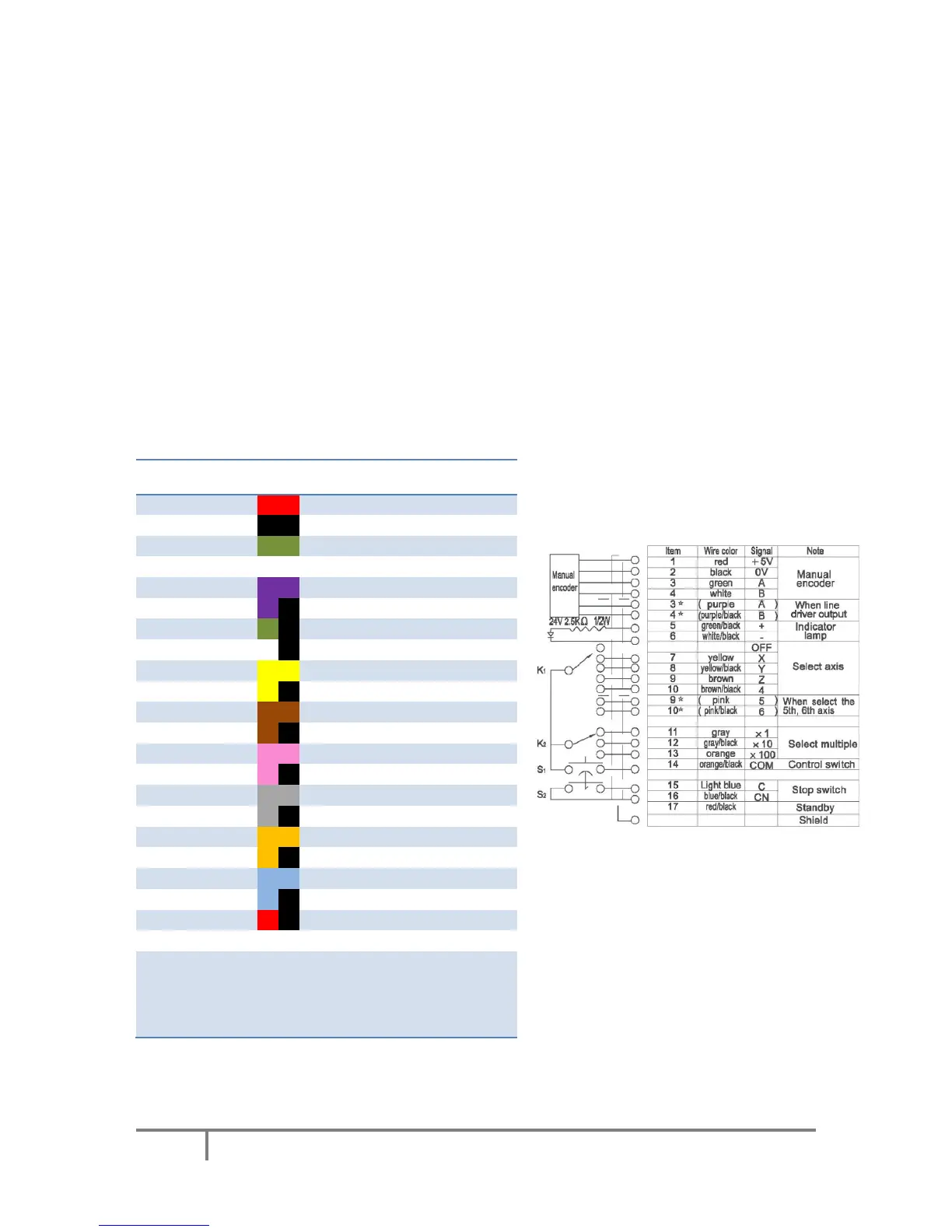
Use the following table to configure PoPendant with Mach3. Activate 'Pendant mode' in Mapping
page in order to activate the MPG jogging activation/deactivation using the 'Control switch' on the
side of the PoPendant.
The configuration can also be downloaded (see PoPendant homepage) and imported into Mach3 (go
to Import/Export tab in plugin configuration and select 'PoKeys pin mapping' and 'Encoder settings
and mapping', then click on 'Import' and select the PoPendant configuration file).
Note: the following table only gives an example on how to connect the PoPendant to PoKeys
device. To ease the setup process, the configuration file for this example is provided on PoPendant
homepage. Wiring can be rearranged by the user, but the plugin configuration must be adjusted
accordingly.
If PoKeys Pulse engine is used, 'Let PoKeys handle MPG jogging' must be checked in encoder
configuration page.
Figure 3: PoPendant internal wiring



 To Next Page