
 Need help?
Do you have a question about the Polaroid 600 series and is the answer not in the manual?
Details on using only Polaroid 600 color film and its features, including battery and expiration dates.
Provides toll-free phone numbers for customer service inquiries in the USA and Canada.
Instructions on how to raise the flash unit and when it automatically charges.
Step-by-step guide on how to load the film pack correctly into the camera.
Guidance on optimal subject distance and background for indoor and outdoor shots.
Techniques for comfortably and securely gripping the camera while shooting.
How to take a picture using the shutter button and understanding flash charging indicators.
Details on the lens, shutter system, flash, film door, and film shade.
Information on flash override, lighten/darken control, photocell, viewfinder, strap, and indicators.
Demonstrates using flash with uneven window light for balanced, flattering portraits.
Shows how flash compensates for shade and harsh sunlight for better exposure.
Explains how flash blends sunlight to soften shadows and reveal facial details.
Instructions for handling developing pictures and cleaning developer rollers.
Guidance on diagnosing and resolving issues when the camera fails to eject film.
Instructions for shooting through glass, requiring flash override to avoid reflection.
How to use the control to adjust picture brightness for lighter or darker results.
Terms and conditions for the one-year warranty on non-special edition cameras.
Terms and conditions for the five-year warranty on special edition cameras.
Information on how to order photo copies, enlargements, and slide duplicates.
Guidance on contacting Customer Service for camera repair needs.
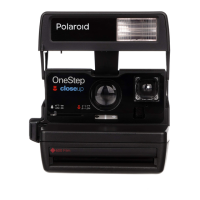
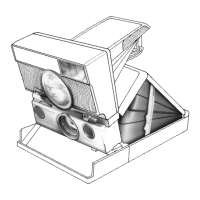
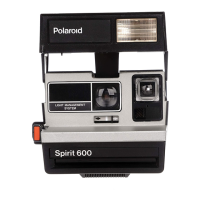
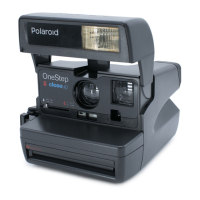
The Polaroid 600 Series Land Camera is an instant camera designed for ease of use, providing immediate photographic results. It utilizes Polaroid 600 color film, which comes in packs of 10 pictures and includes a high-energy battery to power both the camera and its electronic flash. This integrated power source simplifies operation, as there's no need to worry about separate camera or flash batteries. The camera is designed to be user-friendly, with a focus on automatic functions to ensure consistent picture quality in various lighting conditions.
The core function of the Polaroid 600 Series Land Camera is to capture and instantly develop color photographs. It features a built-in electronic flash that operates automatically, ranging from 1/3000 to 1/20,000 of a second. This flash is intended for use with every picture, whether taken outdoors or indoors, to provide balanced lighting and soften shadows, resulting in more pleasing portraits and well-exposed images. The camera has a fixed-focus f/14.6, 106mm lens, simplifying the photographic process by eliminating the need for manual focusing. An automatic variable speed/aperture shutter system adjusts exposure, with speeds ranging from 1/200 to 1/3 of a second and apertures from f/14.6 to f/45. This system, combined with a silicon photo-diode photocell, measures light from the scene to ensure optimal exposure. The camera also includes a film shade that automatically rolls out with each picture as it exits the camera, shielding it from light during development, and then snaps back into place.
Operating the Polaroid 600 Series Land Camera is straightforward. To begin, the electronic flash unit must be raised by gripping its sides and swinging it up until it snaps into place. Once raised, the flash automatically charges, indicated by a red light on its back. Within approximately 3 seconds, a green light will illuminate, signaling that the flash is ready to fire and a picture can be taken. When not in use, lowering the flash unit protects the lens and locks the shutter button, preventing accidental exposures.
Loading film is a simple process: the latch is pushed forward, and the film pack is held by its edges and slid all the way into the camera. Closing the film door automatically causes the camera to eject the film cover. The red light on the flash unit will come on to indicate charging, and the green light will appear when it's ready. To remove an empty film pack, the colored tab on the pack is pulled.
For optimal results, subjects should be positioned between 4 to 10 feet (1.2 to 3m) away indoors, preferably near a light-colored background. Outdoors, subjects should be at least 4 feet (1.2m) away. The camera is designed to be held comfortably in the palm of the left hand, with the right thumb on the thumb-rest, the index finger on the shutter button, and other fingers curled into the palm. Alternatively, the fingers of the left hand can be placed over the viewfinder, with the thumb under the camera, while holding the right hand as described.
To take a picture, the shutter button is pressed all the way down once the green light is visible. After a picture is taken, the flash recharges, and the green light reappears in about 3 seconds. If the green light is off when a picture is desired, lightly touching and releasing the shutter button as soon as the red light comes on will initiate the charging process, allowing a picture to be taken once the green light is on again.
The camera includes a lighten/darken control, which should only be used when reshooting a picture to adjust its brightness. Sliding the control past the white arrow makes the picture lighter, while sliding it past the black arrow makes it darker. A white double arrow in the viewfinder serves as a reminder if the control is not in the center position, indicating that it needs to be returned to center after adjustments.
A flash override button is provided for specific situations, such as photographing a daylight scene through glass. Pressing only this button prevents the electronic flash from firing, avoiding reflections. The camera also features a picture counter to indicate how many pictures remain in the film pack.
Proper maintenance ensures the longevity and performance of the camera. It is crucial to hold the developing picture by its wide white border and keep it out of direct sunlight during development. In cold temperatures (below 55°F or 13°C), the camera and film should be kept warm, and the developing picture should be immediately placed in a warm pocket for at least a minute.
Keeping the developer rollers clean is essential to prevent repeated spots or bar patterns from appearing on pictures. The developer rollers are located inside the film door. If there is film in the camera, the door should be opened in dim light to access them. The rollers can then be cleaned with a damp, lint-free cloth.
If the camera does not eject film, the picture counter should be checked to ensure the film pack is not empty. An empty film pack will still allow the flash to charge, but no picture can be taken. If the red light on the flash unit is on, it indicates that the flash is charging, and a picture cannot be taken until the green light illuminates.
For any questions or issues, Polaroid offers customer service via a toll-free number. In the U.S.A., representatives are available every weekday from 8 a.m. to 5 p.m., Eastern Time. In Canada, a separate toll-free number is provided.
The camera comes with a warranty: a full one-year warranty for non-special edition cameras and a full five-year warranty for special edition cameras. This warranty covers defects and allows for repair or replacement with a fully reconditioned camera, free of charge. To verify the warranty period, the sales slip or other proof of purchase date should be retained. Without this information, the warranty period is determined by the manufacturing date on the camera. The warranty does not cover damage caused by accident, misuse, or tampering, and charges will apply for such repairs. For warranty service, the camera can be returned to a Polaroid Service Center or Authorized Service Center in the United States or Canada, or through a Polaroid camera dealer.
Polaroid also offers services for copies and enlargements of photographs and 35mm slides, including color, black and white, instant, or conventional. These services allow for duplicating slides, making slides from prints, or prints from slides. Square and rectangular enlargements can be ordered framed in three popular sizes. An order form is typically found on the back of the film cover. Postage-paid mailers and a toll-free number are available for these services.
For camera repair, it is recommended to call Customer Service first, as they may be able to help troubleshoot and potentially save the user the trouble of returning the camera.
 General
| Model | 600 series |
|---|---|
| Film Type | Polaroid 600 film |
| Focus | Fixed focus |
| Aperture | f/14 |
| Flash | Built-in electronic flash |
| Type | Instant Camera |
| Lens | Plastic lens |
| Shutter Speed | 1/200 sec |
| Power | 6V battery integrated into film pack |








 To Next Page