16 IK-E283-001E
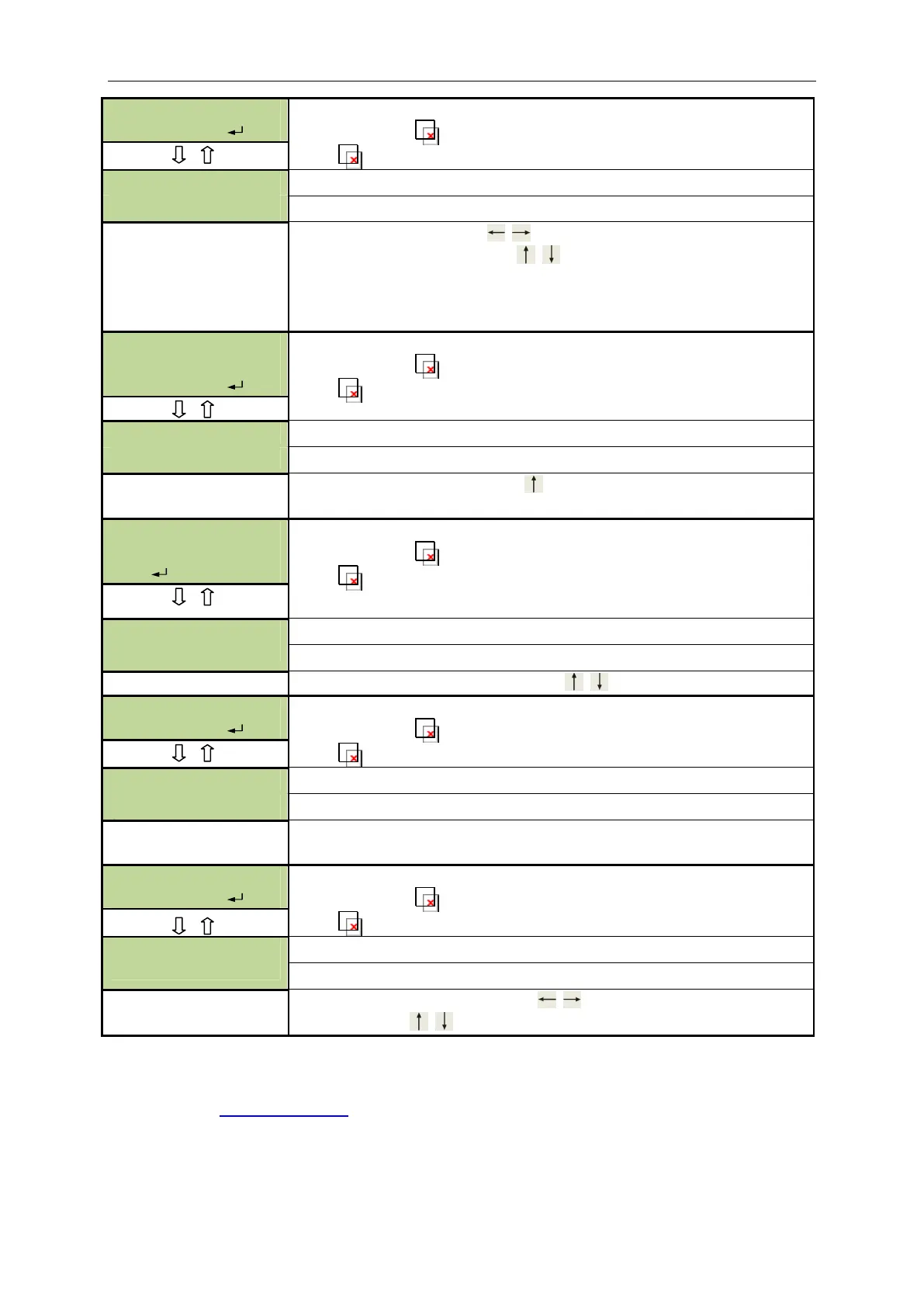
F.08 Enter
2nd stage alarm delays setting
Function recall – push button short pressing
Exit –
push button longer than 1 s pressing
delay of 2nd stage alarm without acknowledgement
delay of 2nd stage alarm with acknowledgement
Selection of T1 or T2 using push buttons
Times being programmed with
with 5-s interval. (e.g. 2’30-
means 2 min and 30 s)
Note: T1 time for acknowledgement should be shorter than T2 time
provided for alarm verification.
ERASURE
F.09 Enter
Function recall – push button short pressing
Exit –
push button longer than 1 s pressing
Concerns events recorded in control panel memory.
by default lack of event memory erasure.
Attention! Switching to YES with push button results in erasure of all
events recorderd in control panel non-volatile memory.
FUNCTIONS F.10
Enter
Diagnostic functions (intended for factory service)
Function recall – push button short pressing
Exit –
push button longer than 1 s pressing
V1.0
Change of displayed information with push buttons
F.11 Enter
Function recall – push button short pressing
Exit –
push button longer than 1 s pressing
Note: Default codes restoration
contacts of S15 jumper located on printed board – Fig. 2
F.12 Enter
Function recall – push button short pressing
Exit –
push button longer than 1 s pressing
2011-01-05 15:20:44
Selection of value being set - with push buttons
Setting – using
push buttons.
4.9 EVENT MEMORY
The software necessary for the event memory readout and information materials are available in
Internet on the
www.polon-alfa.pl web site after obtaining an access code.
Hardware requirements concerning PC computer:
o accessible USB port;
o hard disc of ca. 25 MB free memory;
o installed Windows 98/ME/2000/XP/Vista/7 operating system


 To Next Page