ZONEMASTER UNIPOINT RF DAMPER CONTROL SYSTEM - Owner’s Manual
Page 2
1) Remote handset layout
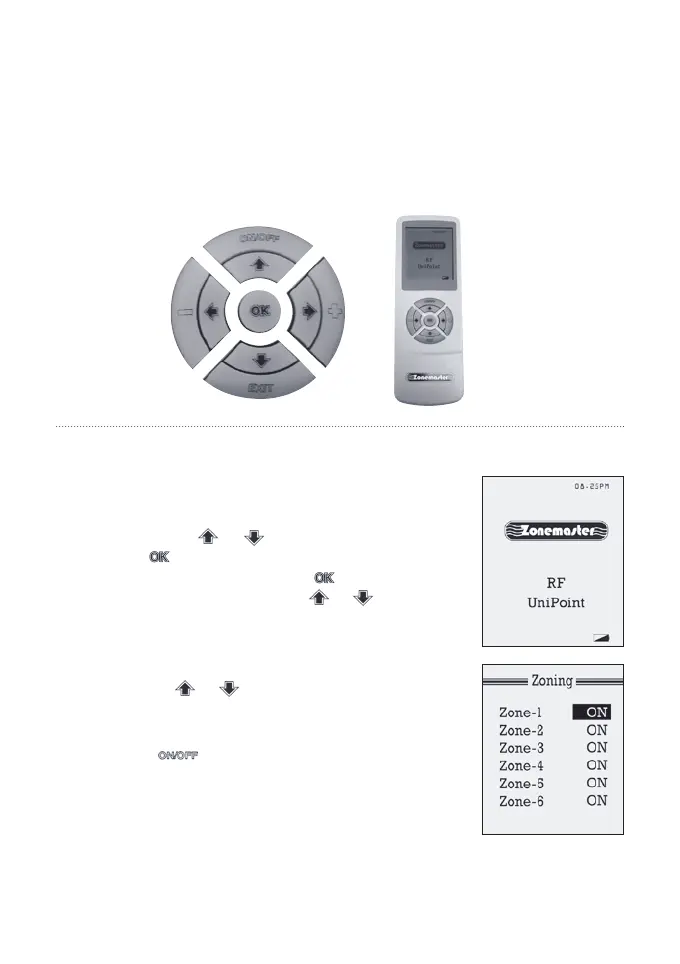
The remote handset has a LCD screen with nine buttons as shown in
Figure 1. The LCD screen will normally display clock time, Zonemaster RF
logo and the battery status.
2) Manual on/off control mode
In sleep mode, as shown on the right gure, there
are two ways to enter into zoning mode. The rst
way is to press or button; the other one is
to press button to get into the function
selection mode, and then press button again
after selecting zoning by using or button.
1) In Zoning mode, the handset displays zone
name and the on/off status of up to six zones
as shown on the right gure.
2) Use the or button to select a zone to be
controlled. The on/off status of the zone will be
highlighted.
3) Press button to turn the zone on or off.
The zone will be changed from ON to OFF or
vice versa.
OWNERS MANUAL
FIGURE 1



 To Next Page