Page 8
9) Check all the LED lights on the damper controllers again.
Ifsomeofthelightsareoff,thecabletotherstoff-light
damper controller could be crossed over. Check and replace it.
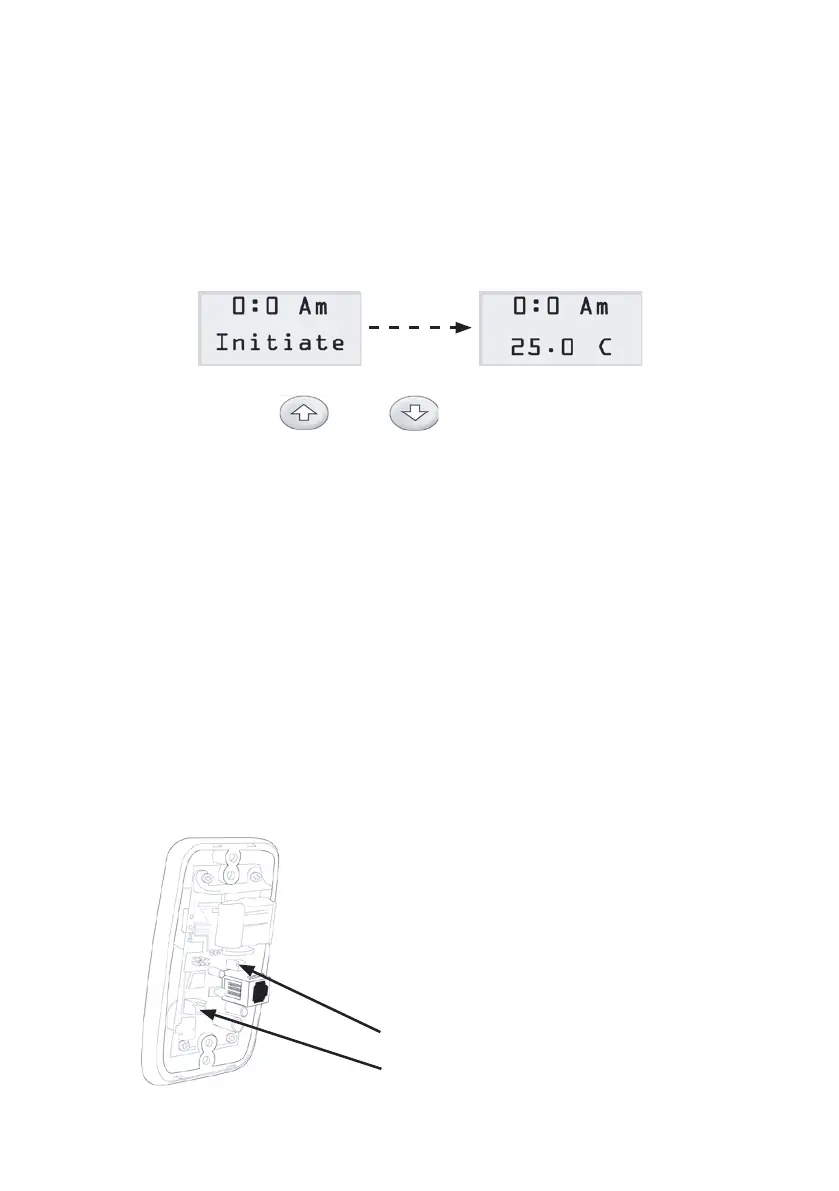
10) Repeat step 9) until all of the lights are on and the LCD screen
on the touchpad shows clock time and the room temperature
where the touchpad is located after showing “initiate” on the
second line for about 15 seconds.
11) Hold down both and buttons on the touchpad for
about 5 seconds to enter the setting mode (refer to next
section). Check all the LED lights on the damper controllers
again.AlloftheLEDlightsmustbeashinginone-second
interval. Otherwise, check the cable and the connection.
12) Turn off the power and disconnect the touchpad.
13) Position the touchpad at the right place. Ideally, its position
isapproximate1.6Mofftheooronthewall.Fitthecable
through the wall cavity and connect the touchpad again.
14) Apply the power again to the transformer. The LCD should
show clock time and temperature. If not, check the cable.
15) Mount the supply air sensor in the supply air duct upstream the
motorised damper.
16) Fit the sensor cable through the
wall cavity and plug into the socket
on the back of the touchpad.
17) Connect the battery by plugging into
the socket on the back of the touchpad.
battery
sensor


 To Next Page