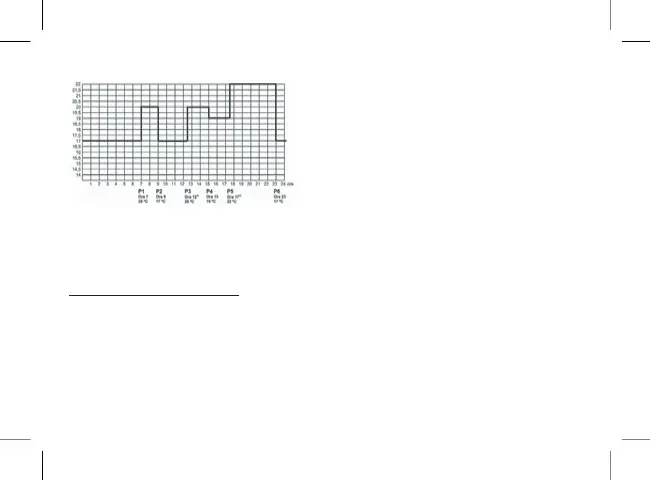
Temperature
Time
The programming scheme can, of course, be freely
modied so that the ideal temperature is available for
each day of the week.
4.1 Program settings:
1. Press the button “ SET”
2. Press the “SET" button again and keep it
pressed while also pressing the "PROG" button.
The numbers indicating the days of the week
(1 2 3 4 5 6 7) ash on the display.
3. Press the (-) or (+) buttons to select the day to be
programmed or all the days of the week. To use
the same program for all the days of the week,
select the solution (1 2 3 4 5 6 7).
4. Press the "PROG" button again to set the P1
program; the display ashes.
5. Press the (-) or (+) buttons to set the P1 program
switch on time (The time can be set at 10 minute
intervals).
6. Press the “PROG" button to conrm the time;
on the display the temperature ashes.
7. Press the (-) or (+) buttons to set the temperature to
be combined with program P1 (The temperature
can be set in increments/decrements of 0.5°C).
8. Press the “PROG" button again to conrm and
go on to the next program scheduling (P2) in the
same way (points 4 to 7).
9. Similarly to the previous steps, using the
"PROG" button and the (-) and/or (+) buttons,
perform the settings until the time and
temperature of all 6 ranges are set.


 To Next Page