Assembling and setting up the printer
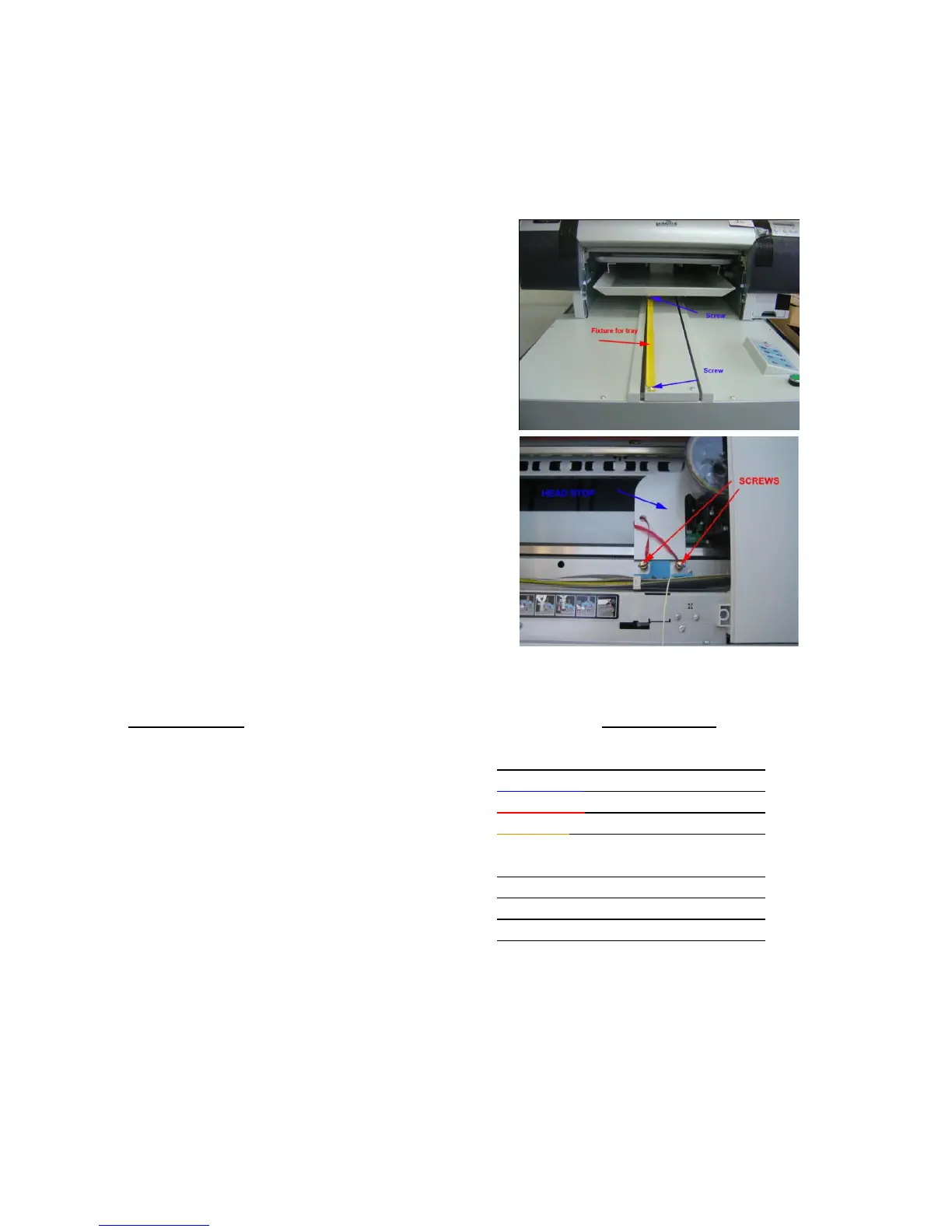
Removing transport fixtures
• Before starting the printer first remove the protective materials
o One is placed for the plate
movement. After removing
this yellow fixture, place the 2
screws back.
o The second brake is placed for
the head movement. Remove
screws and metal part.
Ink configuration
• You have to install the Cartridges on
the printer. The Cartridges should be filled with the following order.
CARTRIDGE
INK FILLED
PHOTO BLACK
CYAN
BLACK INK PD204
MAGENTA
CYAN INK PD201
YELLOW
MAGENTA INK PD202
YELLOW INK PD203
LIGHT BLACK
LIGHT CYAN
WHITE INK PD205
LIGHT MAGENTA
WHITE INK PD205
LIGHT LIGHT BLACK
WHITE INK PD205
WHITE INK PD205



 To Next Page