EasyManua.ls Logo

Porter-Cable 630 - Connecting and Operating the Motor; Starting and Stopping the Motor

Porter-Cable 630
20 pages
Print Icon
To Next Page IconTo Next Page
To Previous Page IconTo Previous Page
Loading...
CONNECTING
TO
POWER
SOURCE
Before
connecting
router
to
power
source
ALWAYS
MAKE
SURE
SWITCH
IS
IN
THE
“OFF”
POSITION.
Also
check
that
the
power
circuit
is
the
same
as
that
shown
on
specification
plate
of
the
router.
Before
starting
the
router
make
sure
bit
is
clear
of
work
piece
and
foreign
objects.
Also
keep
firm
grip
on
router
to
resist
starting
torque.
STARTING
AND
STOPPING
THE
MOTOR
The
Motor
Units
for
these
routers
can
be
used
with
either
the
base
having
two
guide
knobs
or
the
base
with
the
switch-in-handle.
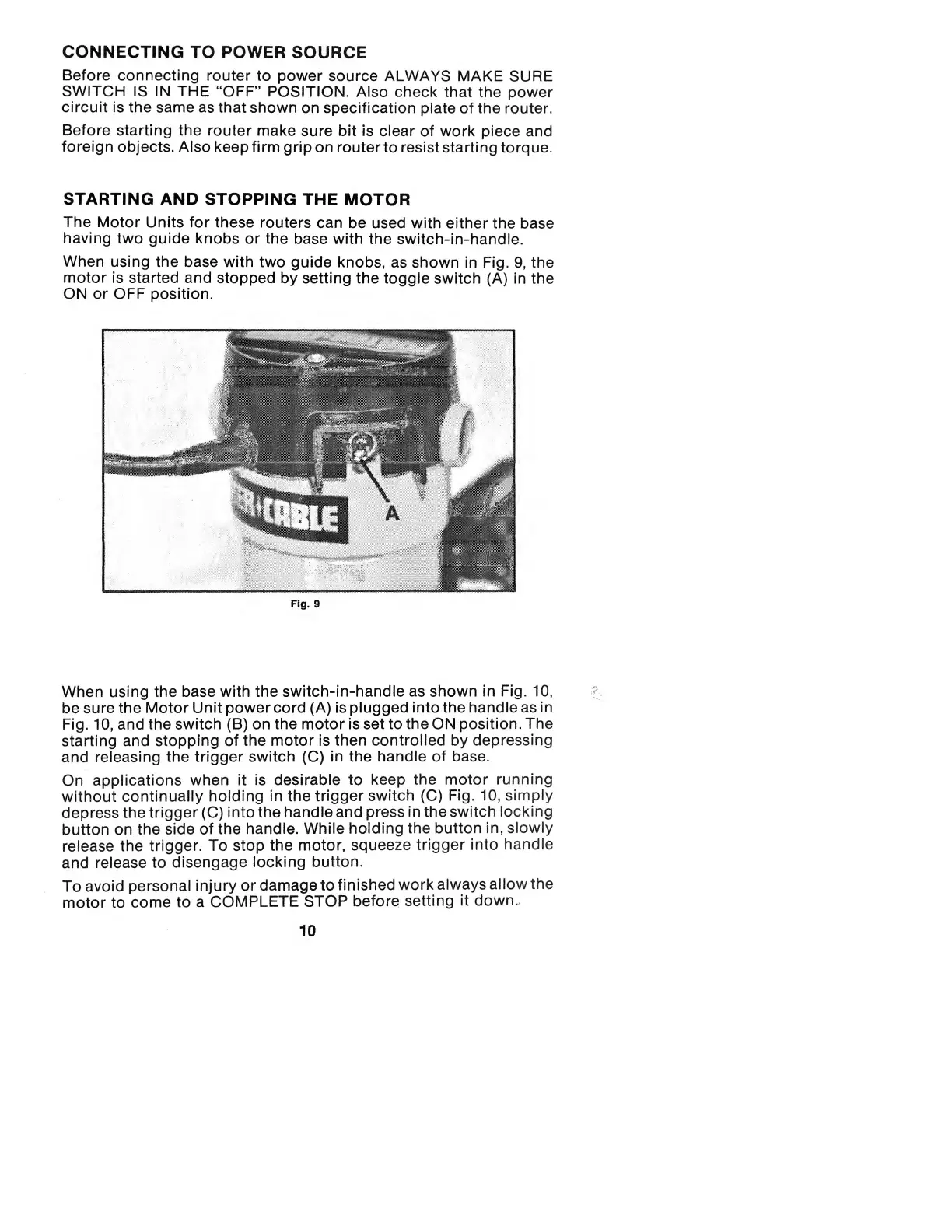
When
using
the
base
with
two
guide
knobs,
as
shown
in
Fig.
9,
the
motor
is
started
and
stopped
by
setting
the
toggle
switch
(A)
in
the
ON
or
OFF
position.
Fig.
9
When
using
the
base
with
the
switch-in-handle
as
shown
in
Fig.
10,
be
sure
the
Motor
Unit
power
cord
(A)
is
plugged
into
the
handle
as
in
Fig.
10,
and
the
switch
(B)
on
the
motor
is
set
to
the
ON
position.
The
starting
and
stopping
of
the
motor
is
then
controlled
by
depressing
and
releasing
the
trigger
switch
(C)
in
the
handle
of
base.
On
applications
when
it
is
desirable
to
keep
the
motor
running
without
continually
holding
in
the
trigger
switch
(C)
Fig.
10,
simply
depress
the
trigger
(C)
into
the
handle
and
press
in
the
switch
locking
button
on
the
side
of
the
handle.
While
holding
the
button
in,
slowly
release
the
trigger.
To
stop
the
motor,
squeeze
trigger
into
handle
and
release
to
disengage
locking
button.
To
avoid
personal
injury
or
damage
to
finished
work
always
allow
the
motor
to
come
to
a
COMPLETE
STOP
before
setting
it
down.
10

Related product manuals