19
OPERATION
BASIC DRILL PRESS OPERATION
To avoid possible injury, keep guard
closed and in place while tool is in
operation. To avoid injury from an
accidental start, ALWAYS make sure
the switch is in the “OFF” position, the
switch key is removed, and the plug is
not connected to the power source outlet
before making belt adjustments.
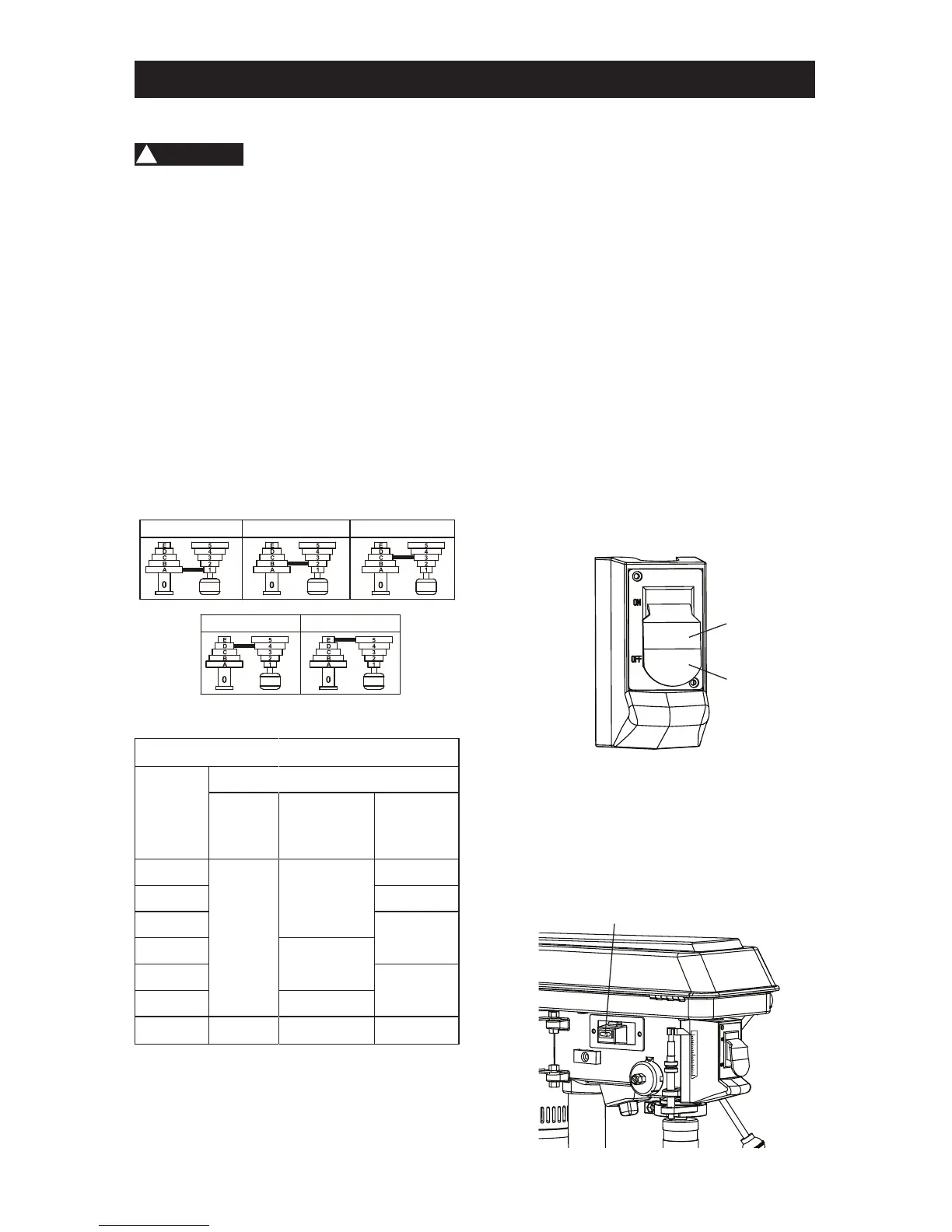
SPEEDS AND BELT PLACEMENT (FIG. R)
This drill press has ve operating speeds.
Please see the chart in Fig. R for obtain each
speed and the placement of the belt. This
chart is also put on the inside of pulley cover
for reference.
Fig. R
DRILLING SPEED TABLE (RPM)
Drill Bit
Diameter
(Inches)
Material
Wood
Alum. /
Zinc. /
Brass
Iron / Steel
1/16
3100
3100
3100
1/8 2340
3/16
1720
1/4
2340
5/16
1100
3/8 1720
1/2
2340 1100 620
ON/OFF SWITCH (FIG. S)
The ON/OFF switch has a removable, safety
key. With the safety key removed from the
switch, unauthorized and hazardous use by
children and others is minimized.
1. To turn the drill press “ON”, insert the
safety key (1) into the slot of the switch (2).
Move the switch upward to the “ON”
position.
2. To turn the drill press “OFF”, move the
switch downward.
3. To lock the switch in the OFF position,
grasp the sides of the safety key, and pull
it out.
4. With the safety key removed, the switch
will not turn the power tool on.
5. If the safety key is removed while the drill
press is running, it can be turned “OFF”
but cannot be restarted without inserting
the safety key.
Fig. S
ROCKER SWITCH FOR LED LIGHT (FIG. T)
1. Press the rocker switch “I” to turn the LED
light “ON”.
2. Press the rocker switch “O” to turn the
LED light “OFF”.
Fig. T
620RPM 1100RPM 1720RPM
2340RPM 3100RPM
BELT: A-1 BELT: B-2
BELT: C-3
BELT: D-4
BELT: E-5
WARNING
!
1
2
1





 To Next Page