17 - ENG
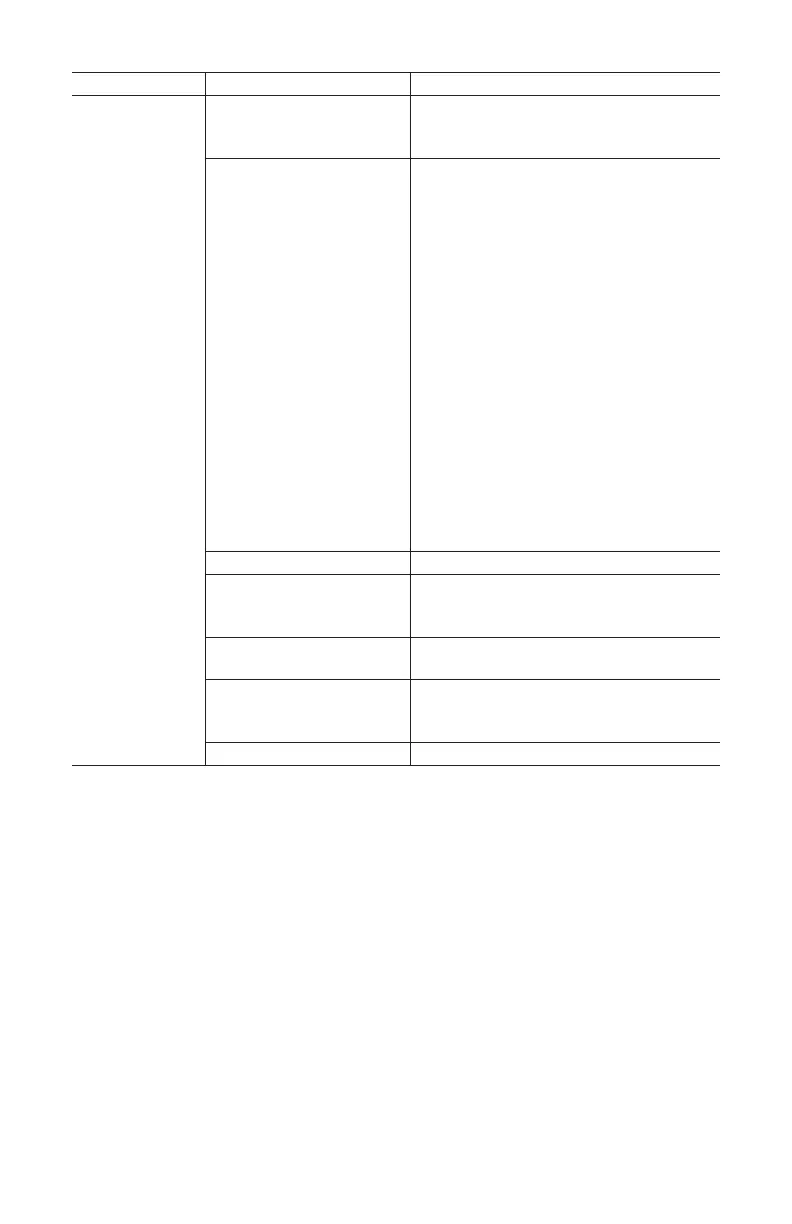
PROBLEM CAUSE CORRECTION
Motor will
not run
Tank pressure exceeds
preset pressure switch
limit
Motor will start automatically when
tank pressure drops below cut- in
pressure of pressure tank.
Make sure the Thermal
Overload Switch has not
tripped. The motor has
a built in thermal cut out
that trips when necessary
to protect the motor
from damage when
overheated.
Fuse blown or circuit
breaker tripped
To reset the motor overload toggle/turn
the pressure switch AUTO/OFF lever
to the OFF position and unplug the
unit from the power outlet. Allow 10
minutes (minimum) for motor overload
cut-out to cool and reset. Unit can
then be plugged in and re-started.
•Replaceblownfuseorresetcircuit
breaker. Do not use fuse or circuit
breaker with higher rating than
specified for your branch circuit.
•Checkforproperfuse;“Fusetron”
type T is acceptable.
•Checkforlowvoltageand
proper extension cord size.
•Disconnectotherapplications
from circuit. Operate compressor
on a dedicated circuit.
Check valve stuck open Remove and clean or replace.
Wrongwiregaugeincord
or excessive extension
cord length
Check for proper gauge and extension
cord length.
Loose electrical
connections
Contact authorized service center.
Paint spray on internal
motor parts
Have checked at service center. Do
not operate compressor in the paint
spray area
Possible defective motor Have checked at service center.


 To Next Page