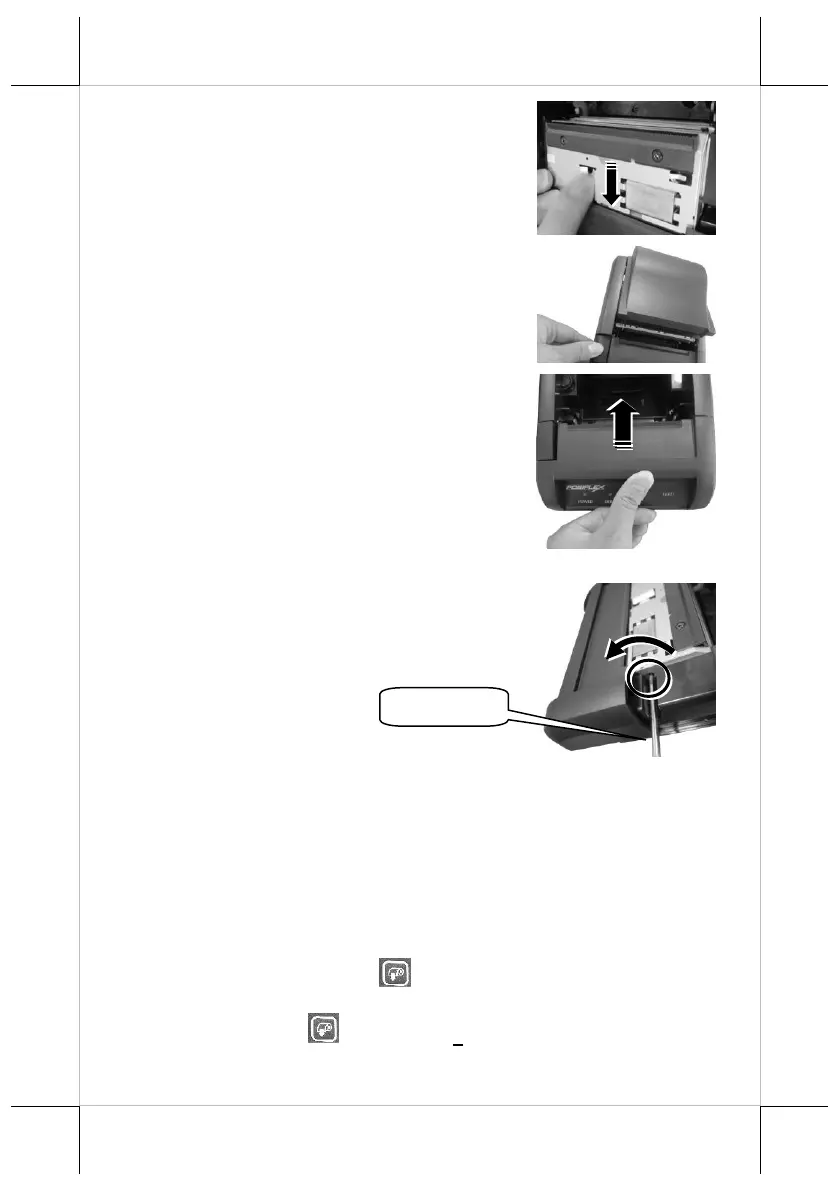
3. Keep turning the wheel in a clockwise
direction until the cutter is completely moved
back to its start position. You may observe
the cutter position through the gap between
paper jams rescue compartment and the
printer compartment.
4. Push down cover release button to test
whether the cover can be open. If the cover is
still stuck, please repeat step 3 until the cutter
position is set to the proper position and you
are able to open the cover.
5. Remove the jammed paper, reinstall the
paper roll, and then push back the cover to
close the paper jams rescue compartment.
P.S. The adjustment wheel also can be turned by
using a screwdriver. The control hole is on the
right side of the compartment. Please refer to the
picture.
Restore Software Switch to Factory Default via Software Switch
Reset
Software Switch Reset is the specially-designed function aimed to facilitate
the factory reset process. Please go through the following instructions to reset
your printer to factory settings using Software Switch Reset.
1. Power off the printer.
2. Open the paper roll cover manually.
3. Keep pressing the feed button and then power on the printer. The
printer will emit one short beep sound.
4. Press the feed button of the printer 2 times.















 To Next Page