EasyManua.ls Logo

Power Acoustik PD-344 - User Manual

Power Acoustik PD-344
22 pages
Print Icon
To Next Page IconTo Next Page
Loading...
PD-344/PD-344T
PD-344B/PD-344BT
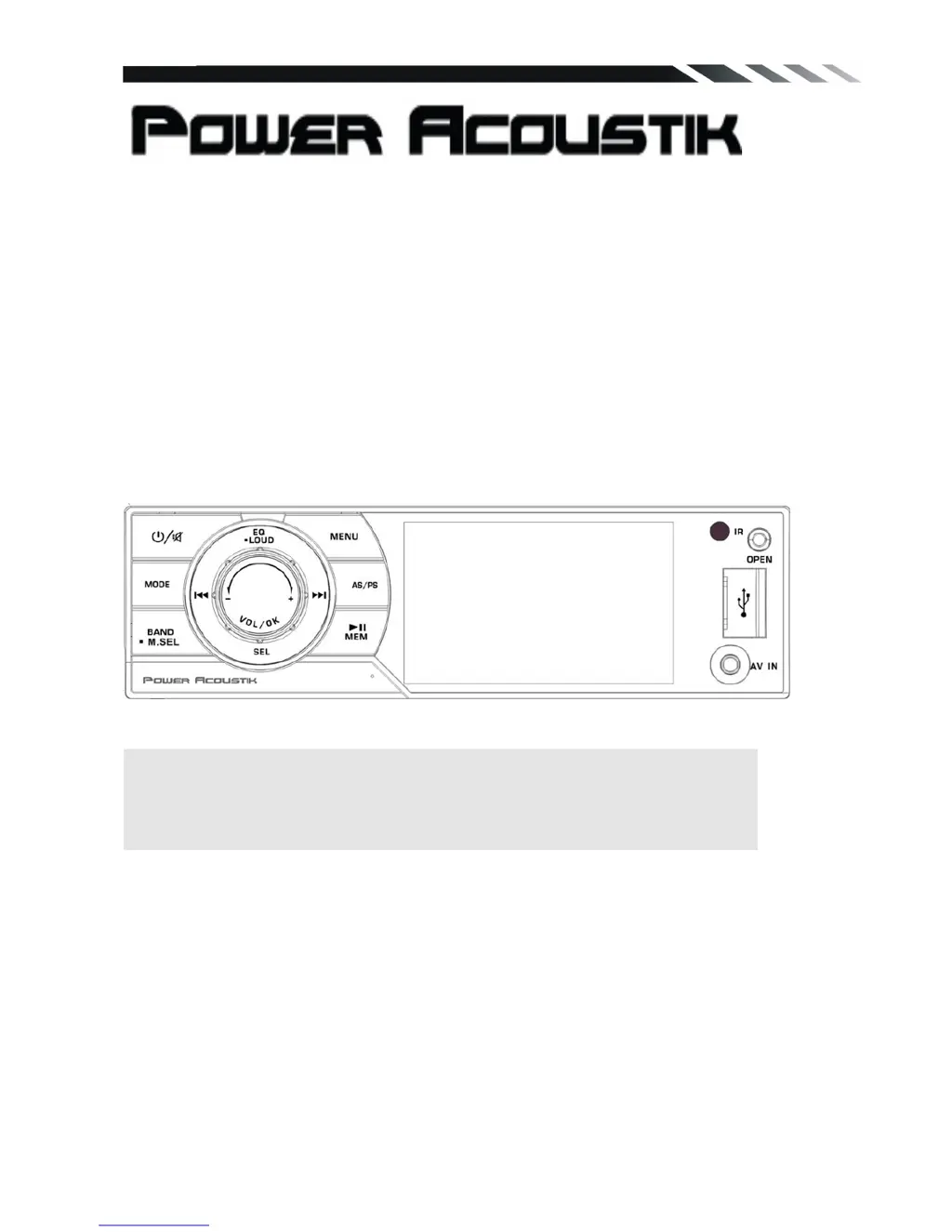
Flip-down/Detachable 3.4” Monitor
DVD/CD/MP3/MP4 Player
AM/FM Radio
Built-in TV tuner(only for PD-344T /PD-344BTmodel)
Support Bluetooth(only forPD-344B /PD-344BTmodel)
Owner’s Manual
Take the time to read through this owner’s manual.
Familiarity with installation and operation procedures will help you obtain the best
Performance from your new DVD-receiver.

Questions and Answers

  • X
    xmasseyJul 26, 2025
    Why is there no sound coming from my Power Acoustik Car Video System?
    • T
      travislisaJul 26, 2025
      If your Power Acoustik Car Video System has no sound, first, make sure the volume isn't set to the minimum. If it is, adjust it to a comfortable level. Also, verify that all the wiring connections are secure and properly connected.
  • A
    Albert PatrickJul 31, 2025
    How to fix a Power Acoustik Car Video System that has no power?
    • J
      jameshebertAug 1, 2025
      If your Power Acoustik Car Video System isn't turning on, it could be due to a couple of reasons. First, ensure that your car's ignition is switched to 'ACC' if the power supply is connected to the car accessory switch. Also, check the fuse; if it's blown, replace it.
  • L
    Larry NewtonAug 5, 2025
    What to do if the operation keys on my Power Acoustik Car Video System do not work?
    • R
      Raymond DanielsAug 5, 2025
      If your Power Acoustik Car Video System's operation keys aren't working, it might be due to noise affecting the built-in microcomputer, or the front panel might not be properly fixed. Try pressing the RESET button. If that doesn't work, reinstall the front panel.
  • H
    Heather RodriguezAug 10, 2025
    Why does the sound skip on my Power Acoustik PD-344 Car Video System?
    • R
      rbaileyAug 10, 2025
      If your Power Acoustik Car Video System is skipping, it could be due to the installation angle being more than 30 degrees, or the disc might be dirty or defective. Adjust the installation angle to be less than 30 degrees. Also, clean the compact disc or try playing a new one.
  • P
    patrick30Aug 16, 2025
    What to do if my Power Acoustik PD-344 Car Video System cannot read the disc?
    • T
      Tyler GarciaAug 16, 2025
      If your Power Acoustik Car Video System isn't reading discs, ensure you're inserting the compact disc with the label facing upward. If it still doesn't work, the disc might be dirty or defective, so clean it or try a new one. Also, if the temperature inside the car is too high, cool off the car until the temperature returns to normal.
  • K
    Kenneth NguyenAug 20, 2025
    Why is my Power Acoustik Car Video System radio not working?
    • S
      Samuel GomezAug 20, 2025
      If the radio on your Power Acoustik Car Video System isn't working, or the automatic station selection isn't functioning, the antenna cable might not be connected, or the signals could be too weak. Ensure the antenna cable is firmly inserted. If that doesn't work, try selecting a station manually.

Summary

Important Safeguards

Accessories

Installation and Un-installation

Installation Procedure

Step-by-step guide for mounting the unit in the dashboard.

Un-installation Procedure

Instructions for removing the unit from the dashboard.

Wiring Connections

Front and Inner Panel Layout

Front Panel Controls

Identifies buttons and slots on the front panel of the unit.

Inner Panel Components

Details the components and slots on the inner panel.

Remote Control

Remote Control Functions

Explains the various buttons and their functions on the remote control.

Battery Removal and Care

Instructions on how to remove and handle the remote control battery.

Main Menu Navigation

General Operations

Covers unit reset, power control, mode selection, and volume adjustment.

Sound and Audio Settings

Audio Adjustments

Details EQ, Bass, Treble, Balance, Fader, and Loudness settings.

Mute and Menu Functions

Explains how to mute sound and access the main menu.

Setup Configuration

Guide to accessing and configuring system setup options.

Display and System Settings

Display Options

Controls for screen ratio, backlight, and display modes.

General System Configuration

Settings for clock display, clock hour, and auto connect.

Radio and DVD Settings

Options for radio area, stereo mode, and DVD playback settings.

DVD and Media Configuration

Subtitle and Audio Language

Select preferred language for subtitles and audio tracks.

Parental Control and TV Type

Configure rating limits and TV screen aspect ratios.

Password and Default Settings

Manage unit password and reset to factory defaults.

Radio Operation

Band and Station Tuning

How to select radio bands and tune to stations manually or automatically.

Station Selection and Scanning

Methods for selecting preset stations and performing preset scans.

Multimedia Playback

Disc Loading and Playback

Instructions for loading discs and basic playback controls.

USB and SD;MMC Card Usage

How to play media files from USB flash drives and SD/MMC cards.

Playback Control Functions

Details on play/pause, stop, and track selection for media playback.

TV Operations

TV System and Audio Setup

Configure TV system, sound system, and auto program search.

Manual Program and Channel Tuning

Steps for manual station search, storage, and fine-tuning.

Bluetooth Connectivity

Bluetooth Pairing and Connection

Guide to pairing a mobile phone and establishing a Bluetooth connection.

Calling and Music Playback

How to make calls and play music wirelessly via Bluetooth.

Bluetooth Phone Features

Dialed, Received, and Missed Calls

Accessing and managing call history through Bluetooth.

Phonebook Management

Downloading and utilizing the phonebook via Bluetooth.

Anti-Theft System and Disc Care

Detachable Panel and Unit Removal

Instructions for removing the front panel and the main unit.

Disc Handling and Cleaning

Guidelines for proper handling and cleaning of discs to ensure playback quality.

Troubleshooting Guide

General Troubleshooting

Solutions for common issues like no power, no sound, or disc read errors.

Operation and Connectivity Issues

Addresses problems with keys, sound skips, and radio reception.

Technical Specifications

Power Acoustik PD-344 Specifications

General IconGeneral
BrandPower Acoustik
ModelPD-344
CategoryCar Video System
LanguageEnglish

Related product manuals