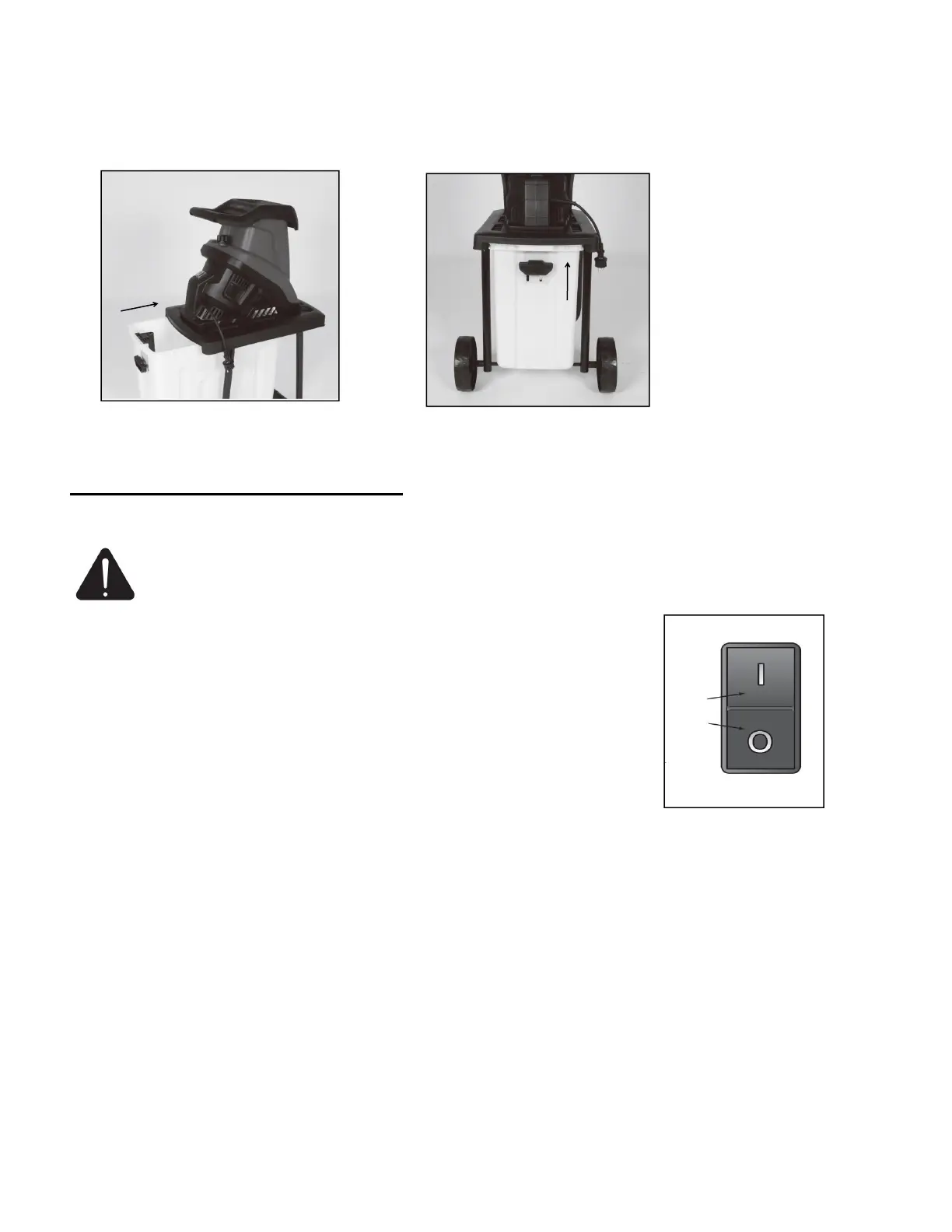
Fitting the collection box(Fig.8/9)
Fit the supplied trash can to the equipment. Put the trash can into the chassis in the direction of the arrow
as shown in Fig.8 , lock it with the handle upside as shown in Fig.9. Unlock it down.
OPERATING INSTRUCTION
WARNING:To reduce the risk of injury, turn unit off, disconnect it from power source
before installing and removing accessories, before adjusting or when making repairs. An
accidental start-up can cause injury.
Connecting up the machine and switching it on(Fig.10)
Connect the coupling on the equipment connection cable (extension) to
the power cable. Be sure to observe the relevant information in the safety
instructions.
The machine can be switched ON (switch position “I”) and OFF (switch
position “O”) using the ON/OFF switch.
Note: The machine cannot be switched on if there is no voltage being supplied to it. If the power supply
is interrupted, the machine will switch off automatically (switch position “O”). The machine cannot be
switched on again until the voltage supply has been re-established and the ON/OFF switch has been
moved to position “I”.
Overload protection
(motor circuit-breaker)
The motor is protected from overloads by an overload switch.
In case of overloading the equipment will shut down automatically. To restart, set the On/Off switch
to the position “I”.
If the motor fails to start, clean the ejector chute.


 To Next Page