22
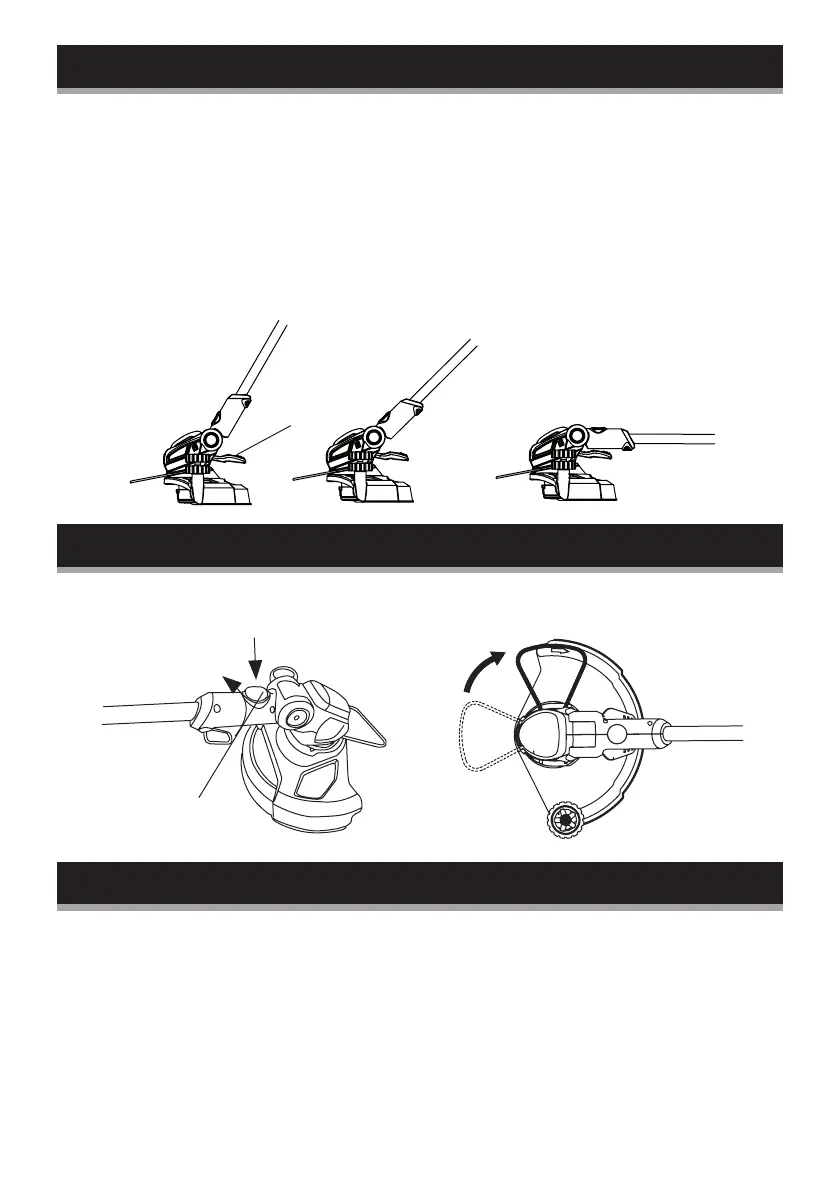
Setting the cutting angle
Adjust the vertical angle of the trimmer head to fit the trimming
conditions:
1. Press the tilt-adjustment pedal (11) down with your foot.
2. Adjust the angle of the pole, up or down.
3. Release the pedal and keep moving the pole until it locks in
place.
Note: Always ensure that the pedal snaps into place after
adjusting the trimmer in one of these three positions!
Edging function
Set the cutting angle to 0° (see setting the cutting angle). Press
the edging button (F), rotate the lower tube 90°.
Automatic line feeding
The equipment features a fully automatic single line-feed system.
The lines will automatically elongate every time you turn on the
appliance. To support proper line elongation, ensure that the coil
has stopped moving completely before turning on the appliance
again.
The lines are automatically cut to the correct length by the line
cutter.
11
F
90
O
90
O


 To Next Page