14
15
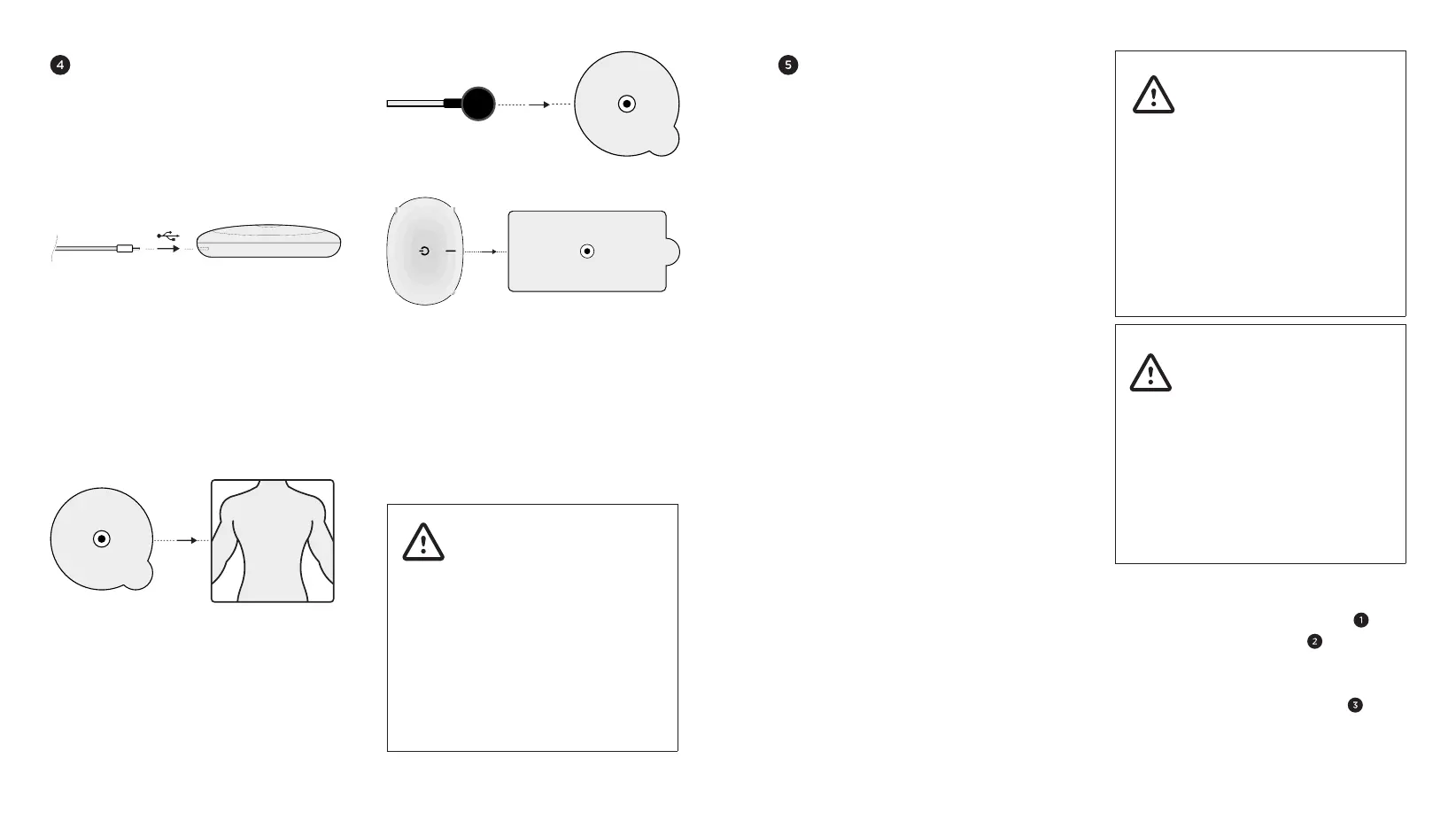
PREPARING AND PLACING
POWERDOT
1) Plug the lead cable you intend to use
into the micro-USB connector on your
PowerDot PD-01M device.
2) Detach the round pads from their
safety film and stick them to the targeted
part of your body, according to the pad
placement visual guidelines found in your
PowerDot Mobile Application.
3) Attach female magnetic round pad
connectors on the lead cable to the male
snaps on the round pads. Attach PowerDot
device female magnetic connector to the
male snap on the rectangular pad.
4) Make sure that the entire surface of the
round and rectangle pads are completely
and securely attached to your body.
5) It’s a good time to turn on your
PowerDot (or PowerDots), if you haven’t
done it yet.
Always thoroughly
inspect the lead cable and
PowerDot device for any
signs of damage BEFORE
every stimulation session.
Do not use damaged
accessories or devices.
For your safety, you are
strongly advised to replace
them immediately.
LAUNCHING & CONTROLLING
A STIMULATION
Once you select a muscle group for
stimulation, assemble and place your
PowerDot (or PowerDots) and pads as
advised above. The Mobile Application
will automatically check for the remaining
battery level and the lead cable
connection status.
When the battery level and lead cable
connection has been verified, the big
red Get Started button will appear,
which means you can already launch the
stimulation session.
Using the Mobile Application, you can
control your stimulation session from the
Stimulation Dashboard, which has these
controls:
For first time users, muscle
stimulation can be an
unusual sensation. We
recommend that you begin
in recommended
stimulation positions, using
low stimulation settings
to familiarize yourself
with the sensation before
progressing to higher
intensities.
If you experience major
discomfort or pain –
PAUSE your stimulation
session and/or DECREASE
intensities. For your
safety, after a PAUSE,
your stimulation session
will resume at only 80%
(or less) of your previous
intensity values.
Intensity Adjustment controls – Tap
on Intensity Increase (or “+”)
and
Intensity Decrease (or “-“) buttons for
an accurate adjustment, or hold either
button down for a faster adjustment.
Stimulation Dashboard Menu - to
access, tap on it or swipe screen up.


 To Next Page