INSTRUCTIONS PL600/PL1000
19
4.2.1 Programmable Functions of LED Display
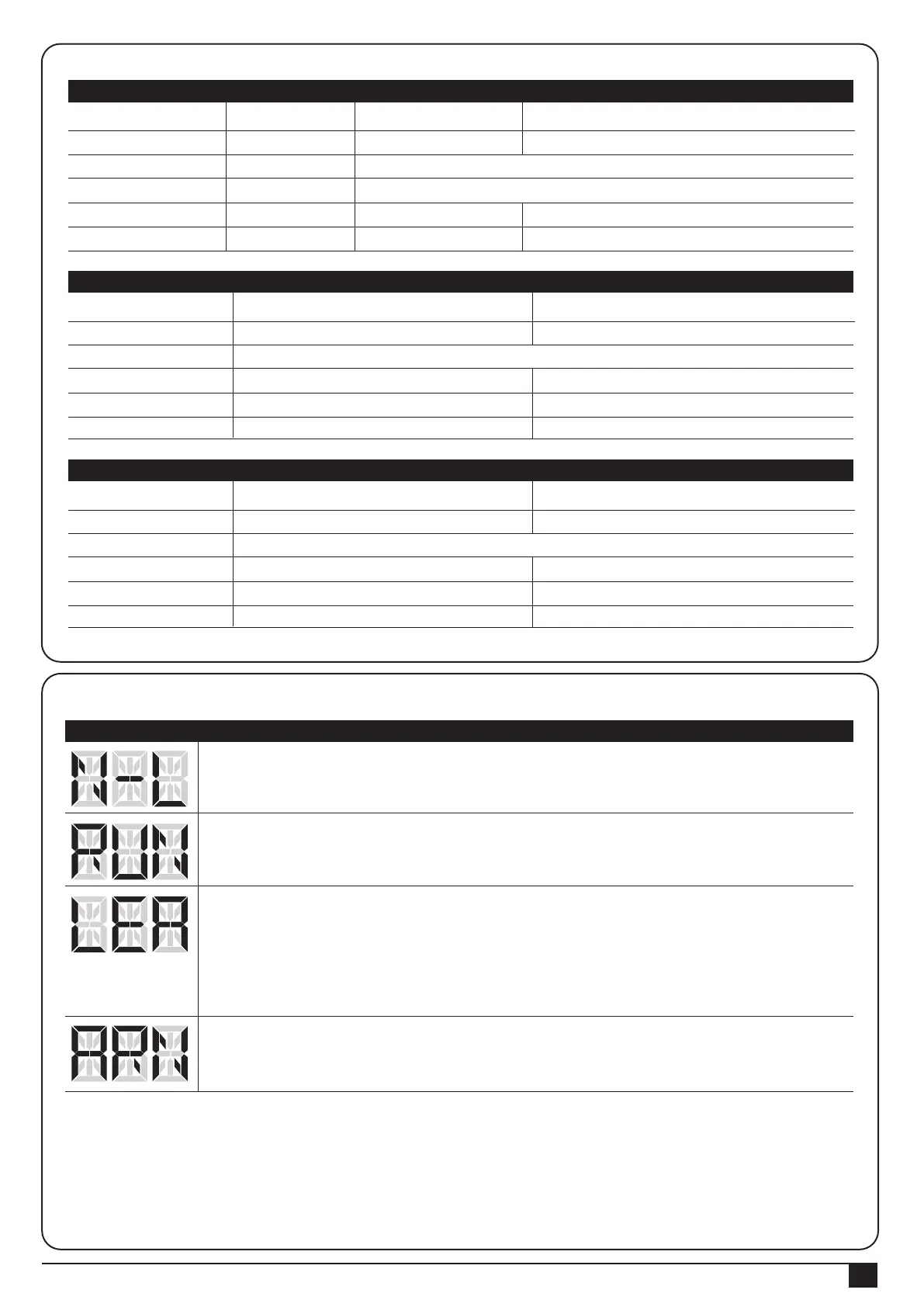
Gate Status
Closed
Open
Stop during moving
Closing
Opening
Photocell 2
Stop opening
No effect
Stop opening
No effect
Closes the leaf
Photocell 1
No effect
Open
No effect
Reloads automatic closing time
Reloads automatic closing time
Photocell 1/ Photocell 2
Stop opening
Locks and, on release, reverses to open
Locks and, on release, continues opening
Logic F3-1 The reactions of the photocells when detecting obstacles
Gate Status
Closed
Open
Stop during moving
Closing
Opening
Safety Edge
Stop opening
Stop opening/ closing
Reverses to open for 2 seconds
Reverses to close for 2 seconds
Photocell 1
No effect
Reloads automatic closing time
Open
No effect
Reloads automatic closing time
Logic F3-2 The reactions of the safety edge/ photocell when detecting obstacles
Gate Status
Closed
Open
Stop during moving
Closing
Opening
Loop Detector
Open
Open
Open
Open
Photocell 1
No effect
Reloads automatic closing time
Open
No effect
Reloads automatic closing time
Logic F3-3 The reactions of the loop detector/ photocell when detecting obstacles
LED Display Programmable Functions
“N-L”: The PL600 system learning is not done.
“RUN”: The PL600 system is in normal performing.
“LEA”: Enter learning mode and then wait for learning instructions.
The operation of gate learning:
(1). Press “SET” one time; then press “SET” + “DOWN” for 3seconds, and the LED display
shows “LEA” ; and then press the transmitter (A) button one time. After 1~3seconds, the LED
display shows “ARN”
“ARN”: The system learning is in progress.
The Auto-learning process of gate moving: “Gate open to the end- stop close to the end- stop.
● F3 function settings:



 To Next Page
 Loading...