UPS Startup
19
Powerware
®
FERRUPS FE/QFE UPS (500 VA–18 kVA) User’s Guide : Rev A www.powerware.com
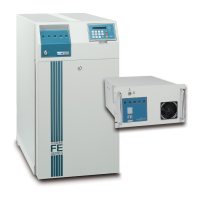
Startup for the FE and QFE 4.3–18 kVA UPS
To start the FE and QFE 4.3–18 kVA UPS, use the following steps:
1. Confirm the equipment to be protected by the UPS is powered
off.
2.
For Plug-Receptacle UPSs: Verify that the AC input power is off
at the service panel. Plug the UPS power cord into a power
outlet.
NOTE If the plug does not match your receptacle outlet, ask your electrician to install
the proper outlet.
For Hardwired UPSs: Confirm that an electrician has completed
and tested the connection to the proper power source and
connected your protected equipment according to the
Powerware FERRUPS FE/QFE UPS (500 VA–18 kVA) Installation
Guide. Confirm that your AC line disconnect switch and the
UPS ON/OFF switch are both in the OFF position.
3. If your UPS has a DC switch, turn on the switch according to
the UPS model:
4.3–7 kVA: If you have an external battery cabinet(s) with a DC
switch, turn the switch to the ON position.
If you do not have an external battery cabinet(s): unlock the
UPS front cover panel using the FERRUPS key and remove the
front cover panel. Locate the DC switch behind the UPS front
cover panel. If there is a precharge button next to the switch,
press it for a few seconds. Turn the DC switch to the ON
position and reinstall the UPS front cover panel.
10–18 kVA: If you have an external battery cabinet(s) with a DC
switch, turn the switch to the ON position.
4.
Starting the UPS on battery power: Use the key to turn the
ON/OFF switch to the ON position. After a brief self-check, the
BATTERY POWER and READY indicators illuminate. The UPS
beeps every 20 seconds, indicating the UPS is running on
battery power. The control panel scrolls this display:
)(55836
0RGH $XWR
&KDUJHU 2II
%HHSHU (QDEOHG


 To Next Page