Communication
42
Powerware
®
FERRUPS FE/QFE UPS (500 VA–18 kVA) User’s Guide : Rev A www.powerware.com
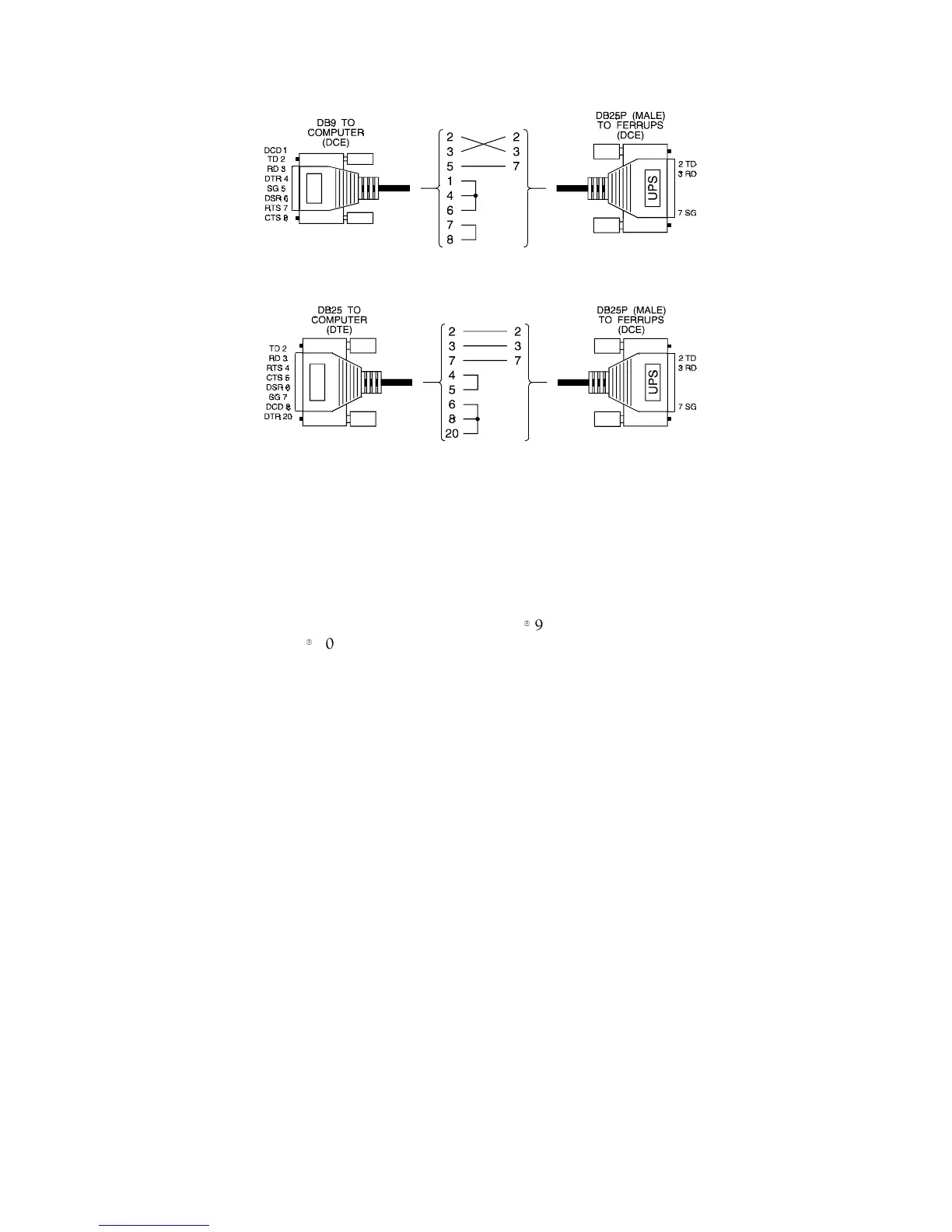
Figure 10. DB-9 to UPS Pinout
Figure 11. DB-25 to UPS Pinout
2. Connect the cable from the RS-232 port on the back of the UPS
to the serial port on your terminal or computer.
3. Your terminal or computer should be set to: 1200 baud, 8 bits,
No parity, 1 stop bit, and full duplex.
The terminal or terminal emulation software should also be set
to full duplex. If you are using a terminal, note that the
FERRUPS UPS supports the Televideo
9
900 series, ADM3A and
WYSE
9
50 emulation.
Table 6 shows the standard settings at the UPS DB-25S port and
the settings that can be adjusted. Call your service
representative if you need to adjust any of the settings.



 To Next Page