3
3 WIRING
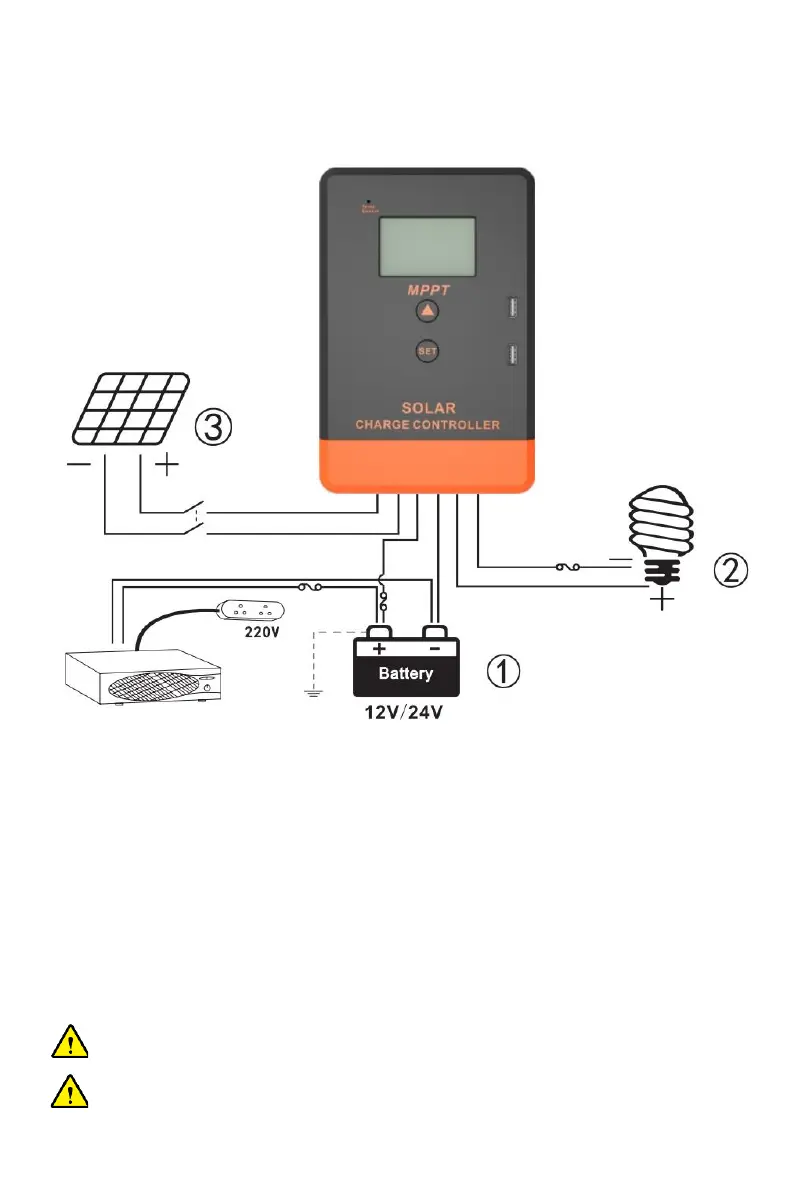
Photo 2 Connection diagram
Order of connection:
1. Connect battery
Notice: The battery terminal shall be installed with insurance, and the installation distance shall not
exceed 50mm.
2. Connected Load
3. Connect PV array
4. Controller is powered on
Connect the battery identify the voltage of the control system and observe whether the display
screen is lighted. If it doesn't work or the display is abnormal, refer to section 6 for troubleshooting.
NOTICE: This series of MPPT is a common positive:
controller, PV array, battery and load of the positive pole can be grounded at the same time.
NOTICE: If the inverter or other starting current is loaded. Sin the system, please connect
the inverter directly to the battery. Do not connect with the controller's load terminal.



 To Next Page