EASYKA – EASYBKA
________________________________________________________________________________________________________________________________________________________________________________________________
14
2. Bypass Mode.
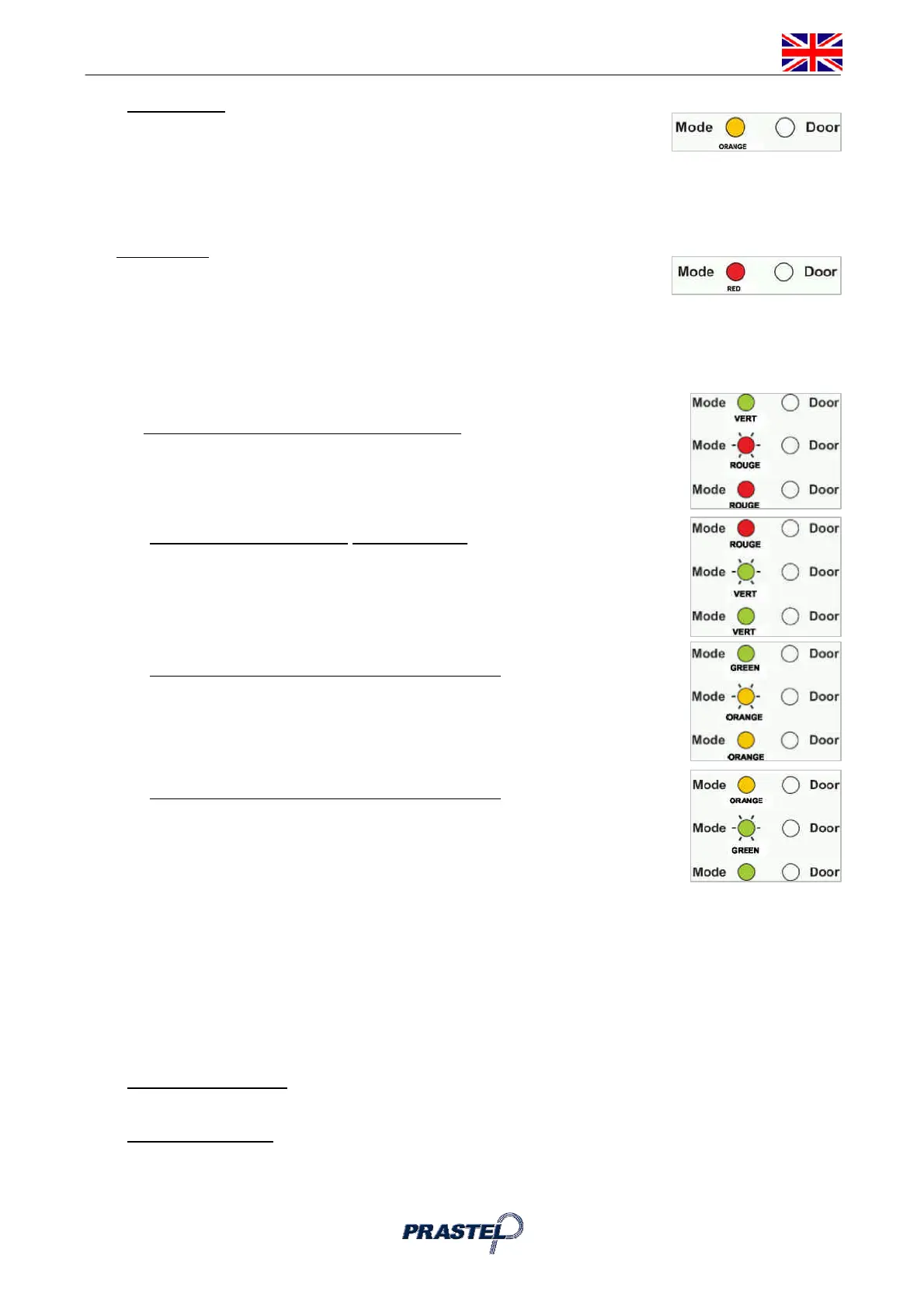
In Bypass mode the Mode LED is orange. In Bypass Mode, access to the premises
is dependent on whether the controller's Lock Strike Relay is programmed for Fail
Safe Operation or Fail Secure Operation.
� When the Lock Strike Relay is programmed for Fail Secure Operation, the door is locked until the
Door Bell Button is pressed.
� When the Lock Strike Relay is programmed for Fail Safe Operation, the door is constantly unlocked.
3. Secure Mode
In secure mode the LED is red. Only Secure and Master Users can access the
premises during the Secured Mode. A Secure User must enter their Primary and
Secondary Codes to gain entry. After entering their Primary Code the Door LED will flash green for 10
seconds, during which the Secondary Code must be entered. A Master User only needs to present their PIN
code once to gain entry.
5.1 Changing the Modes of Operation
5.1.1 Changing from Normal Mode to Secure Mode:
The default factory setting for the Normal / Secure Code is 3838.
1. Enter the 4-digit Normal / Secure Code. Mode LED will flash red
2. Press the "#" key to confirm the Mode change. Mode LED is red.
5.1.2 Changing from Secure Mode to Normal Mode:
The default factory setting for the Normal / Secure Code 3838.
1. Enter the 4-digit Normal / Secure Code. Mode LED will flash green.
2. Press the "#" key to confirm the Mode change: the LED will turn green.
The EASYKA Auxiliary Input can also be used to switch the Mode of Operation
From Normal to Secure and vice versa. (see par.12).
5.1.3 Changing from Normal Mode to Bypass Mode:
To set the Normal/Bypass code refer to par. 13).
1. Enter the 4 digit Normal / Bypass Code. Mode LED will flashorange.
2. Press the "#" key to confirm the Mode change. Mode LED will turn orange.
5.1.4 Changing from Bypass Mode to Normal Mode:
To set the Normal/Bypass code refer to par 13.
1. Enter the 4 digit Normal / Bypass Code. Mode LED will flash green.
2. Press the "#" key to confirm the Mode change. Mode LED will turn green
6. AUXILIARY INPUT AND OUTPUT
The EASYKA auxiliary input and output can be configured in different combinations, for optimum usability in
different applications. (see par.14).
7. REQUEST TO EXIT (REX) BUTTON
The REX button must be located inside the premises to be secured and is used to open the door without the
use of a proximity card or PIN code, it is usually located in a convenient location, e.g. Inside the door or at a
receptionist's desk. The function of the REX button depends on whether the Lock Strike Relay is
programmed for Fail Safe Operation or Fail Secure Operation.
1. Fail Secure Operation: From the moment the REX button is pressed, the door will be unlocked until the
"Lock Strike Release Time" has passed. After this time, the door will be locked even if the REX button
has not been released.
2. Fail Safe Operation: From the moment the REX button is pressed, the door will be unlocked until the
REX button is released, plus the "Lock Strike Release Time". In this case the "Lock Strike Relay" only
begins its count down once the REX button has been released.



 To Next Page