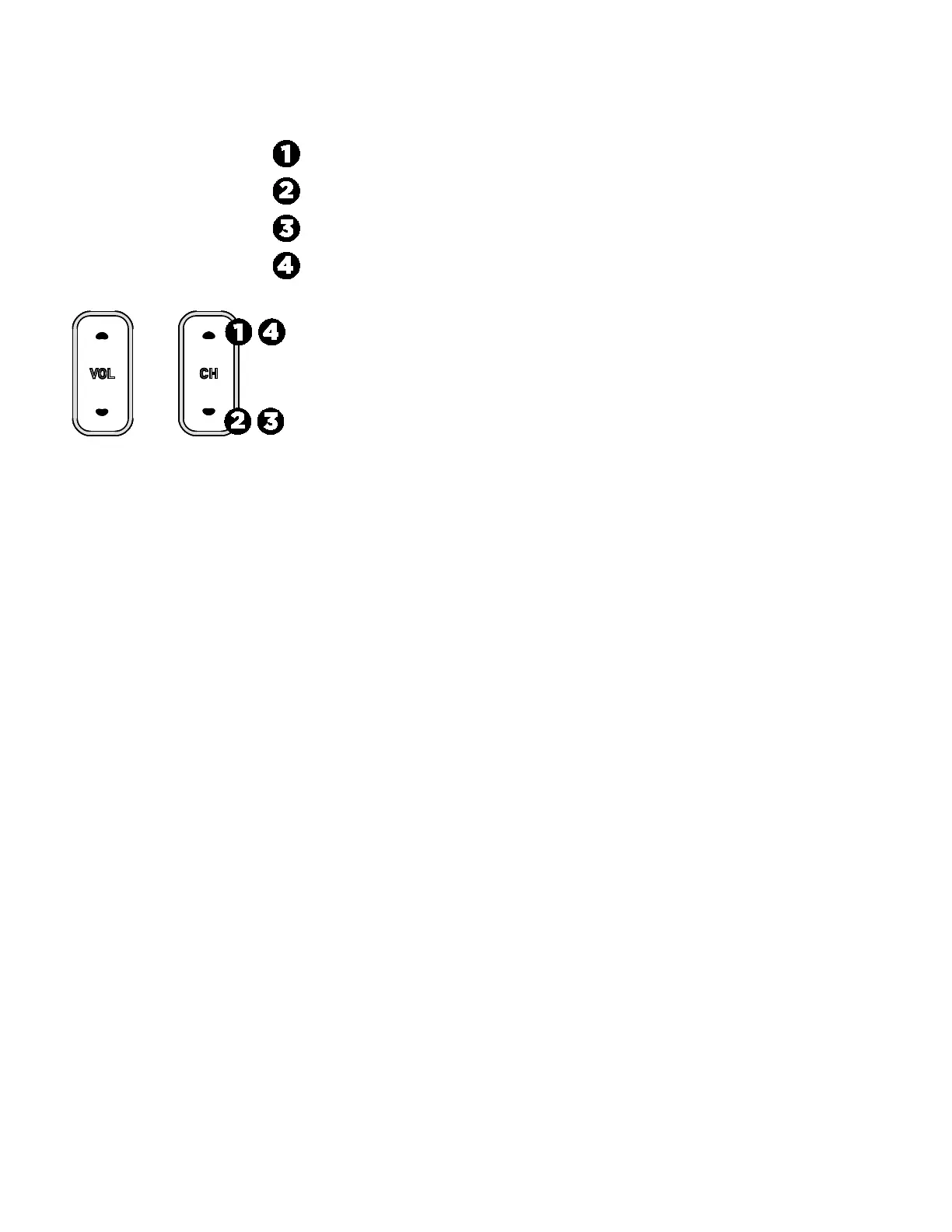
2. While holding
, press each of the following keys once in the order presented. Refer to the diagram below and press:
3. Release
.
4. Using the on-screen keyboard, touch the following numbers to enter the password:
5. Touch
.
6. Insert a USB drive into the console.
7. On the Settings menu, touch
.
8. On the System Settings menu, touch
, then
Export/Import Channel Names
.
9. When the box is lit, touch
. The channel guide file is saved on your USB drive in the /precor folder.
10. Touch
to return to the System Settings menu.
11. Touch
twice to return to the Welcome screen.
Important You must return to the Welcome screen before you remove the USB drive.
12. Remove the USB drive from the console.
To import the channel guide file from your console:
Note
Before you can import the channel guide to the other networked fitness consoles, you must make sure that the Media Adapters
on those consoles are activated. Once activated, follow steps below.
1. On the Settings menu, touch
.
2. On the System Settings menu, touch
, then
Export/Import Channel Names
.
3. When the box is lit, touch
. The channel guide file is loaded and the Channel Guide displays the updated channel
names.
4. Touch
to return to the System Settings menu.
5. Touch
twice to return to the Welcome screen.
Important You must return to the Welcome screen before you remove the USB drive.
6. Remove the USB drive from the console.



 To Next Page