7
Software description:
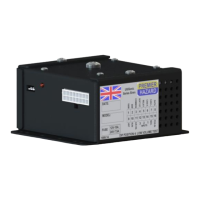
INTERLOCK
The interlock input needs to be connected to a positive voltage source for the tone to be able to
sound, such as a beacon interlock device. If not used connect to battery positive to enable tones.
HORN / FOOTSWITCH INPUT
Providing that the interlock input is connected to a positive voltage source, and that the siren isn’t
already sounding. Pressing the horn or footswitch will play a single sequence of the selected tone.
RUN INPUT
Connecting this to battery negative will cause the siren to play the selected tone, while connected,
providing that the interlock input is connected to a positive voltage source. Such as a beacon interlock
device or battery positive.
TOWN / COUNTRY SOUND SELECT INPUT
When this input is disconnected the Town sound will play (without vibrato) when selected either by
pressing the horn or connecting the run input to battery negative.
When this input is connected the Country sound will play (with vibrato) when selected either by
pressing the horn or connecting the run input to battery negative.
Typical installation diagram:


 To Next Page