The following steps will describe how to perform a quick
recharge to verify the system is working correctly.
1. Turn the incoming water on at a low ow position. Listen
to the water ow. Water is entering the media tank. Do not
open the valve completely because media may enter the
valve.
2. Start a recharge.
3. Open a service faucet. The salt tank will begin to ll with
water. Air will come out of the faucet. After all of the air has
left the media tank the water will run without air spurts.
When the salt tank has 3 to 4 inches (7.6 or 10.1 cm) of
water, turn off the faucet and advance to the next cycle.
4. Turn inlet water on full.
5. The brine prep cycle allows the water in the salt tank to
dissolve the salt. During this cycle inspect for leaks. If
any leaks are present they should be repaired before
proceeding. If there are no leaks, advance to the next cycle.
6. Backwash forces water through the media to the drain.
Inspect the water for air bubbles and small particles. When
the water is running clear, advance to the next cycle.
7. Brine draw and slow rinse run at the same time. The
discharge to drain will slow down. The water in the salt tank
will lower. If water is leaving the salt tank, advance to the
next cycle.
8. The repressurize cycle is short and allows internal system
pressures to stabilize. After 1-2 minutes advance to the
next cycle.
9. Fast rinse is a full pressure rinse of the media in the tank.
The discharge to drain should be high. Advance to the next
cycle.
10. Backwash 2 is a second backwashing of the media tank.
Discharge to drain will be slow. Advance to the next cycle.
11. Fast rinse 2 is the last cycle in the recharge process. Flow
to drain will be high. This cycle is 1 min long. Allow this
cycle to complete and advance to Service.
The controller will start the rst time with a recharge scheduled
to start at the normal time of recharge. The media in the tank
will function properly until that rst recharge.
Fill the salt tank with softener salt. The display should be
showing the current time of day and the colon will be ashing.
The system is fully operational.
During normal operation (Service mode) the display will
show the current time of day with the colon blinking. This will
alternate with a display of the capacity remaining.
PLACING SOFTENER INTO OPERATION
continued
PLACING SOFTENER INTO OPERATION
(TURNING ON THE WATER)
Things You Might Need to Know
• When the controller is rst plugged in, it may display a
ashing hourglass and the message Err 3, this means
that the controller is rotating the camshaft to the home
position.
• The preset default time of recharge is 12:00 am.
• The Premier Series controller is programmed to recharge
if a recharge has not taken place in the last 15 days. This
setting cannot be changed.
• Make sure control power source is plugged in. The
transformer should be connected to a non-switched
power source.
• Unless changed, the settings for a newly installed system
are:
Hardness - 25 gpg
Salt Setting - HE (High Efciency)
Water Used Settings - 0 cubic meters
Internal System clock is set to 8:00 am. The display
continues to show “- -:- -” until the time is manually set.
The rst recharge will occur when the system clock
reaches 12:00 am.
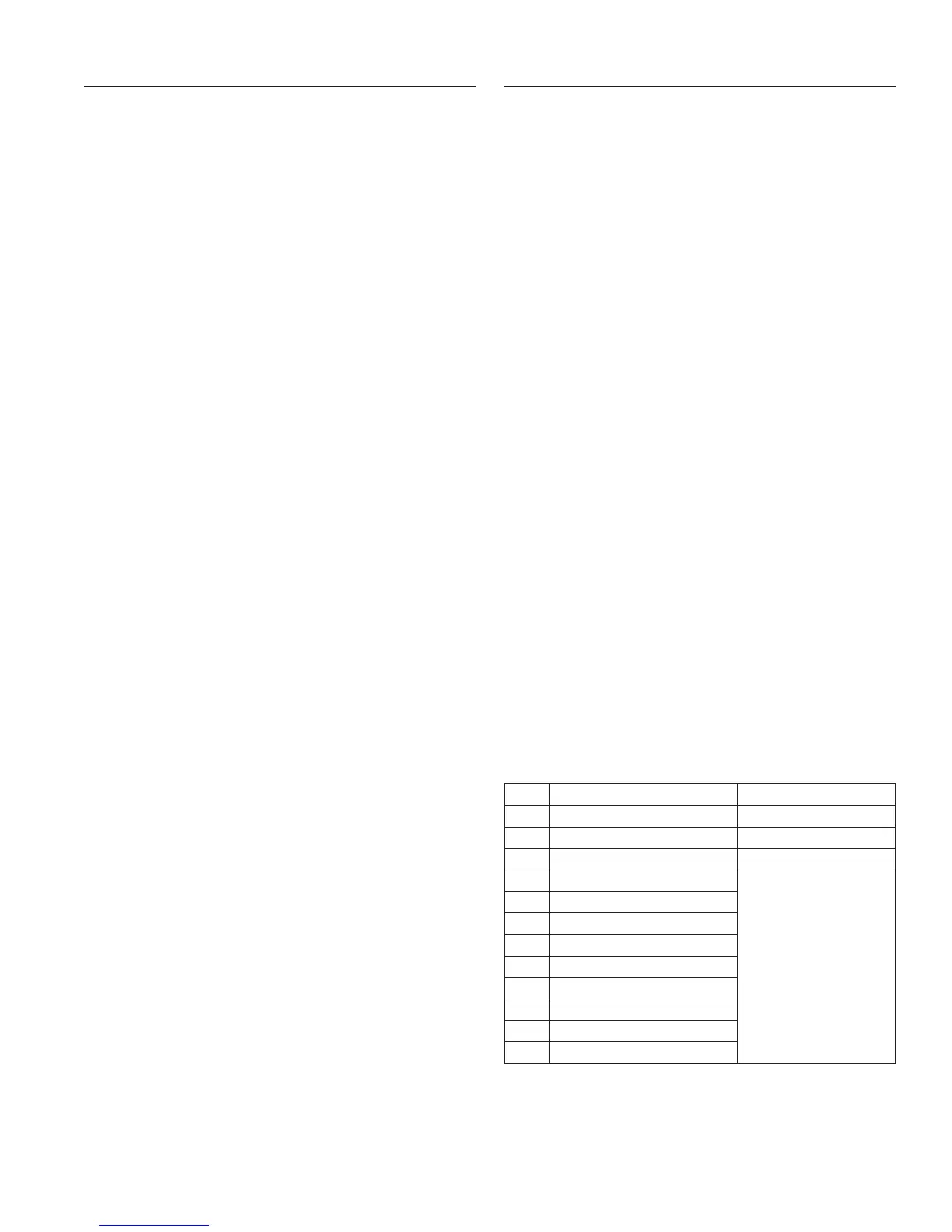
Accessing History Values
The Premier control features a review level that displays the
operation history of the system. This is a great troubleshooting
tool for the control valve.
To access history values, press Recharge followed by the Salt
Amount button and hold for 3 seconds to view the Diagnostic
Codes.
NOTE: If a button is not pushed for 30 seconds the
controller will exit the history table.
Press the Time of Day button to increment through the table.
When the desired code is reached, Press the Salt Amount
button to display the value.
When the Salt Amount button is pressed to view H2 the current
ow rate will be displayed but not updated. Continue to press
and release the Salt Amount button every 5 seconds to update
the display. The ow icons on the display will ash when there
is ow thru the softener.
Code Description Notes
H1 Days since last recharge Days since last recharge
H2 Current ow rate Liters per minute
H3 Current day of week Current day of week
H4 Water used today since 0200
In cubic meters,
max value displayed 99.99
max value stored 655.35
H5 Water used since last recharge
A0 Average water usage for day 0
A1 Average water usage for day 1
A2 Average water usage for day 2
A3 Average water usage for day 3
A4 Average water usage for day 4
A5 Average water usage for day 5
A6 Average water usage for day 6
Premier AF-40K MR12 • 13


 To Next Page
 Loading...