128-9363
14 of 24
Page 14
TRANSCEIVER ICONS AND THEIR INDICATIONS
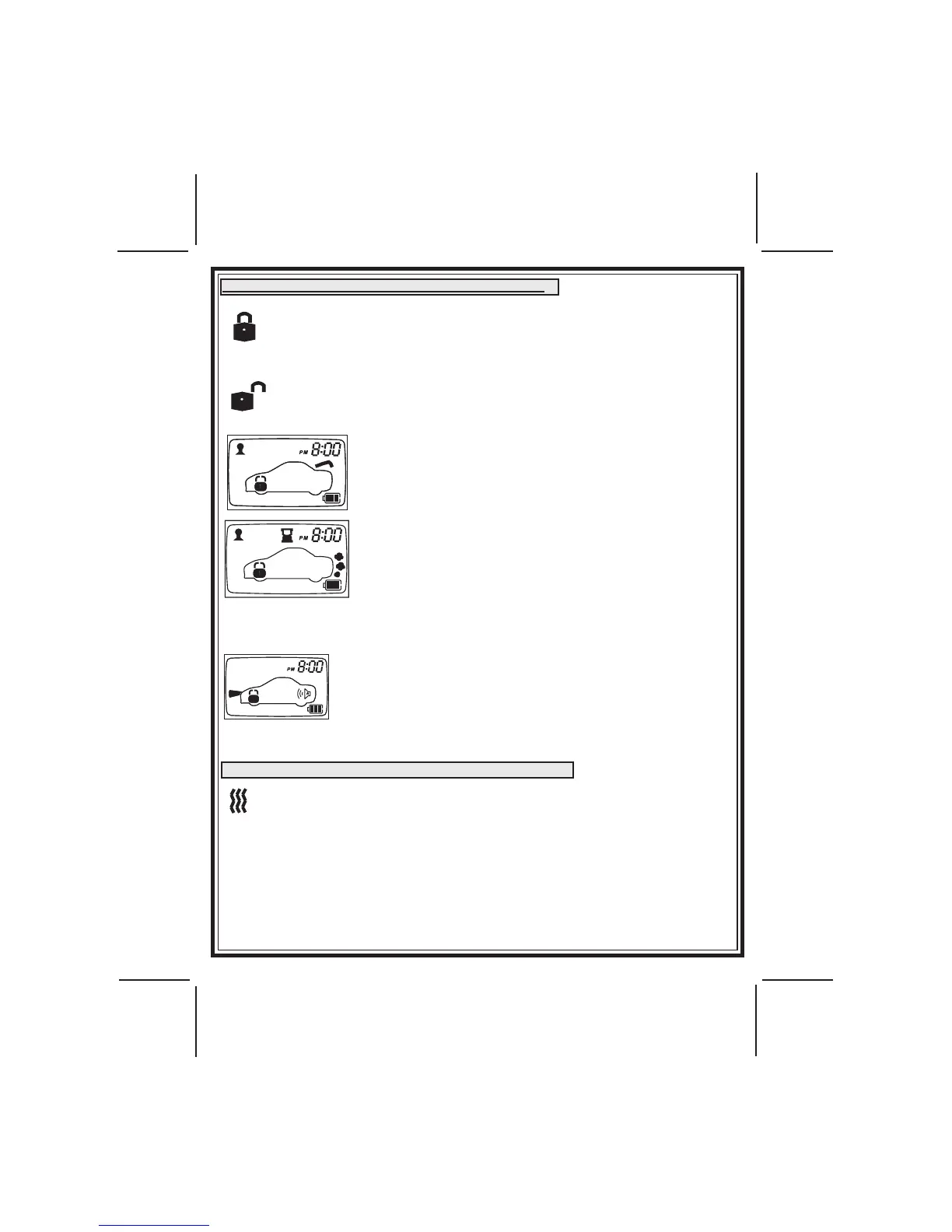
When Disarmed, press the Arm/Lock button to Lock and Arm the System.
The Lock Icon is displayed on the LCD panel & the parking lights ash
once.
When Armed, press the Disarm/Unlock button to
Unlock and Disarm the System. The Unlock Icon is displayed on the LCD
panel & the parking lights ash twice.
When the Trunk/Key Icon Button Has Been Operated for 3
seconds the trunk open icon will ash on the LED Screen.
The Trunk Open will appear and remain on the display until
the trunk is shut.
When the Trunk/Key Icon Button is pressed 2 times in succes-
sion The three puffs of smoke are displayed on the LCD screen
while the vehicle is running. The exhaust indication will ash
and the hour glass will indicate count down timer based on
the run time set up by your installation center. When the unit
shuts off the exhaust indication will turn off and the transmitter
will play a melody.
NOTE: Engine can be started in many modes armed, disarmed, valet, etc. The screen
shown is Locked/Armed and running.
When the Panic Mode has been activated and the system is
armed the vehicle's lights will ash, the siren and lock icon
will be displayed on the LCD screen and the siren will beep.
If the system is disarmed and the Panic Mode is activated,
the lights will ash unlock icon will be displayed and the siren
will beep on the LCD screen.
TURNING OFF BEEP TONES AT THE TRANSCEIVER
When ever the vehicle is operated from the two way transmitter, the unit
will beep responsive to the function executed at the vehicle. 1 beep
when armed, 2 beeps when disarmed, etc. at times It may be inconve-
nient or too noisy to hear the beep tones, so the system allows you to
set the unit for vibrate mode.
To toggle on or off beep tones/vibrate, Simultaneously press the "F" and unlock
buttons. The icons shown left will appear in the upper left hand corner of the
screen to indicate vibrate.


 To Next Page