128-9363
17 of 24
Page 17
Timing Count Down
The unit offers an additional count down timer for situations where an alert tone
may be needed to remind you of something important. For instance you may
have a meeting 4 hours from now and you want a reminder in 3 Hrs and 45 Mins.
This additional count down timer allows you to set the count down up 19 Hours
and 59 Minutes from the current time and when the timer reaches zero, the trans-
mitter will emit a tone or vibrate dependent on your preferred setting. See chart
for setting the count down time for this feature.
Valet
When the System is in the valet mode, the icon shown will show in the
display when the status check buttons are activated.
Parking Meter Counter
The transmitter has a built in clock that can count down from 10, 20, 30, 60, 90,
or 120 minutes. This feature is useful when parking the vehicle in a metered
parking lot. If the time on the parking meter is 30 minutes, you can set the count
down timer to 20 minutes. The transmitter will emit a beep tone when the timer
expires to remind you to get back to your vehicle. See following chart for setting
the parking meter count down timer feature.
Alarm Clock Mode
The transmitter has a built in alarm clock that can be set to beep at a certain time
each day. The alarm clock mode must be set, and the feature turned on. To use
this feature please refer to the chart shown later in this guide.
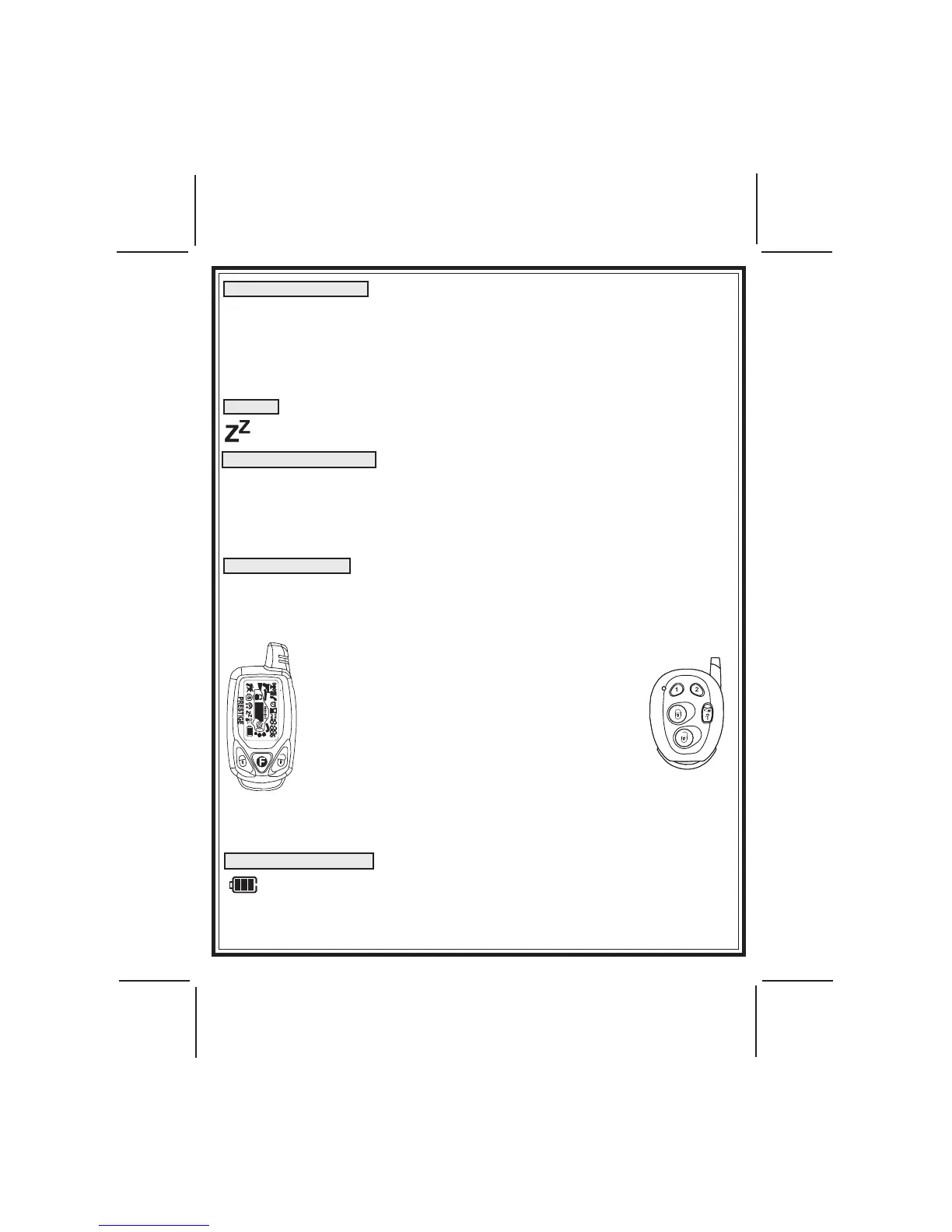
NOTE: Your system is shipped with two transmitters, 1 two way, shown on
the left and the one way transmitter, shown
right. The one and two way transmitters are
programmed from the factory with separate
lock & unlock buttons, the trunk/key icon button
operates remote start and remote trunk release
where applicable. The option button and any
button combination may be programmed to
operate various options. Consult your installa-
tion center for button programming and options
that may have been added to your vehicle.
Although this is the default programming from
the factory, this can be changed for you to any
conguration you prefer.
Please refer to the transmitter programming shown later in this manual.
NOTE: A maximum of two of either style transmitter may be programmed to your
unit.
BATTERY INDICATOR
Your transmitter has a battery indicator that is shown in the upper right
corner of the screen as shown on the left. This icon indicates a new bat-
tery shown with 3 bars. As the battery deteriorates, the bars will disap-
pear. 1 bar indicates the battery should be replaced. Replace battery with
a fresh 1.5V AAA battery and dispose of the used battery properly.


 To Next Page