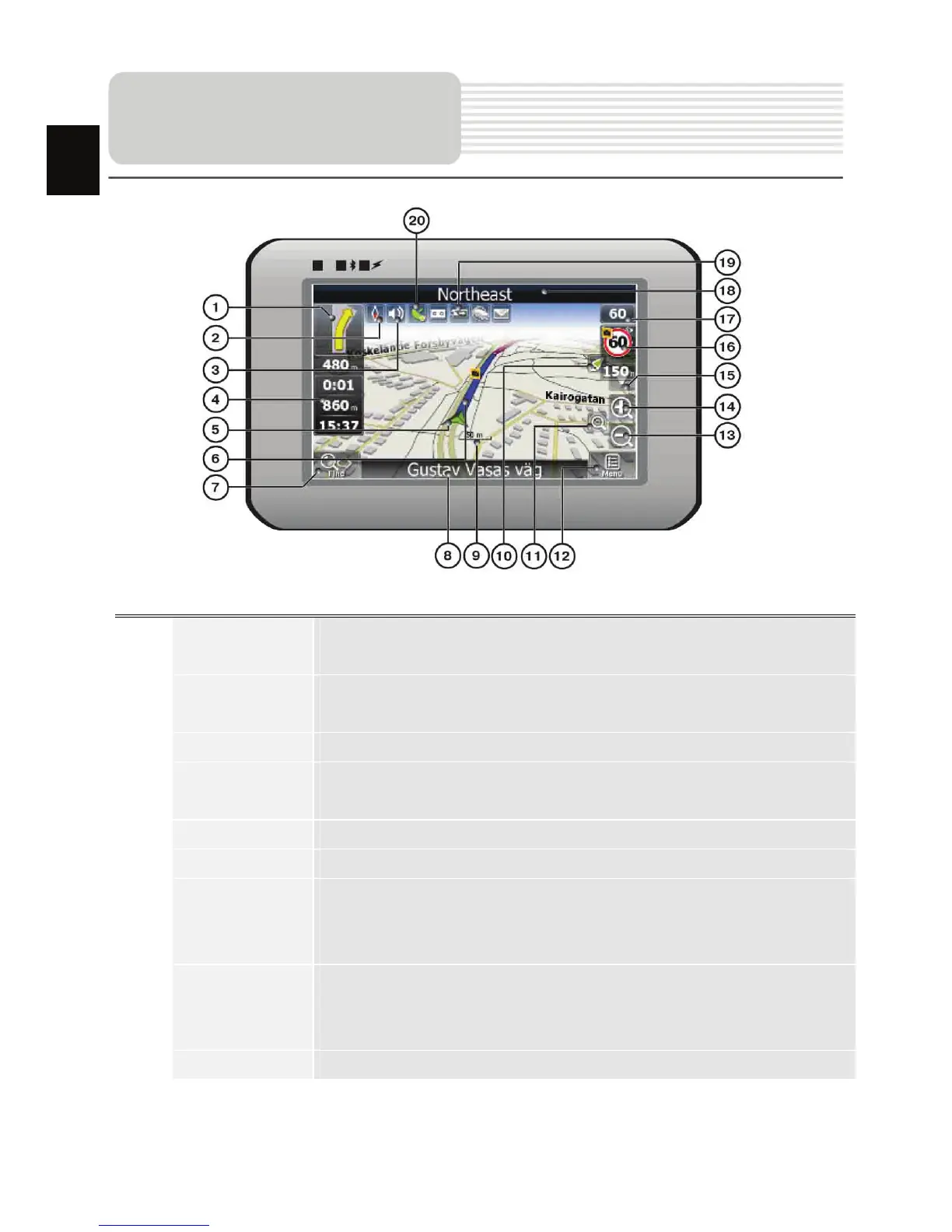
EN-16
No. Name Function
1 Next maneuver
Next maneuver on the way and distance up to it. Press this Icon
to open route options menu.
2 Compass
Press the compass loon to edit map rotation mode, map view
and day/night mode.
3 Sound Press this button to turn on/off voice and sound effects.
4
Information
panels
Display time until the end of the trip, total route length, and
arrival time.
5 GPS-cursor If GPS connection is established, displays your current location.
6 Route Route you are currently navigating displays as a wide blue line.
7 Search
Press this button to enter the search menu and to find specific
address or object (you can find more Info about Search In
~Functionality~ section)
8
Information
panel
Shows street name you are currently moving on. Available only
if GPS or GLONASS connection is established. If there is no
street name, the direction will be shown.
9 Scale Map current scale.
Program interface
EN














 To Next Page