■ Horn Button
Press the horn button to sound the horn. Release the button to stop the horn.
▓ How To Set Freewheel Mode
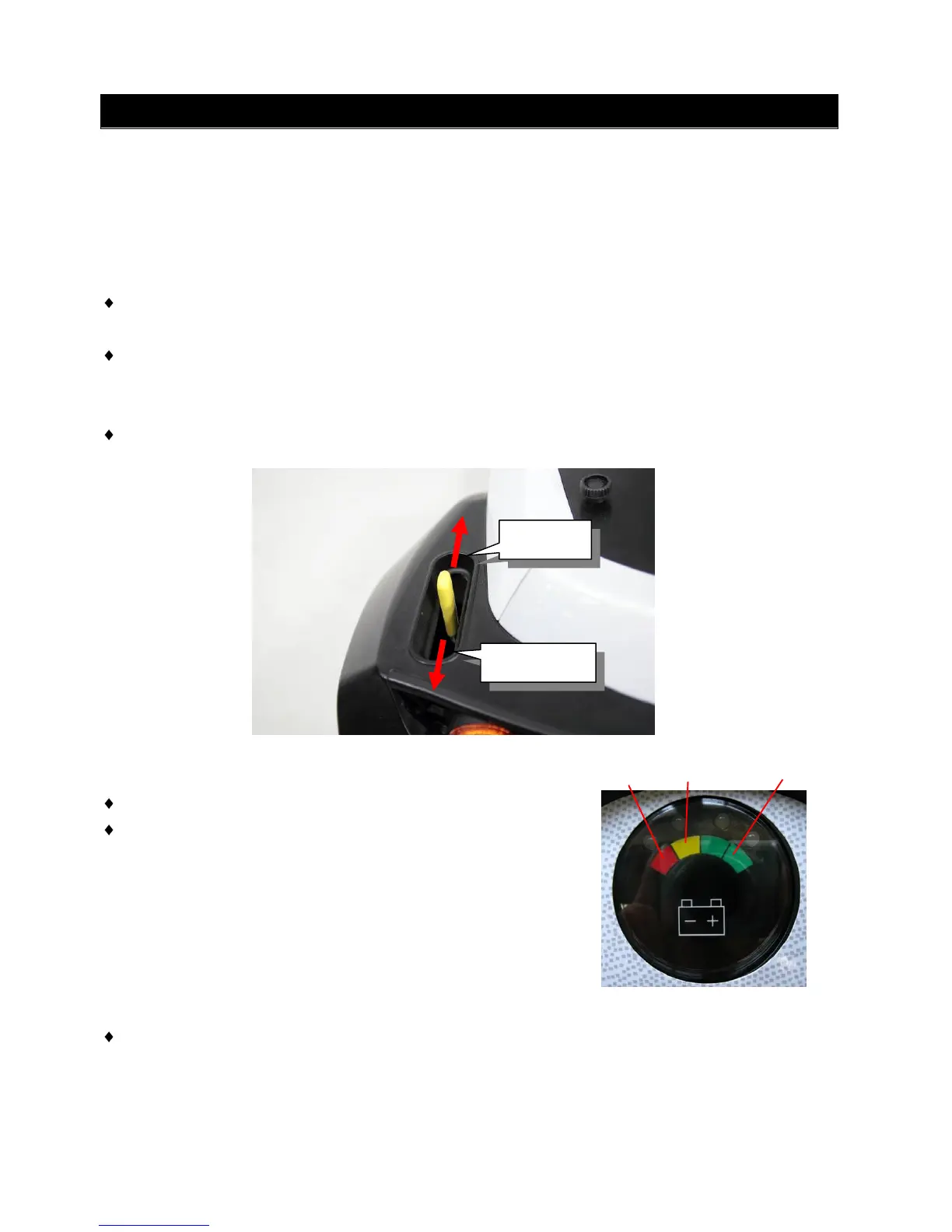
The motor on the scooter can be disengaged to allow the scooter to be pushed.
Drive Mode
– To put the scooter in to “drive” mode, push the freewheel lever up completely
Freewheel Mode
– To put the scooter in to “freewheel mode”, push the freewheel lever down completely and
the scooter can be moved manually.
Please note that this will put the scooter in to freewheel mode, so scooter‟s motor and brake
will be disengaged
■ Light Button
Push the light button to switch the front and rear lights on.
Push the button again to turn the lights off.
■ Battery Indicator
The battery indicator on the tiller console uses
a color code to indicate the approximate power
remaining in your batteries. Green indicates (40~
100%) capacity, yellow a draining charge(10 ~
30%),and red indicates that an immediate recharge is
necessary.
The remaining power suggested by the battery indicator will vary by the actual driving time
incurred and how you drive. Repeated starting, stopping, climbing will consume the power
more quickly.



 To Next Page