19
Outback www.pridemobility.com
III. YOUR SCOOTER
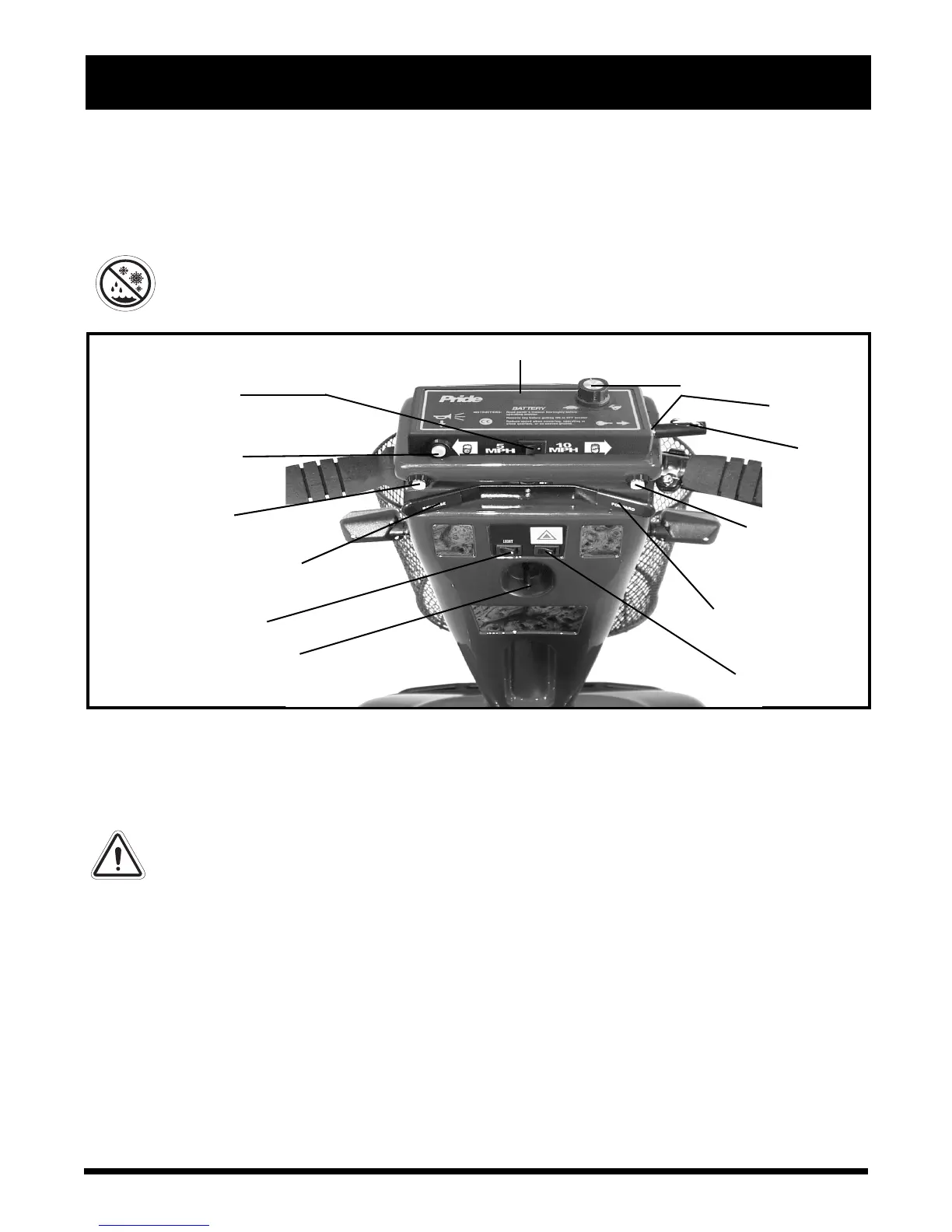
Figure 5. Control Console Assembly
BATTERY CONDITION METER
KEY SWITCH
HORN BUTTON
LIGHT SWITCH
SPEED ADJUSTMENT DIAL
TILLER ADJUSTMENT LEVER
8-16 KM/H SWITCH
KEY
The control console assembly, located on the front section, houses all of the controls you need to operate
your scooter, including the speed adjustment dial, throttle control lever, battery condition meter, horn
button, and key switch. See figure 5.
PROHIBITED! Do not expose the control console assembly to moisture. In the event that
the control console assembly does become exposed to moisture, do not attempt to
operate your scooter until the control console assembly has dried thoroughly.
CONTROL CONSOLE ASSEMBLY
Key Switch
Fully insert the key into the key switch to power up your scooter.
Pull the key out to power down your scooter.
WARNING! If the key is removed from the key switch while your scooter is in motion,
the electronic brakes will engage and your scooter will come to an abrupt stop!
Tiller Adjustment Lever
This lever allows you to adjust the tiller between four different positions. For tiller adjustment instruc-
tions, see VI. “Comfort Adjustments.”
Horn Button
This button activates a warning horn. Your scooter must be powered up for the horn to be operational.
Do not hesitate to use the warning horn when doing so may prevent accident or injury.
Hazard Light Switch
This switch enables you to control your scooter’s front and rear (amber) hazard lights. Toggle this
switch to turn the hazard lights on and off.
THROTTLE CONTROL
LEVER (FORWARD)
THROTTLE CONTROL
LEVER (REVERSE)
HAZARD LIGHT
SWITCH
RIGHT TURN
INDICATOR
LEFT TURN
INDICATOR



 To Next Page