As you will read in the following paragraph, ESATTO robotic microfocuser inclu-
des also a WiFi connection (to let you control it without the need of a personal
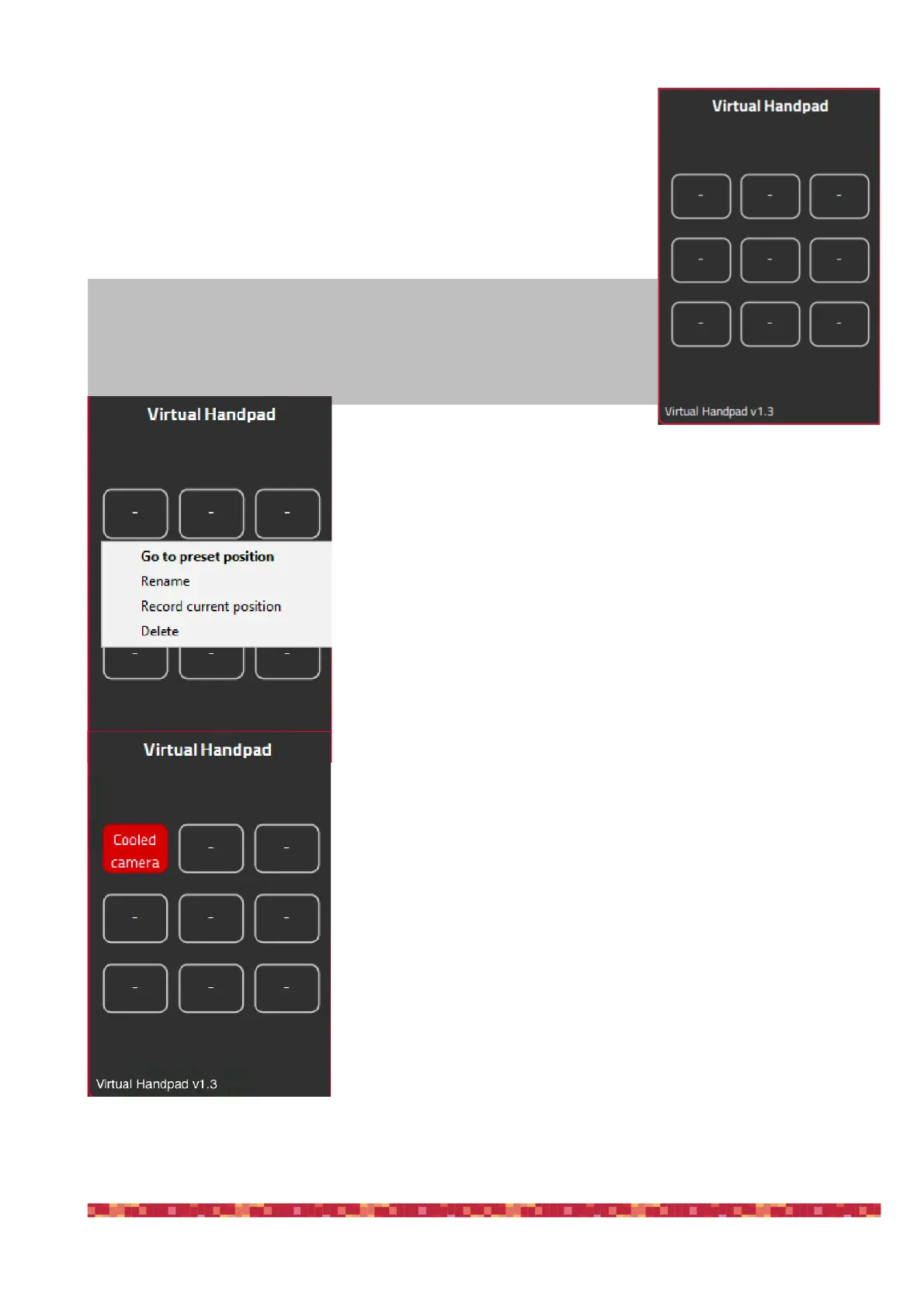
computer) and the ESATTO Virtual HandPad. You can use the Virtual HandPad
wirelessly via WiFi, or via USB using the FOCUSER Manager software. Using
either, you can save up to 9 preset positions, for example to let you recall the
focus position of a specific camera or a visual accessory like an eyepiece.
In order to save a new position in the Virtual HandPad, you first have to
move the ESATTO focuser to the position where your telescope is in perfect
focus (you will need an optical accessory or a camera in order to do this) and
then follow this procedure:
Click on one of the empty buttons and select the “Record current position”
option. A new window will appear asking you to type the name of the button.
By clicking OK the new position will be saved and the ESATTO Virtual
HandPad will show the new button in red color, with the name you choose.
NOTE
When you save the focus position in the ESATTO Virtual HandPad, you will
find the same positions when you will control the ESATTO with WiFi from your
smartphone or tablet.


 To Next Page