>
3
Connecting the A32 Amplifier
This chapter explains how to connect the A32 to the other components in your
system, using the connections on the back panel.
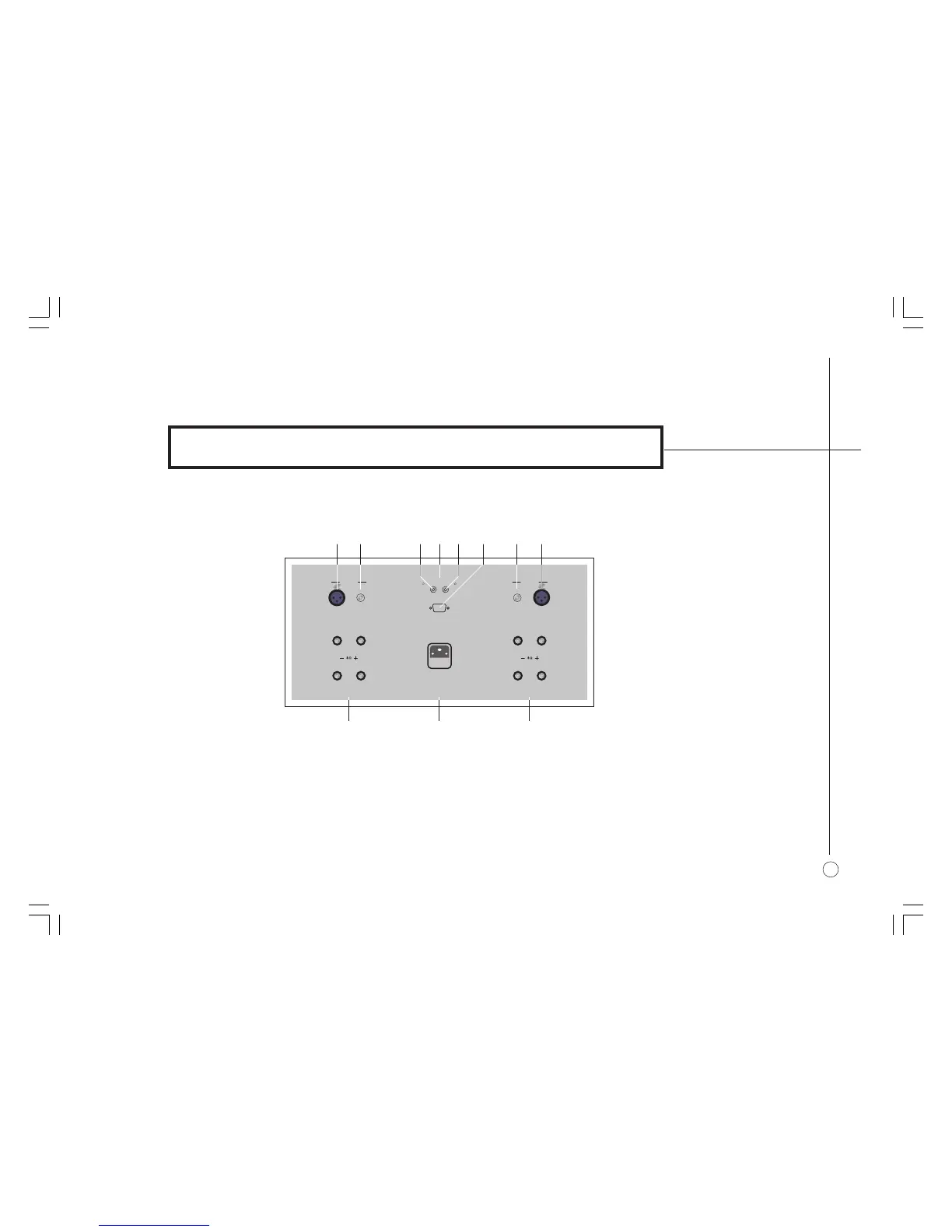
BACK PANEL CONNECTIONS
]E Remote trigger output.
]F RS232 control connection.
]G Left unbalanced input (RCA).
]H Left balanced input (XLR).
]A Right balanced input (XLR).
]B Right unbalanced input (RCA).
]C Remote trigger input.
]D XLR/RCA selector.
]I Right loudspeaker outputs (dual).
]J Mains power input and fuse.
]K Left loudspeaker outputs (dual).
RCA
XLR
-*,Ê,
,-ÓÎÓ
/,,
" ÊÊÊÊ"
-*,Ê
/
*1/-
,/
*1/-
*1/-Ê-7
R> R? R@
R6 R7
R9R8 R: R; R< R=
§2 Connecting.pm7 1/12/05, 10:56 am3


 To Next Page