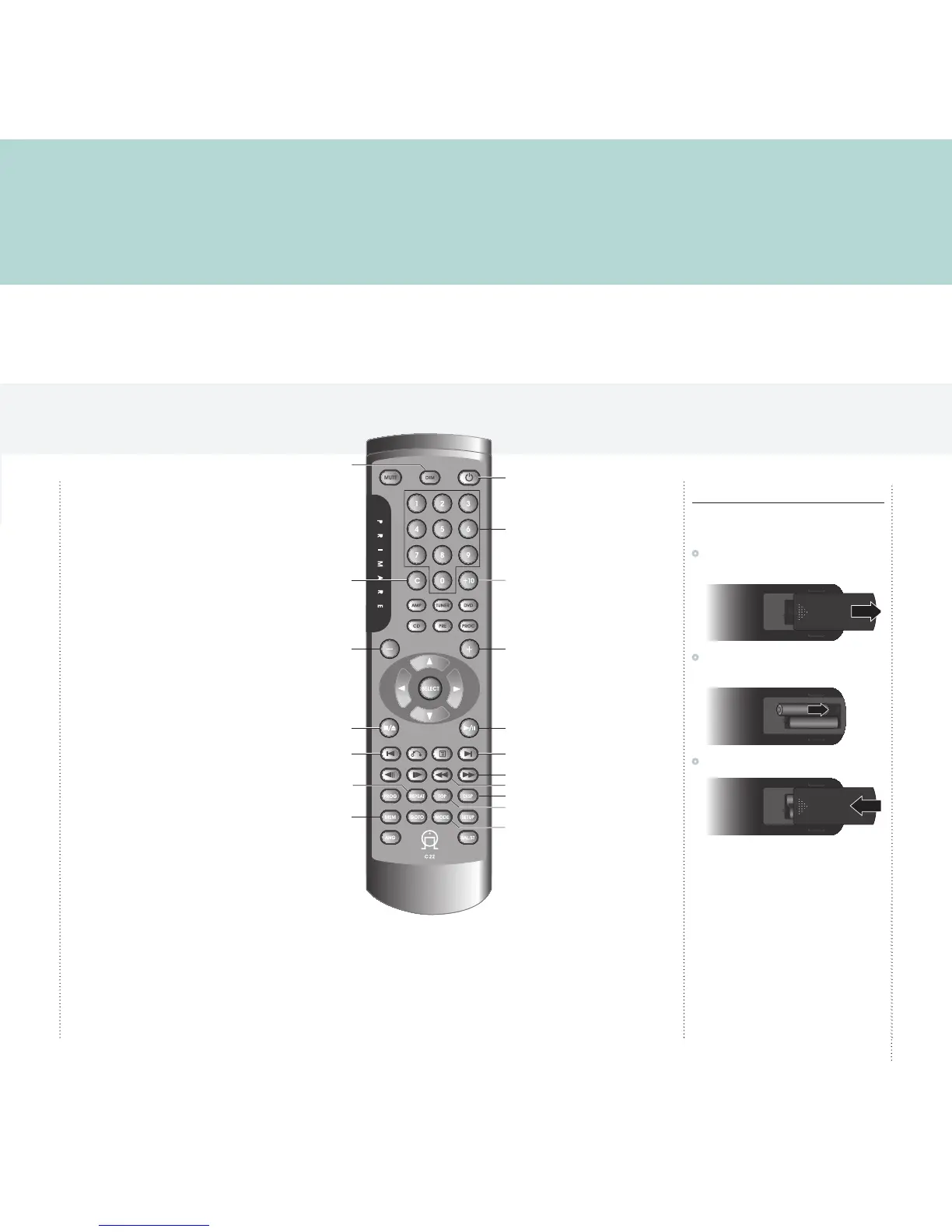
Clear number entry
Dim display
Switch on/off
Enter number >10
Enter track number
Decrease volume of
preamplifier/processor
Restart the current track, or
step to the previous track
Repeat the track or disc
Increase volume of
preamplifier/processor
Play or pause the disc
Program a selection of tracks
Step to the next track
Display option
Play a random
selection of tracks
Open or close the CD tray,
or stop the disc
Repeat a section of the disc
Reverse scan
Forward scan
Fitting the batteries
Before using the remote control you need to insert
the two AAA batteries supplied with the C22.
•
Gently slide open the cover on the back of the
remote control:
•
Insert the two batteries, observing the polarity
printed on the bottom of battery compartment:
•
Slide back the cover until it clips into place:
Note: Replace only with alkaline
batteries type AAA, LR03, or equivalent.
Dispose of old batteries considerately.
You can operate all the functions of the CD31
using the C22 remote control:



 To Next Page