WINDOWS 7/8 instruction guide for your Printrbot printer and computer software
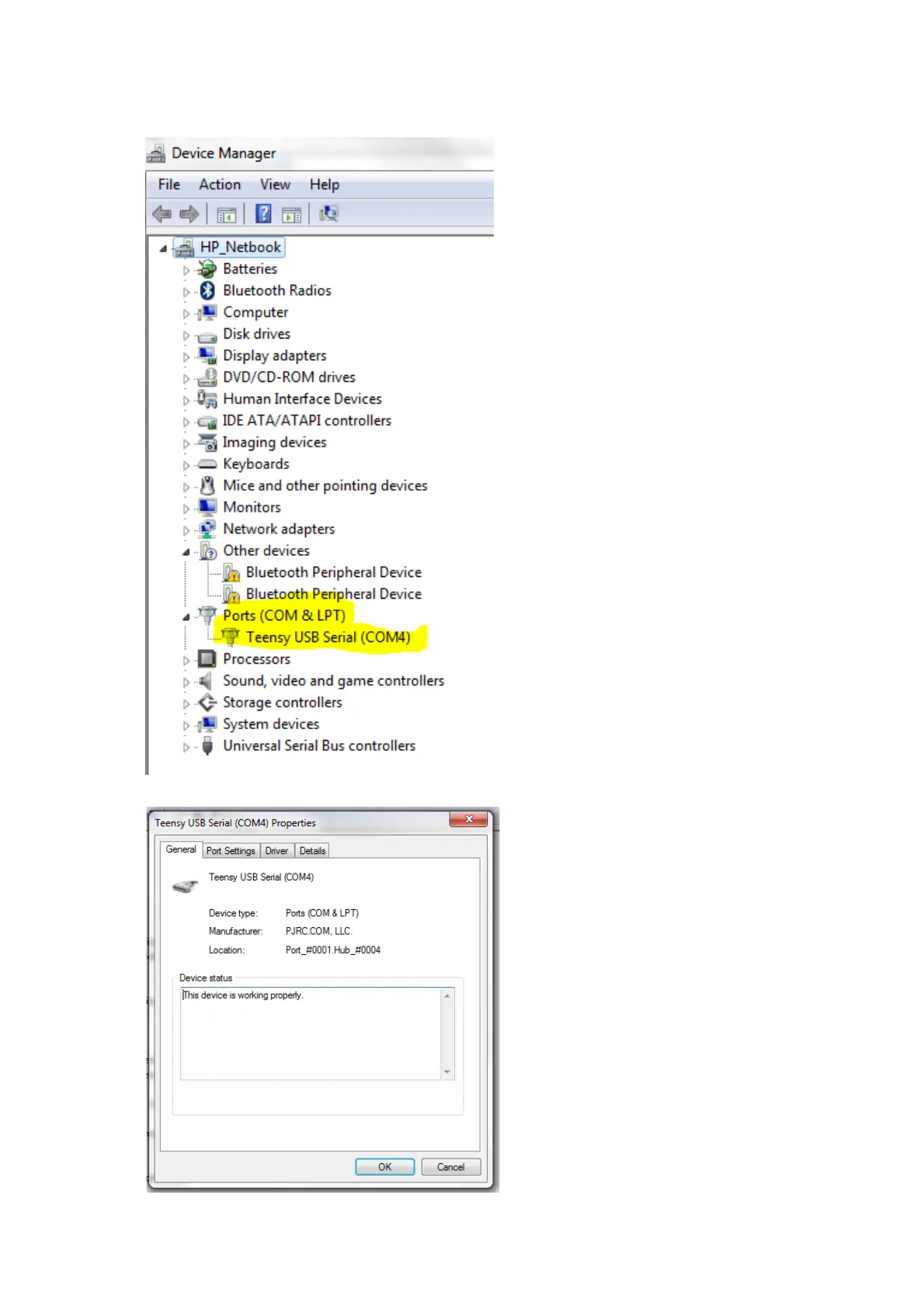
LookforthePorts(Com&LPT)
settings
IfyoudonotseeTeensyUSBSerialas
anentrythenthecompleteinstallation
procedurefailed.Repeatthedownload
andinstallprocedureaspreviously
described.
IfyouseenoCOMnumberinbrackets
thenthedriverisinstalledbutnot
configuredcorrectly.Doubleclickon
theentrytoinvestigatefurther.
IfyoudoseeaCOMnumberinbrackets
thenthedriverisinstalledcorrectlyand
theCOMnumberiswhatyouwillenter
intheRepetiersoftwarelaterintheset
upprocedure.
TheDevicestatusmessagewillindicate
whetherthedevicedriverisnot
installed,notinstalledcorrectlyor
installedcorrectly
Ifthedriverisinstalledcorrectlythen
clickonOKandexitthesettings
Page 21 of 23



 To Next Page