12
Section 7: Basic Operation
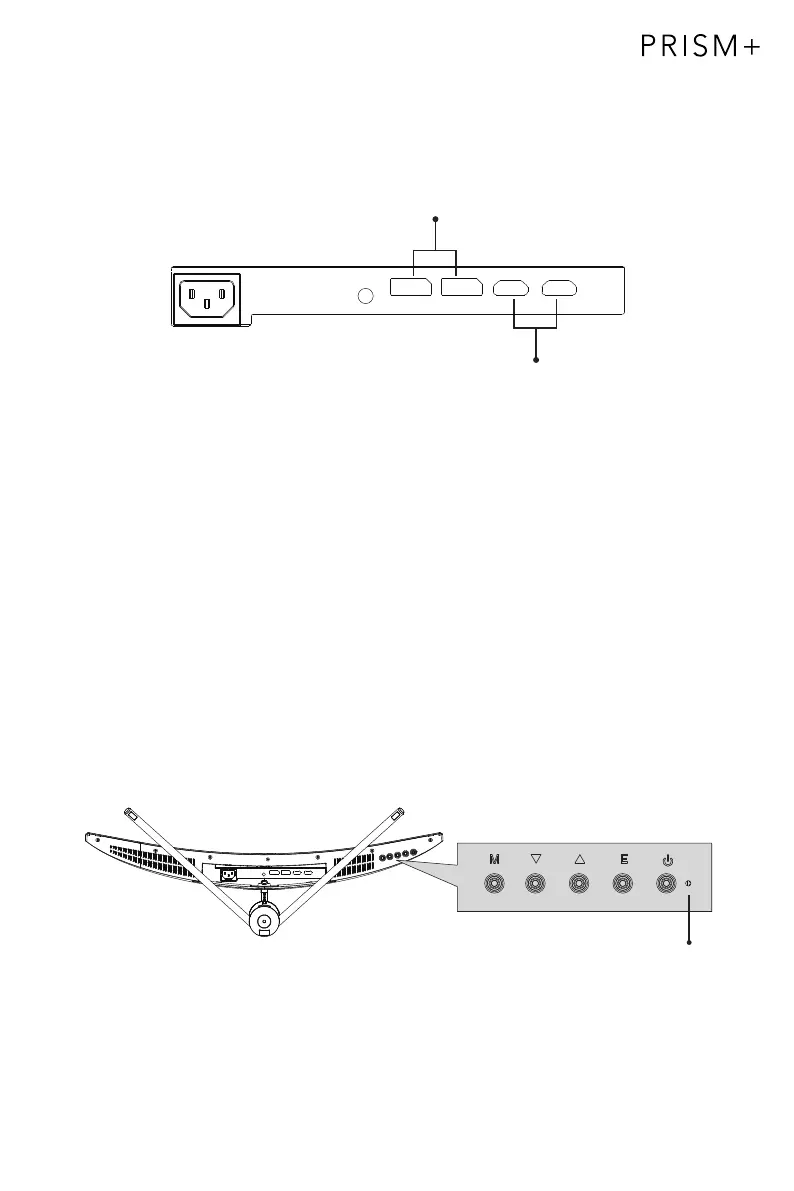
1. Insert one end of the DP cable into your PC’s graphics card. A HDMI cable may
also be used. HDMI cable is not included.
2. Connect the other end of the cable to the corresponding connector on your
monitor.
HDMI Connectors
3. Connect the power cable to your monitor then connect the other end to your
power source. It is recommended that you use a surge protector with adequate
voltage if a wall outlet cannot be reached directly.
4. Locate the power button on the monitor and p
res
s it to turn on the monitor.
FreeSync
This feature is off by default. To use this feature, please note that you must have
hardware with FreeSync capability, a DP or HDMI cable, and the latest graphic drivers.
To use this feature, connect your computer and monitor with a DP or HDMI cable. After
connecting, a pop-out message will prompt and request you to enable this feature on
your computer. If you do not receive the prompt, you may need to enable your graphics
card menu's function. See your graphics card manufacturer’s documentation for
instructions on how to enable FreeSync.
Section 8: Indicator Light
Indicator Light
Solid blue light indicates power is on and the monitor is operating normally. Flashing
blue light indicates no video source
, no horizontal/vertical signal has been
detected or voltage is low. Please ensure your computer is on and all video cables
are fully connected.
DP Connector


 To Next Page