EasyManua.ls Logo

Pro-4 Tactical Flashlight with Multi-Tool - User Manual

Pro-4 Tactical Flashlight with Multi-Tool
4 pages
Print Icon
To Next Page IconTo Next Page
Loading...
Flashlight with Multi-Tool
Instruction Manual
Installing 3 AAA Alkaline Batteries
Turning ON / OFF - Switching Light
Modes
• Zoom In / Out
• Tools
• Maintenance
• Warnings
• Troubleshooting
Instructions
14+
AGES
QR CODE
Designed, Imported,
and Distributed by:
Pro-4 Marketing
32411 Industrial Drive
Madison Heights, MI 48071
Tel: 248-809-2129
Toll Free: 1-833-776-3687
www.Pro-4Tactical.com
Question and Answer IconNeed help?

Do you have a question about the Pro-4 Tactical Flashlight with Multi-Tool and is the answer not in the manual?

Summary

Product Operation and Maintenance

Installing Batteries

Guide to inserting 3 AAA alkaline batteries correctly into the flashlight for operation.

Power and Light Modes

Instructions on turning the flashlight on/off and cycling through its four light modes.

Zoom Functionality

How to adjust the flashlight beam from narrow to wide for different illumination needs.

Multi-Tool Functions

Details on using the integrated tools such as cutters, glass breaker, and screwdrivers.

Care and Upkeep

Recommendations for cleaning, battery removal, and lubricating moving parts.

Safety Precautions

Warnings regarding sharp tools, intended use, and age recommendations.

Troubleshooting Guide

Steps to resolve issues like the flashlight not turning on or having a weak light.

Product Warranty Information

1 Year No Questions Asked Warranty

Details on the free repair or replacement policy within one year of purchase.

Overview

This document describes the Pro-4 Tactical Flashlight with Multi-Tool, a versatile device designed for various utility and emergency situations.

Function Description

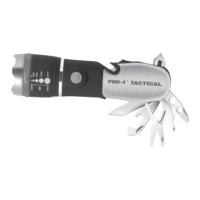
The primary function of this device is a flashlight, offering multiple light modes and adjustable beam focus. Integrated within its design is a multi-tool, providing a range of practical implements for different tasks. It is designed for portability and ease of use in various environments.

Important Technical Specifications

  • Power Source: 3 AAA Alkaline Batteries. Fresh alkaline batteries are strongly recommended. Mixing old and new batteries, or different types of batteries, is not advised.
  • Light Modes: The flashlight features four distinct light modes:
    • High Power Light
    • Medium Power Light
    • Low Power Light
    • Flashing Red Hazard
  • Multi-Tool Components: The integrated multi-tool includes:
    • Belt and Rope Cutter (with enclosed blade)
    • Striker Head (surrounds the flashlight lens)
    • Glass Breaker (deploys automatically via a slide switch)
    • Flat Head Screwdriver
    • Sharp Knife
    • Phillips Head Screwdriver
    • Bottle and Can Opener
    • Small Pry Bar
    • Scissors
    • 6mm Allen Wrench
    • 8mm Allen Wrench
  • Age Recommendation: Recommended for ages 14 and above. Keep out of reach of children.
  • Dimensions/Weight: Not explicitly stated, but implied to be compact and handheld.
  • Warranty: 1-Year "No Questions Asked" Warranty for repair or replacement of nonworking units. Registration is required within 2 weeks of purchase.

Usage Features

  • Battery Installation:
    1. Unscrew the flashlight head and remove the battery pack.
    2. Insert 3 AAA batteries into the battery pack, ensuring correct polarity (+/-).
    3. Insert the battery pack into the flashlight with the positive (+) end exposed.
    4. Replace the flashlight head.
  • Turning ON/OFF and Switching Light Modes:
    • To turn the flashlight ON/OFF, firmly press the ON/OFF button until a "click" is heard.
    • To cycle through light modes (without turning the flashlight off), press the button halfway (without clicking). The light will advance to the next mode. The sequence of modes is High, Medium, Low, Flashing Red Hazard.
  • Zoom In/Out:
    • Zoom In: For a long, narrow, focused light beam, push the flashlight head towards the front end of the flashlight.
    • Zoom Out: For a broader light beam, push the flashlight head towards the back end of the flashlight.
  • Using the Multi-Tool:
    • Belt and Rope Cutter: Slide the belt or rope into the notch on the side of the flashlight and use the enclosed blade to cut.
    • Glass Breaker: Slide the switch towards the top of the flashlight; the glass breaker will deploy automatically. To replace, hold the switch open, manually fold the glass breaker into the handle, and then release the switch.
    • Other Tools (Screwdrivers, Knife, Opener, Pry Bar, Scissors, Allen Wrenches): Unfold the desired tool from the flashlight handle.

Maintenance Features

  • Cleaning: Clean the flashlight with a clean, dry cloth as needed. Ensure it is dry after use.
  • Battery Storage: Remove and store batteries when the device is not in use for 90 days or longer to prevent leakage and damage.
  • Lubrication: Lubricate moving parts with a standard consumer lubricant as needed to ensure smooth operation of the multi-tool components.
  • Sharpening: Use a standard consumer knife sharpener to sharpen the knife and scissor blades as necessary. Sharp blades are safer and more effective.

Warnings and Troubleshooting

  • Safety: Knives and other tools are very sharp. Exercise caution with all sharp-bladed objects. Use all tools for their intended purpose only.
  • Battery Disposal: Follow City Ordinance Guidelines for proper disposal of dry cell batteries.
  • Intended Use: The flashlight should be used for illumination purposes only.
  • California Proposition 65 Warning: This product may expose users to chemicals, including benzene and ethylbenzene, known to the State of California to cause cancer. More information is available at www.p65Warnings.ca.gov.
  • Troubleshooting (Flashlight not turning on, intermittent, or weak light):
    • Remove and replace batteries, ensuring the battery pack is properly inserted.
    • Ensure the flashlight head is screwed on tightly and batteries are properly inserted into the battery pack.
    • If the problem persists, contact Pro-4 Tactical for technical advice.
    • Refer to www.Pro-4Tactical.com for Warranty and Replacement Information.

Pro-4 Tactical Flashlight with Multi-Tool Specifications

General IconGeneral
BrandPro-4 Tactical
ModelFlashlight with Multi-Tool
CategoryFlashlight
LanguageEnglish

Related product manuals