EasyManua.ls Logo

Pro-face GP-377RT - Chapter 3 Replacement Procedure; Work Flow

Pro-face GP-377RT
44 pages
Print Icon
To Next Page IconTo Next Page
To Previous Page IconTo Previous Page
Loading...
14/44
Chapter 3 Replacement Procedure
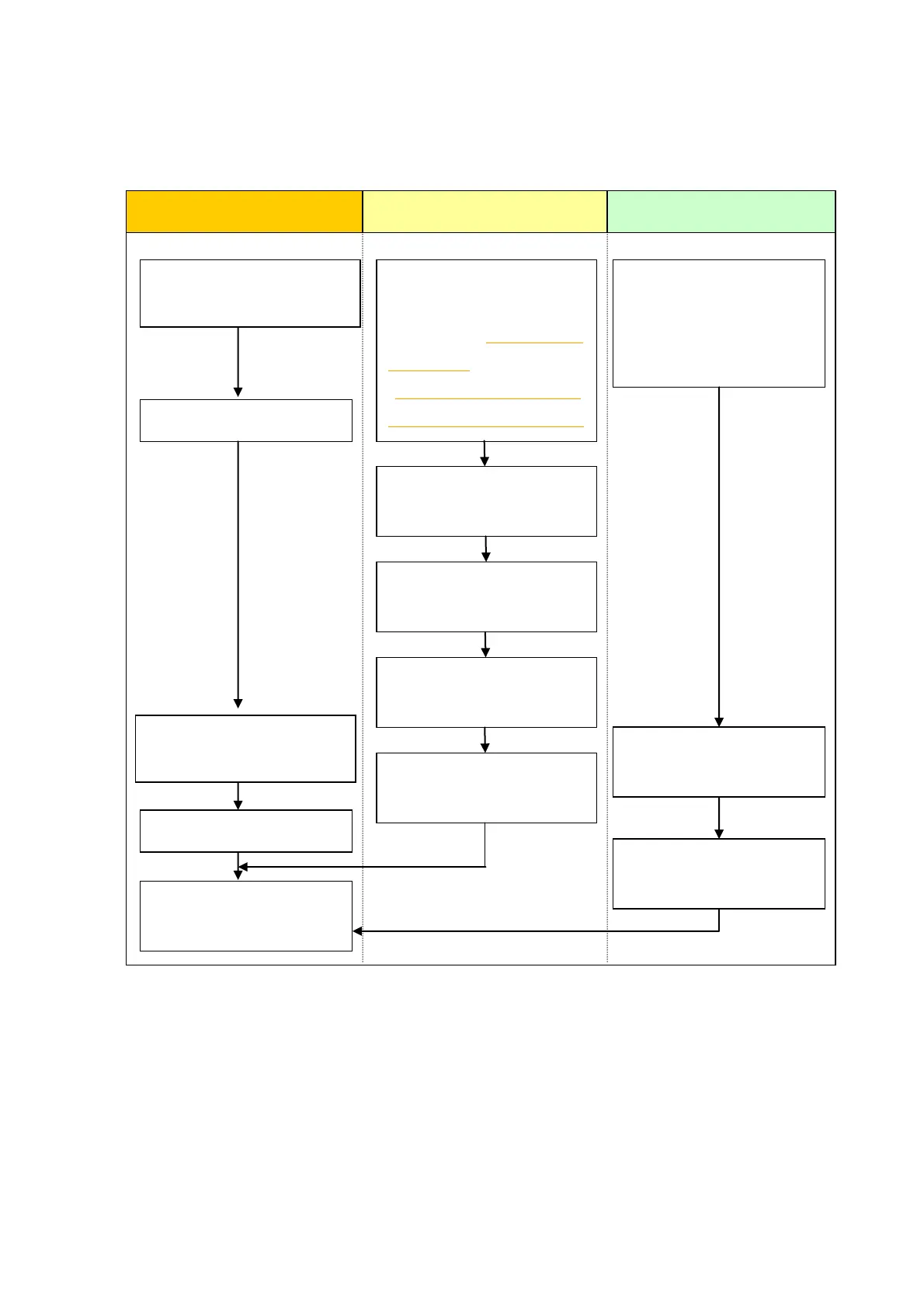
3.1 Work Flow
Receive screen data from
GP unit. *1
Convert GP screen data with
GP-Pro EX’s Project
Converter.
Check and modify the data
on GP-Pro EX.
Transfer the screen data to
GP-4501T/TW.
Connect GP4000
SERIESand PLC with the
PLCs cable.
Start connection and check
the communication.
Remove GP unit.
Connect the power cord.
Check the performance
and start operation.
Installation
Screen
Communication
Install GP4000 series.
Check the compatibility of
hardware in Chapter 2.
Check the connection
between GP4000
SERIESand a PLC in the
GP-Pro EX Device/PLC
Connection Manual.
Check the differences of
specifications in
OtasukePro! [Compatibility
of Software]
(http://www.pro-face.com/
otasuke/qa/gp3000/replace
/soft/conv/care/3/).
*1: This step is required if screen data is saved only in the GP unit, not in any other device.

Related product manuals