EasyManua.ls Logo

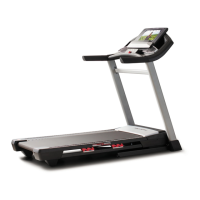
Pro-Form PFTL496140 - User Manual

Pro-Form PFTL496140
36 pages
Print Icon
To Next Page IconTo Next Page
Loading...
Serial Number
Decal
Model No. PFTL49614.0
Serial No.
Write the serial number in the space
above for reference.
USER’S MANUAL
www.proform.com
ACTIVATE YOUR
WARRANTY
To register your product and
activate your warranty today,
go to www.proformservice.com/
registration.
CUSTOMER CARE
For service at any time, go to
www.proformservice.com.
Or call 1-888-533-1333
Mon.–Fri. 6 a.m.–6 p.m. MT
Sat. 8 a.m.–12 p.m. MT
Please do not contact the store.
CAUTION
Read all precautions and instruc-
tions in this manual before using
this equipment. Save this manual
for future reference.

Questions and Answers

  • J
    Jeff SmithAug 2, 2025
    Why does my Pro-Form PFTL496140 Treadmill power turn off during use?
    • E
      Ethan StantonAug 2, 2025
      If your Pro-Form Treadmill turns off during use, first check the power switch; if it has tripped, wait five minutes before pressing it back in. Also, ensure the power cord is securely plugged in; if it is, unplug it, wait five minutes, and plug it back in. Another solution is to remove and reinsert the key from the console.
  • P
    Pamela ParkerAug 10, 2025
    How to fix Pro-Form PFTL496140 power that won't turn on?
    • D
      Donna CamachoAug 10, 2025
      If your Pro-Form Treadmill power does not turn on, ensure the power cord is plugged into a surge suppressor, and the surge suppressor is plugged into a properly grounded outlet. Also, make sure the key is inserted into the console after plugging in the power cord. If it still doesn't turn on, check the power switch located on the treadmill frame; if tripped, wait five minutes, then press the switch back in to reset it.
  • C
    clarkjasonAug 18, 2025
    What to do if Pro-Form Treadmill incline does not change correctly?
    • A
      amyporterAug 18, 2025
      If the incline of your Pro-Form Treadmill isn't changing correctly, recalibrate the incline system. Insert the key, press an Incline button, and while it's changing, remove the key. After a few seconds, re-insert the key. The treadmill will rise to the maximum incline, then return to the minimum, recalibrating the system.
  • S
    Stephanie CrossAug 25, 2025
    How to turn off demo mode on Pro-Form PFTL496140?
    • P
      Paul FosterAug 25, 2025
      If the console screen of your Pro-Form Treadmill remains lit after removing the key, it might be in display demo mode, which is designed for store displays. To turn off this mode, hold down the Stop button for a few seconds.

Summary

Important Precautions for Safe Use

Pre-Exercise Health Consultation

Advise consulting physician, especially for individuals over 35 or with health issues.

User Requirements and Attire

Adhere to weight limits, use one person at a time, wear appropriate clothing and shoes.

Electrical Safety and Surge Protection

Use a UL-listed surge suppressor; ensure proper grounding and outlet compatibility.

Before You Begin: Treadmill Overview

Assembly Instructions

Product Registration Process

Register your product online for warranty and service benefits.

Using the Treadmill: Power and Setup

Connecting the Power Cord Safely

Emphasizes using a surge suppressor and proper grounding for electrical safety.

Surge Suppressor Specifications

Details required UL listing, voltage, and joule ratings for surge suppressors.

Console Operation and Features

Starting and Operating the Treadmill

Powering On the Treadmill

Step-by-step guide to plugging in, using the power switch, and inserting the safety key.

Using Manual Mode

Instructions for selecting manual mode and starting the walking belt with console controls.

Manual Mode Operation Details

Using Onboard Workout Programs

Selecting and Starting Onboard Workouts

Choose preset workouts, understand profiles, and begin exercise sessions.

Goal Setting and Audio Features

Configuring Set-a-Goal Workouts

Set personal goals for calories, time, or distance and track progress.

iFIT Workout Functionality

iFIT Module Setup and User Selection

Install iFIT module, connect to network, and select user profile for personalized workouts.

Downloading and Executing iFIT Workouts

Select, download, and start iFIT workouts; follow audio coach prompts for guidance.

The Information Mode

Treadmill Folding and Moving

Folding the Treadmill for Storage

Securely fold and latch the treadmill into its storage position.

Moving the Treadmill Safely

Instructions on how to move the folded treadmill using its wheels.

Maintenance and Troubleshooting

Troubleshooting Power and Console Issues

Solutions for power not turning on, turning off during use, and console display problems.

Treadmill Troubleshooting Continued

Walking Belt Maintenance and Adjustment

Exercise Guidelines and Intensity

Replacement Parts and Warranty Information

Pro-Form PFTL496140 Specifications

General IconGeneral
BrandPro-Form
ModelPFTL496140
CategoryTreadmill
LanguageEnglish

Related product manuals