Function Description
Home Page
After the device is staed, it stas to load the inteace. After loading to 100%, it enters the home
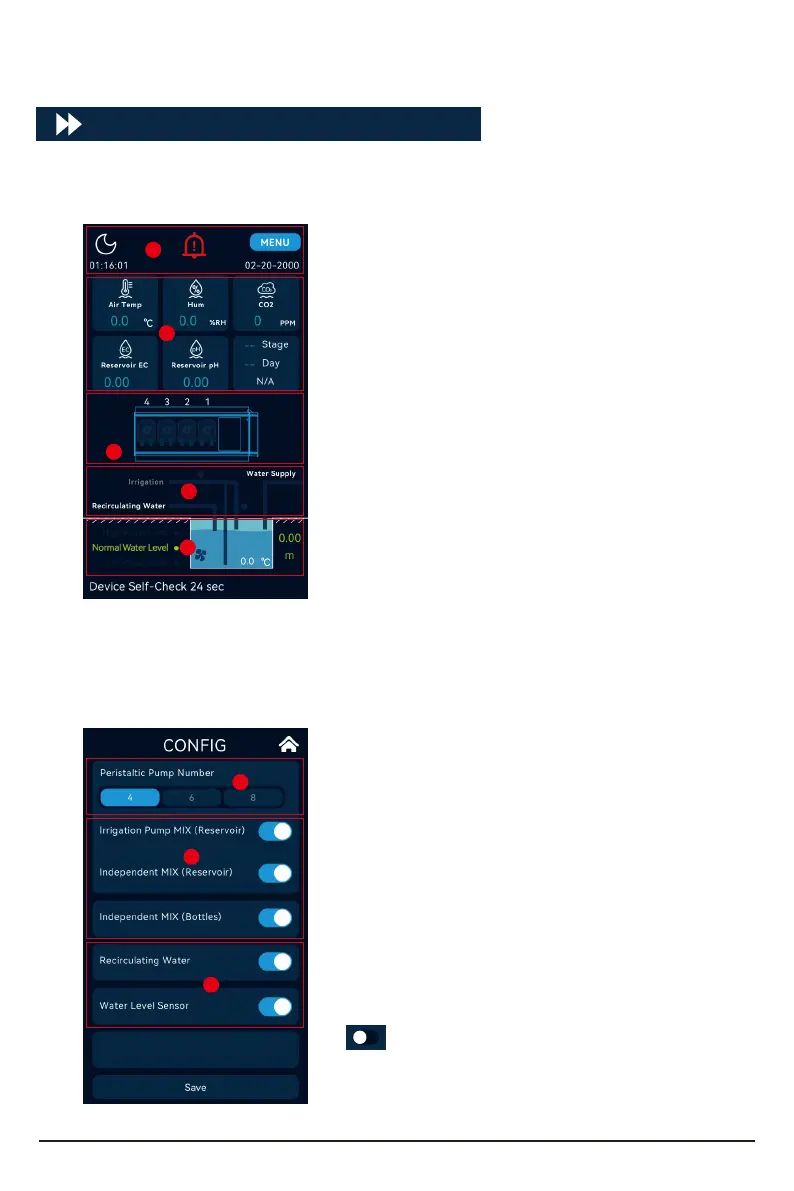
page , including data display, device conguration and working status :
Click the day and night icon several times on the home page to enter the conguration inteace,
where you can congure the working status of the device.
Day and night mode, alarm, date, time, menu
options.
Air temperature, humidity, CO2 concentration value,
stock solution EC value, pH value, cycle operation
value.
The current working status of the peristaltic pump.
The current working status of each valve.
Current nutrient pool water level status, height,
stirring status, and stock solution pool water
temperature.
A.
B.
C.
D.
E.
Aqua-Pro can be congured with dierent numbers
of peristaltic pumps according to the actual
situation.
Set the function of the irrigation pump, Including
the use of independent mixing, and the use of
independent stock solution mixing.
Set recirculating water function and water level
sensor switch.
A.
B.
C.
A
B
C
E
D
A
B
C
08
O indicates that the function is disabled or not
enabled.



 To Next Page