JF72553B
42
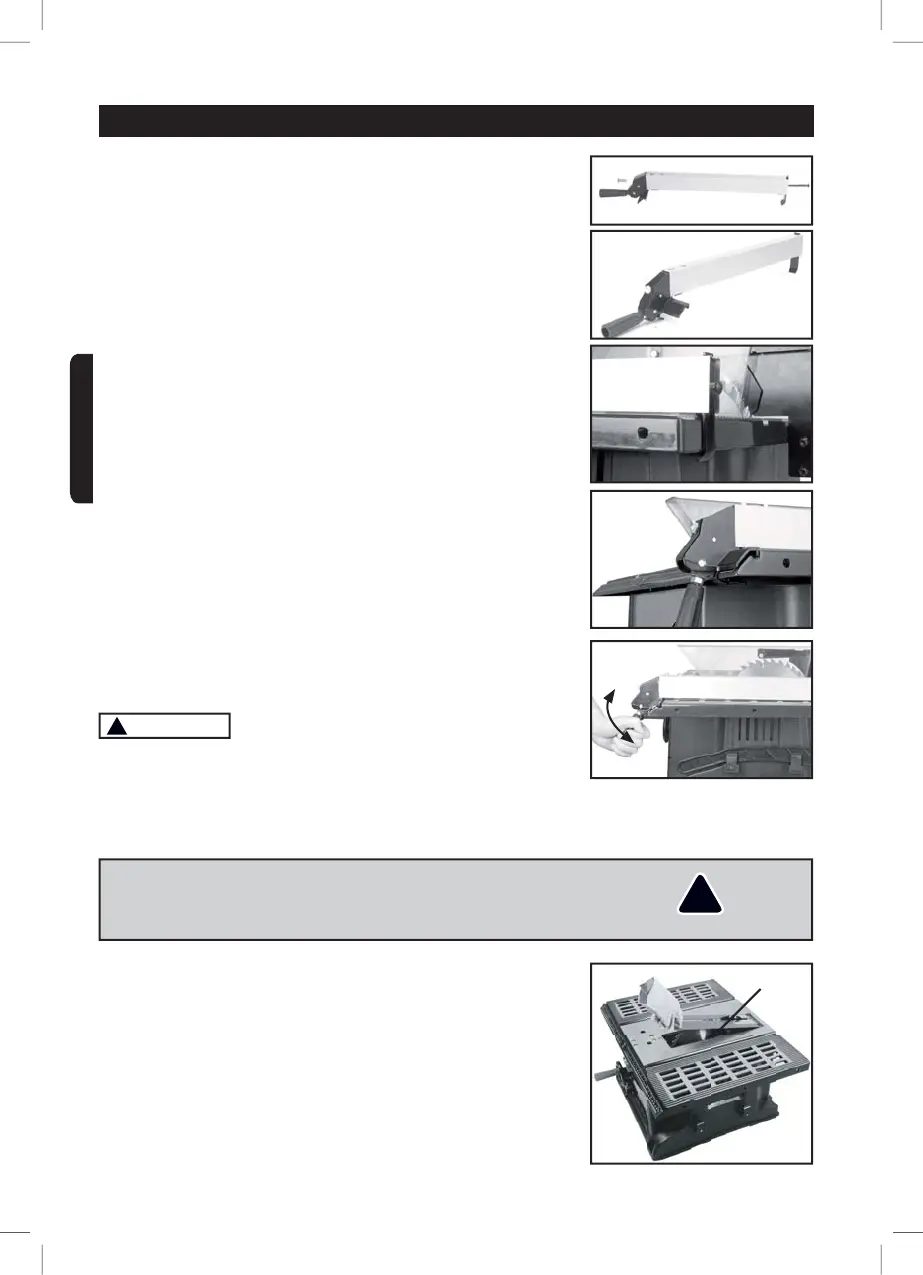
2. Place the shaft (3) into the stop (2) and secure the shaft (3)
through the guide handle (2) using the knurled screw (7) (Fig. 2).
The longitudinal stop is now fully installed (Fig. 3).
3. Position the stop from the outside on the saw table (A1) so that
the clip (4) engages under the saw table (2) (Fig. 4) and the guide
handle (1) engages in the front groove on the saw table (Fig. 5).
4. The stop can be secured or released by pressing the lever on the
guide handle up or down (Fig. 6).
!
WARNING
The incorrect alignment of the splitter can cause recoil and serious
injuries.
INSTALLING AND CHANGING THE BLADE
Wear gloves when installing and removing the saw blade.
1. To change the saw blade (Q), remove the table insert (Fig. 1).
.
¿J
¿J
¿J
¿J
¿J
¿J
Q
!
WARNING! To avoid injury from an accidental start, make sure the
switch is in the OFF position and the plug is disconnected from the
power source outlet.
ASSEMBLY AND ADJUSTMENTSASSEMBLY AND ADJUSTMENTS
ENGLISH


 To Next Page