13
trigger
inputs
communication
ports
~ac
mains
outputs
HPA 3 power amplifier by MADRIGAL AUDIO LABS made in u. s. a.
PRO C E E D
R
input select
PUSH
right
outputs
input select
PUSH
right
outputs
input select
PUSH
right
outputs
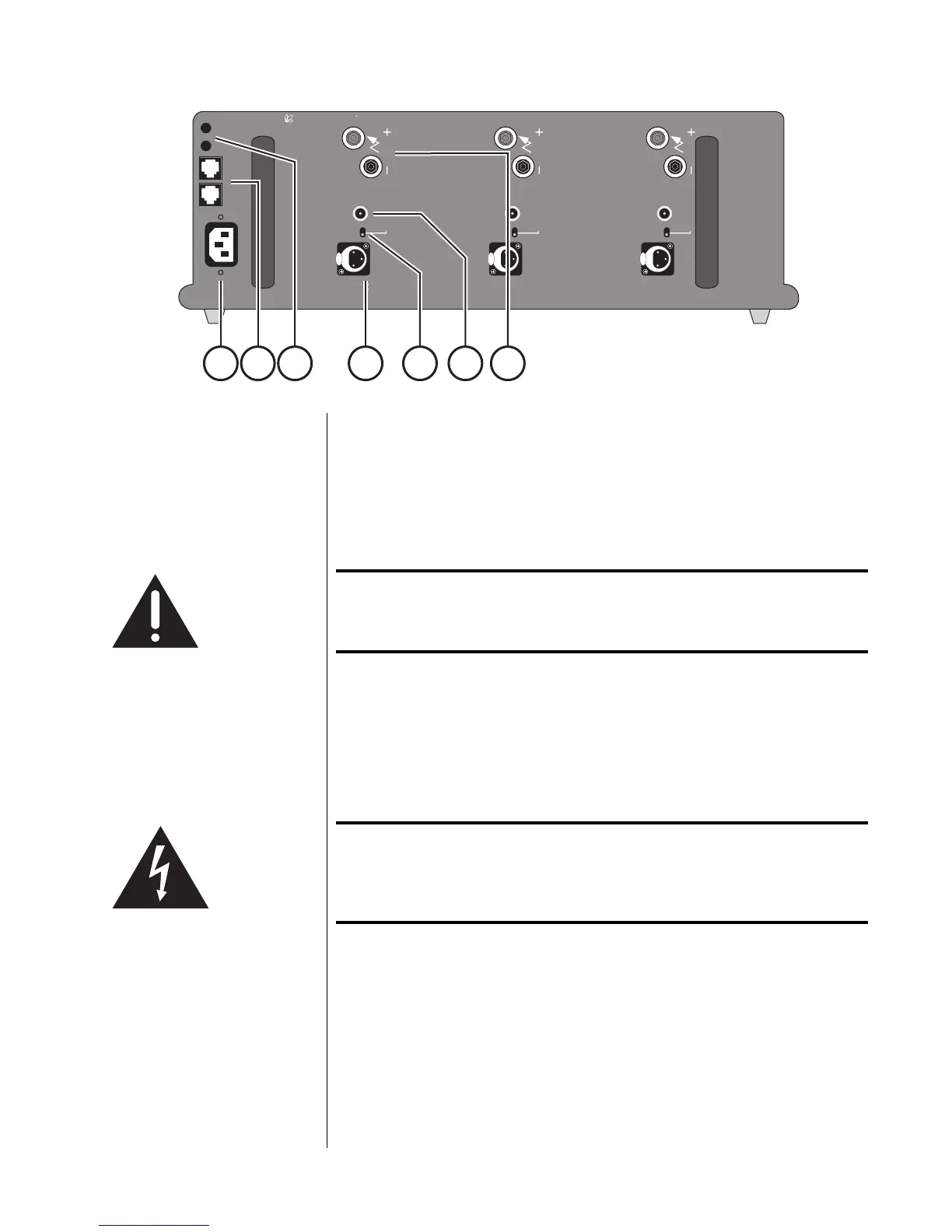
1 4 5 6 72 3
Rear Panel
Caution! Turn the volume on your controller/preamplifier all the way
down before attempting to connect anything to your Proceed
HPA 3 Power Amplifier.
1 AC MAINS RECEPTACLE
Connect the AC power cord (included in the accessory pack) to the IEC-
standard AC receptacle on the rear panel of the amplifier, then to the AC
mains outlet.
Warning! Your Proceed amplifier has been safety-tested and is
designed for operation with a three-conductor power cord.
Do not defeat the “third pin” or earth ground of the AC power
cord.
2 COMMUNICATION PORTS
These RJ-45 communications ports provide for sophisticated inter-compo-
nent communications within the context of a Proceed system, allowing the
multichannel controller to toggle the amplifier between operate and
standby as needed, without forcing the user to turn the amplifier on sepa-
rately. Since this communication link provides two-way communication, it is
more reliable and preferred over simpler DC trigger hookups (although we
support DC triggers as well, since their use is so widespread).



 To Next Page