9
INTRO:itplaysthefirst10secondsofeachsongcontainedinthecurrentfolder.
ALL:sameasnormalplayingbutwhenitreachesthelatestsongitrestartsfromthefirst.
SINGLEONE:itplaysonlythecurrentsongthenstops.
FOLDER:itplaysallsongcontainedinthecurrentfolder.
Briefexplanationofhowtheplayerworks.WhenyouinsertanSDmemorycardorUSBflashdrive
intherespectiveslot,theplayerscrollstheentirecontentofthememorylocatingallaudiofilethat
canbeplayed(fileswith.WAV.MP3.WMAextensions).Allfileswillbeplayedinnumericaland
alphabeticalorder,consideringfirstthe“nameofthefolder”andthenthe“nameofthefile”.
Exampleofuse:insertamemoryintoaslot,theplayerstartsplayingthefirstsonginnumericaland
alphabeticalorder.PressPLAYMODEbuttontochooseINTRO,thenwaituntilyouhearthesongyou
wanttolisten.ThenpressagainthePLAYMODEbuttontochooseFOLDERtoplayallsongscontained
inthatfolderorSINGLEONEtoplayonlytheselectedsong.
21.
PREVIOUSSONG
Skiptoprevioussong.
22.
NEXTSONG
Skiptothenextsong.
Pressingandhold or yousetthedigitalvolumeoftheinternalmediaplayer.We
suggesttoletthisvolumealwaysatthemaximumandtoadjusttheleveloftheplayerusingthe
ownlevelpotentiometer.
23. IRRECEIVER
ThisistheremotecontrolIRreceiver.
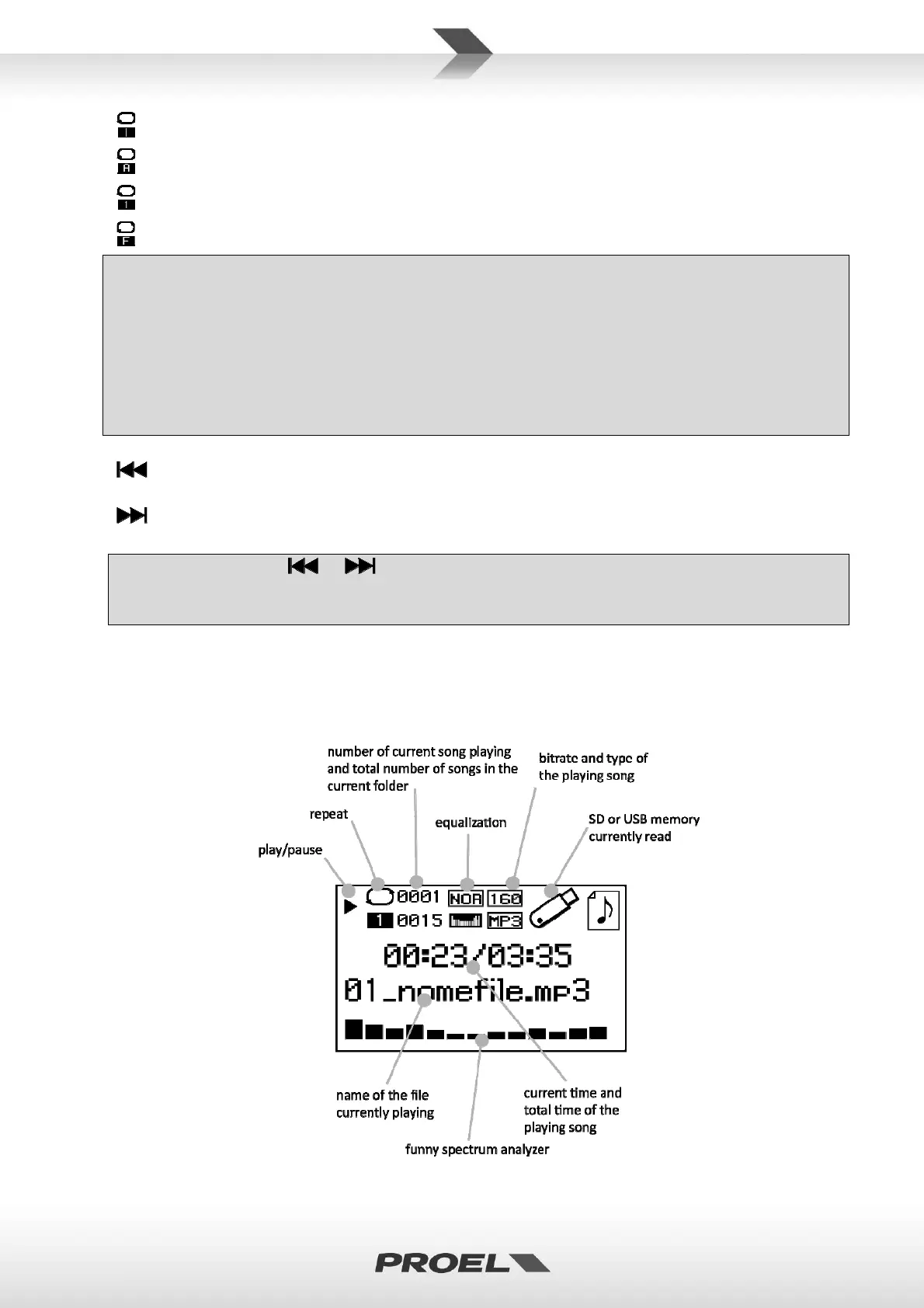
24. LCDDISPLAY
TheLCDDISPLAYshowsseveraldata:


 To Next Page