1
Function Instruction
4 wired and 99 wireless defense zones;
LCD screen with time clock display;
Voice prompt for all operations;
3 groups of timely arm and disarm;
Can store 6 phone numbers: when alarming, system will
make alarm call to these numbers automatically;
Can store 3 SMS numbers: when alarming, system will send
alarming SMS automatically;
One programmable 12V relay output;
Tamper alarm function: there is a button at the back side of
the panel; it will make alarm once the button is loosen;
10-second automatic message recording;
Built-in artificial intelligent digital voice announcer;
Built-in artificial intelligent English message;
Can send SMS to arm/disarm/check alarm record;
Can set arm and alarm delay time;
Built-in wireless transmitter for convenient connection to
wireless siren(customized);
Users can make calls by using keypad on main unit, just like
a telephone;
One-key-control function: Out Arm, Home Arm, Remote Arm;
SOS, fire, gas, door, hall, window, balcony, and boundary
places alarm;
Real-time, delay, 24 hours, bypass defense zones
programming function;
Wireless coding: easy to add additional wireless
accessories;
Remote control Arm, Disarm, Monitor, and Intercom by
phone;
SMS alarm for power failure or recovery;
Built-in NI-HM rechargeable battery.
[Function Instruction]
In order to make the main unit get the wireless signal well for all
wireless accessories, please put the alarm host at the central place of
your defense area. Make sure it’s away from large metal objects and
household appliances which may cause high frequency interference,
as well as barriers such as reinforced concrete wall or fire door, etc.
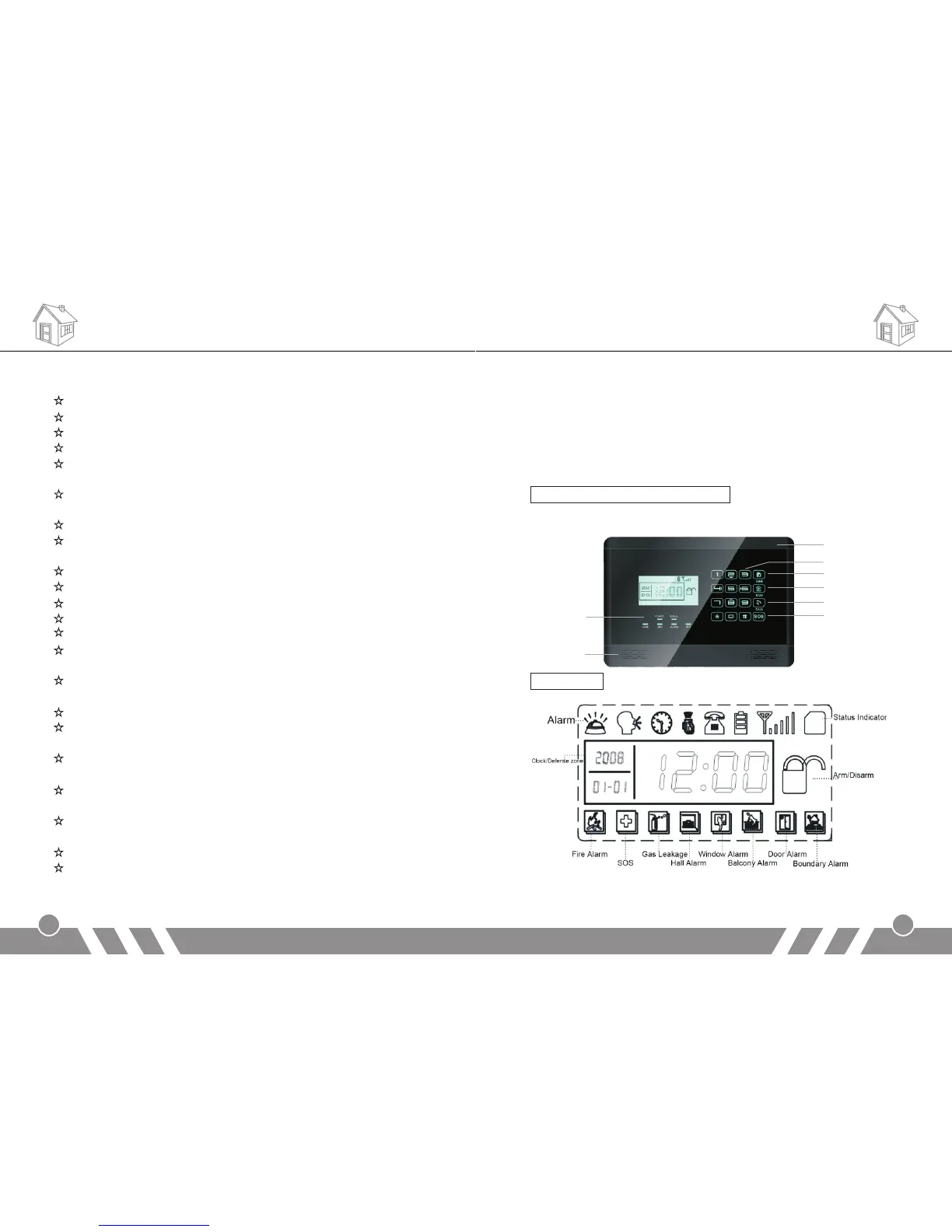
Main panel front schematic diagram:
LCD display:
[Alarm Host Diagram]
Alarm Host Diagram
2
Status
Indicator
Home Arm
MIC
GSM
Speaker
Out Arm
Touch Keypad
Call Out
Emergency


 To Next Page