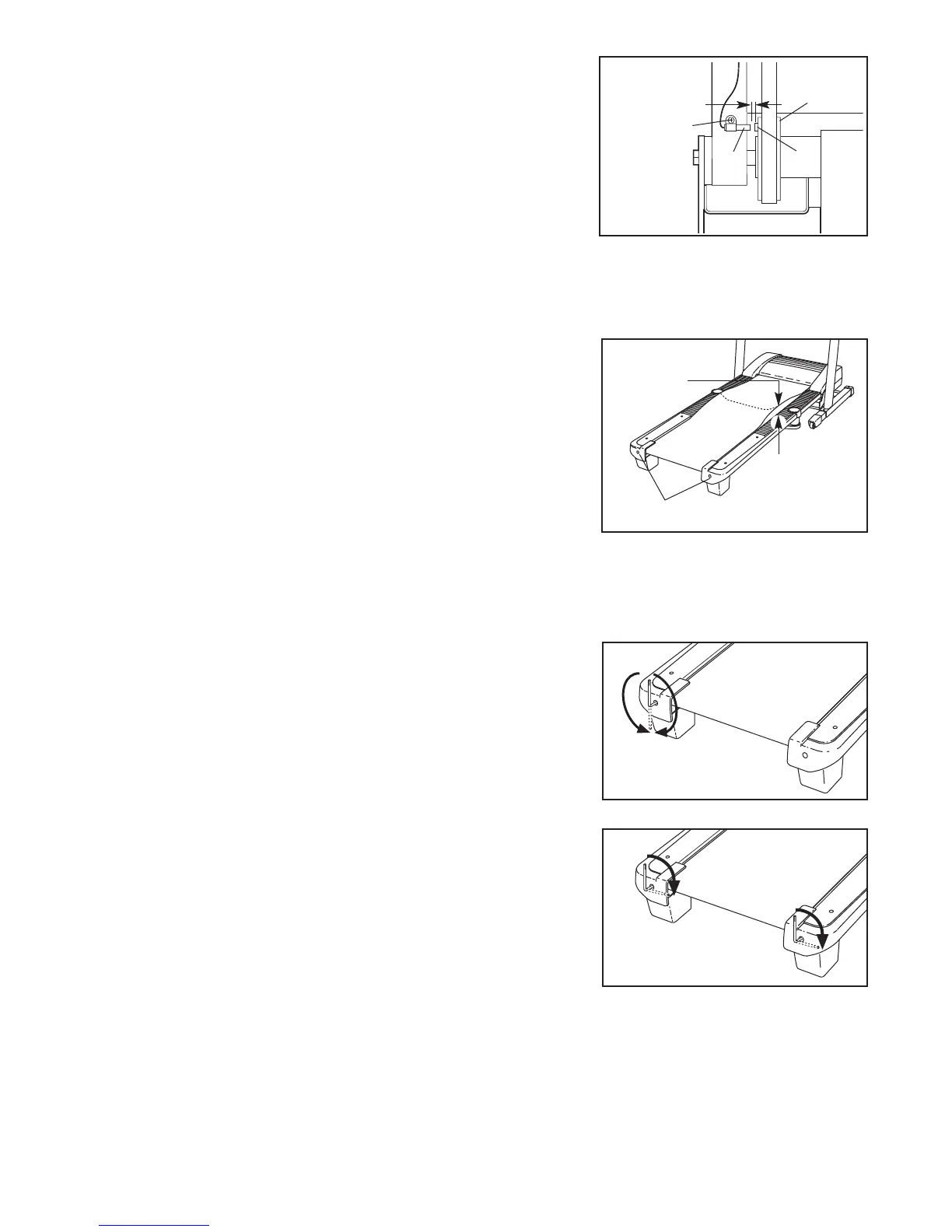
Locate the Reed Switch (63) and the Magnet (46) on
the left side of the Pulley (47). Turn the Pulley until
the Magnet is aligned with the Reed Switch. Make
s
ure that the gap between the Magnet and the
Reed Switch is about 1/8 in. (3 mm). If necessary,
l
oosen the Screw (7), move the Reed Switch slightly,
and then retighten the Screw. Reattach the Hood, and
run the treadmill for a few minutes to check for a cor-
rect speed reading.
PROBLEM: The walking belt slows when walked on
SOLUTION: a. Use only a single-outlet surge suppressor that meets all of the specifications described on page 9.
b. If the walking belt is overtightened, treadmill perfor-
mance may decrease and the walking belt may be-
come damaged. Remove the key and UNPLUG THE
POWER CORD. Using the hex key, turn both rear
roller bolts counterclockwise, 1/4 of a turn. When the
walking belt is properly tightened, you should be able
to lift each edge of the walking belt 2 to 3 in. (5 to 7
cm) off the walking platform. Be careful to keep the
walking belt centered. Then, plug in the power cord,
insert the key, and run the treadmill for a few minutes.
Repeat until the walking belt is properly tightened.
c. If the walking belt still slows when walked on, please see the front cover of this manual.
PROBLEM: The walking belt is off-center or slips when walked on
SOLUTION: a. If the walking belt is off-center, first remove the key
and UNPLUG THE POWER CORD. If the walking
belt has shifted to the left, use the hex key to turn
the left rear roller bolt clockwise 1/2 of a turn; if the
walking belt has shifted to the right, turn the bolt
counterclockwise 1/2 of a turn. Be careful not to over-
tighten the walking belt. Then, plug in the power cord,
insert the key, and run the treadmill for a few minutes.
Repeat until the walking belt is centered.
b. If the walking belt slips when walked on, first re-
move the key and UNPLUG THE POWER CORD.
Using the hex key, turn both rear roller bolts clock-
wise, 1/4 of a turn. When the walking belt is correctly
tightened, you should be able to lift each side of the
walking belt 2 to 3 in. (5 to 7 cm) off the walking plat-
form. Be careful to keep the walking belt centered.
Then, plug in the power cord, insert the key, and care-
fully walk on the treadmill for a few minutes. Repeat
until the walking belt is properly tightened.
PROBLEM: The incline of the treadmill does not change correctly
SOLUTION: a. With the key in the console, press one of the Incline buttons. While the incline is changing, re-
move the key. After a few seconds, re-insert the key. The treadmill will automatically rise to the
maximum incline level and then return to the minimum level. This will recalibrate the incline system.
b
a
Rear Roller Bolts
2–3 in.
b
Top
View
19
4
6
7
6
3
1
/8 in.
47


 To Next Page
 Loading...