ELECTRONIC MONITOR OPERATION GUIDE
Your exercise bike features a microprocessor-based monitor, designed to give you contin-
uous exercise feedback as you work out. Please read the instructions below carefully
before using the monitor. Save this guide for future reference.
MONITOR MODES
SPEED- Displays your pedaling speed in miles per hour.
TIME- Displays the elapsed time you have exercised.
DISTANCE-Displays the distance you have pedaled in miles.
SCAN- Displays the SPEED, TIME, and DISTANCE modes in a repeating cycle.
CALORIE- Displays the approximate number of nutritional Calories (kilocalories or kcals) you are
burning per minute.
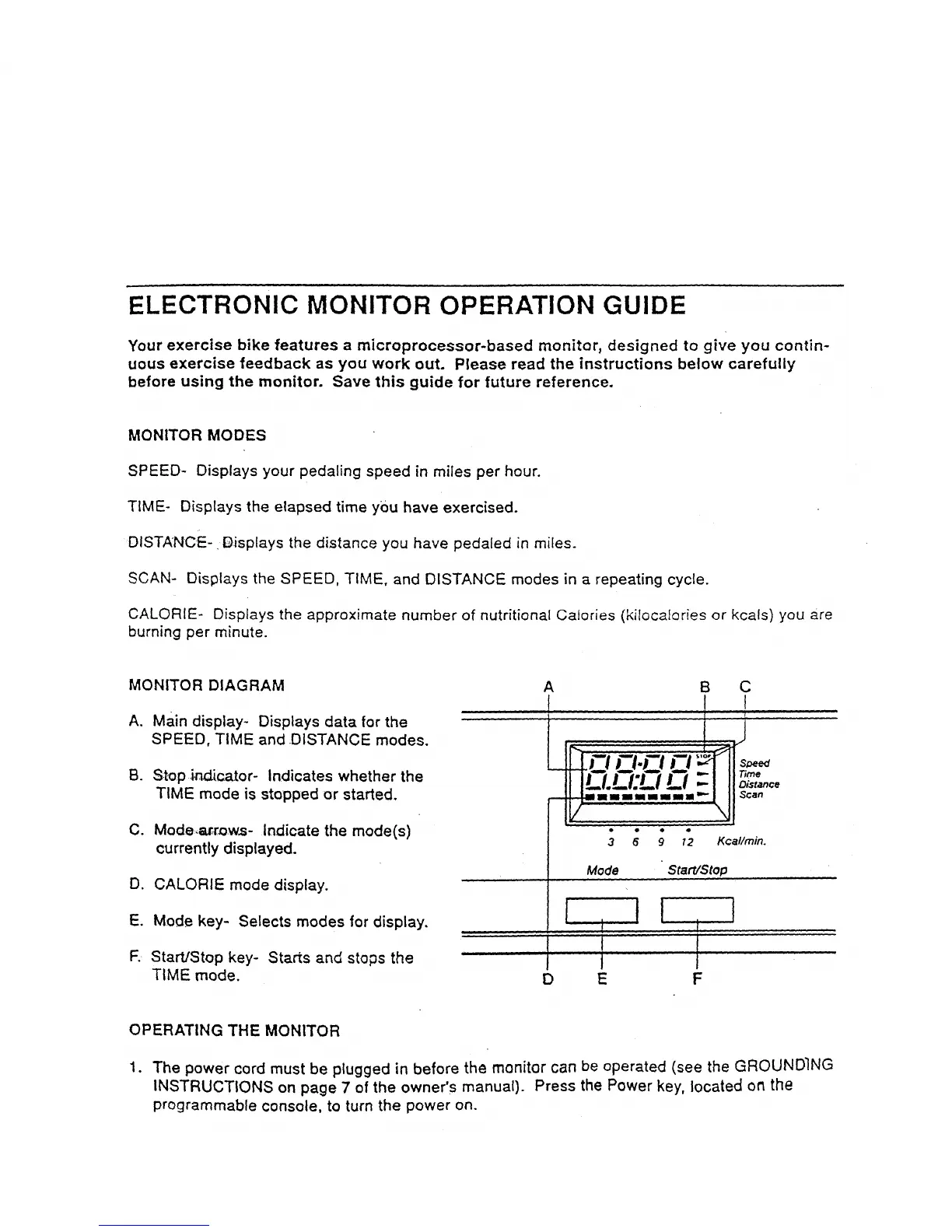
MONITOR DIAGRAM
A. Main display- Displays data for the
SPEED, TIME and .DISTANCE modes.
B. St-op indicator- Indicates whether the
TIME mode is stopped or started.
C. Mode:,_,r_,s- Indicate the mode(s)
currently displayed.
CALORIE mode display.
Mode key- Selects modes for display.
Starts and stops the
A B C
! I !
Mode Start/Stop
D,
E. I i
F. StartJStop key- l I
TIME mode. D E
II
I
J
F
I
OPERATING THE MONITOR
1. The power cord must be plugged in before the monitor can be operated (see the GROUNDING
INSTRUCTIONS on page 7 of the owner's manual). Press the Power key, located on the
programmable console, to turn the power on.



 To Next Page