The computer console will not
1. Check that the batteries are inserted
properly with the correct polarity (see
markings on the inside of the battery compartment).
2. Check that the battery springs are in
proper contact with batteries.
3. Remove the old batteries and replace with
There is no reading on the computer
console display.
1. Check that the Sensor Wir
e (78) coming
out from the Mainframe (59) is securely
connected to the Extension Sensor Wire
(10) coming from the bottom of the Hand
Pulse Handlebar Support Frame (41).
See Step 7 page 18.
2. Check that the Extension Sensor Wire (10) coming out
from the top side of the Hand Pulse Handlebar Support
Frame (41) is securely connected to the wire with a
male connector coming out from the Computer
Console (29). See Step 10 page 21.
3. Check that the two Hand Pulse Sensor
Wires (35) from the hand pulse handlebar
are connected to the two wires with female
connectors coming out from the Computer
Console (29). See Step 10 page 21.
4. Check the wires for cuts, tears, or stripped and
exposed wires.
The elliptical equipment makes a
squeaking noise.
1. The bolts may be loose on the elliptical equipment,
so inspect and tighten any loose bolts, nuts, and
caps.
2. See Assembly page 21 and page24.
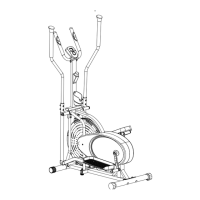
After prolong use, the chain may get loose and start
to have a clicking noise.
1. Open the Right Cover (83) & Left Cover (84) to reach
the Nut M6 (48). Tighten the chain by turning the Nut
M6 (48) clockwise.
2. Repeat for the other side.
3. Ensure that the mounts are intact and not damaged
when inspecting the inside of the covers.


 To Next Page