4
Introduction
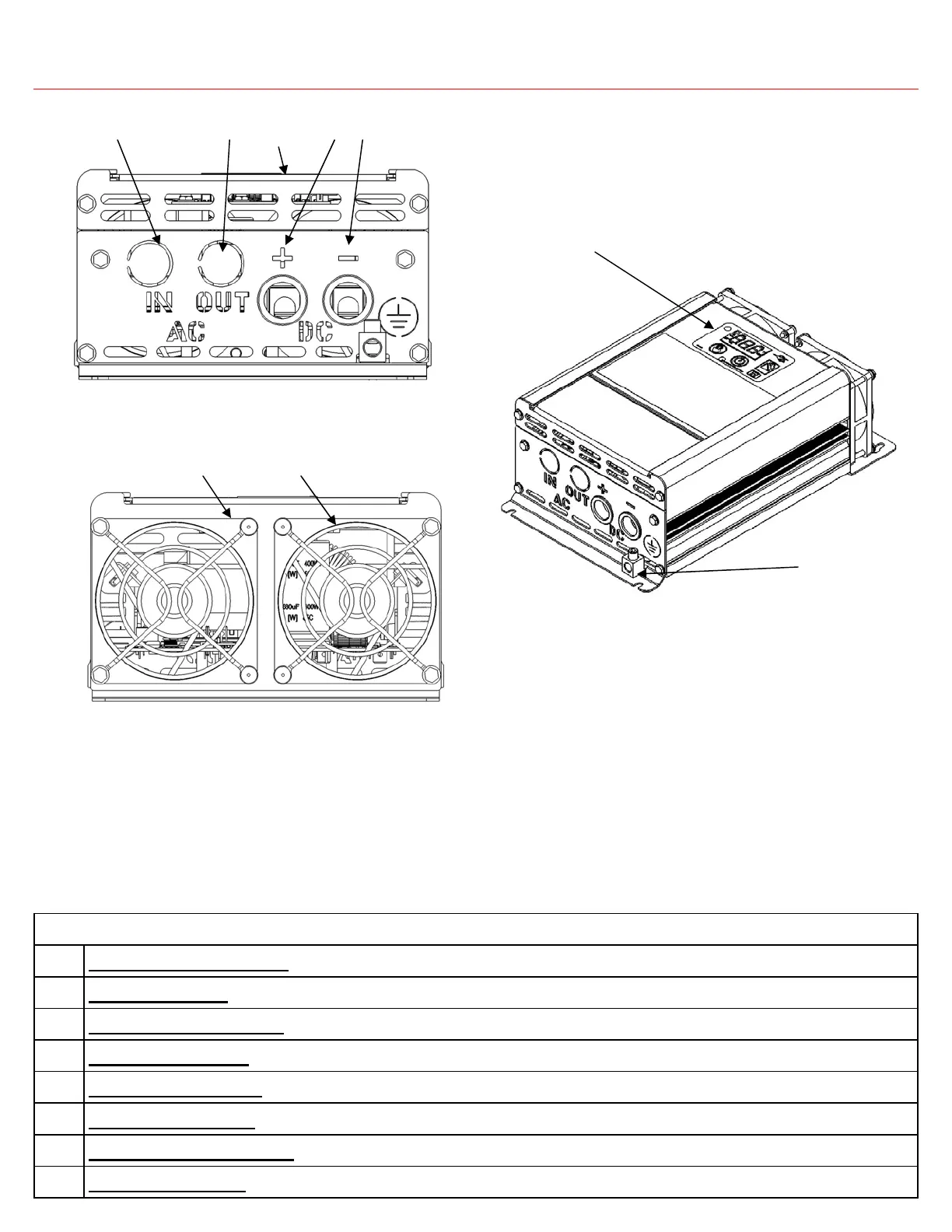
Descriptions
1 DC Input Port (negative): Used to connect to battery (-)
2 Ventilation Input: Ensure ventilation input is not blocked for proper operation
3 DC Input Port (positive): Used to connect to battery (+)
4 AC Input Knockout: Knockout to be removed when connecting transfer switch to external AC power
5 AC Output Knockout: Knockout to be removed when connecting to hardwired AC Output
6 AC/DC Access Panel: Remove access panel to wire install AC and DC wiring
7 Equipment Ground Lug: Connect case to earth ground to ensure proper, safe operation
8 On-Board Display: Display monitors all relevant parameters of the PD1600 Series Inverter
Figure 2 PD1600 Series Inverter (AC/DC End View)
Figure 3 PD1600 Series Inverter (Fan End View)
Figure 4 PD1600 Series Inverter (Isometric View)
8
7
2 2
1 3 6 4 5


 To Next Page