19
REPLACE THE REMOTE CONTROL BATTERY
3.
CLEAN
4.
RE-INSTALL
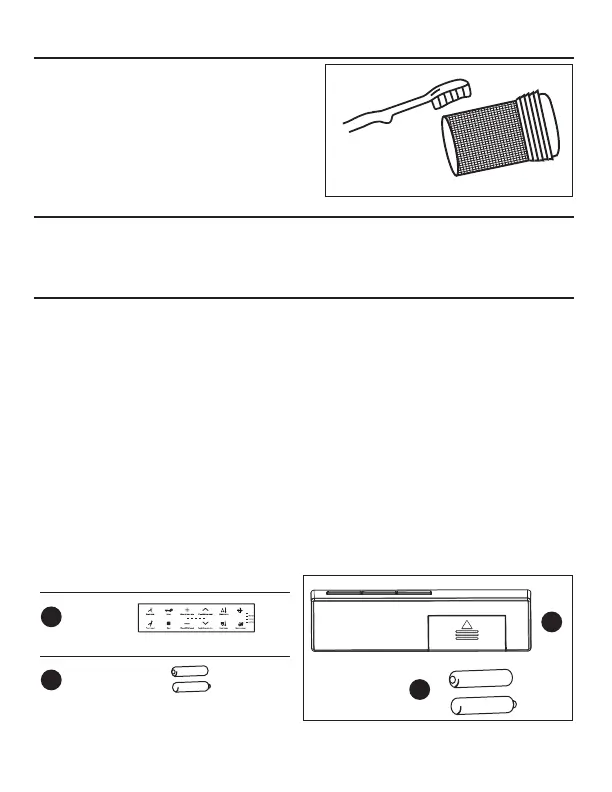
1. Take out the strainer and remove the dirt from it.
Flush it with tap water and brush with a cleaning
toothbrush.
NOTE: Please do NOT use any detergent; just
water. Do NOT use too much force when
cleaning, or the strainer may become bent or
damaged.
When the battery is running out, the remote controller could become insensitive and not
work properly. The batteries should be replaced at this point.
• The positive and negative poles of the battery must be placed correctly, and the compression
spring protrudes from the negative pole.
• New and old batteries cannot be mixed.
• Please use alkaline batteries.
1. Install the strainer back in the reverse order it was taken off.
NOTE: After mounting, open the valve and check for water leakage.
Remote control code matching instructions
1. The system is powered off and the remote control is on standby.
2. Press the "weak" and "rear" of the remote control at the same time until the gear indicator
flashes continuously and then release.
3. Power on the system within 5 seconds.
4. The indicator light of the remote control stops flashing and the code matching is completed.
NOTE: The code matching time of the remote control is 10 seconds, and the code matching will be
automatically exited after the time-out operation.
x 2
Hardware Used
FF
AAA-Batteries
Parts Used
-
+
-
+
-
+
-
+
B
FF
B
Remote
x 1
Fan
Fan


 To Next Page