WARRANTY
20
In accordance with the instructions and precautions for use, if a failure occurs after normal use within
1 year of purchase date. Please contact customer service center. This warranty is void if any of the
following conditions exist.
• Failures due to carelessness or negligence during use, and failures due to improper repair or
modification.
• Failure or damage to the mobile installation location.
• Faults and damage caused by fire, earthquake, flood, lightning, and other natural disasters,
pollution, or abnormal voltage.
• Failures and damage caused by the use of unspecified power sources (voltage, frequency).
• Used for purposes other than general domestic use.
Project Source should not be liable for any loss caused by the fore said incorrect installation or use.
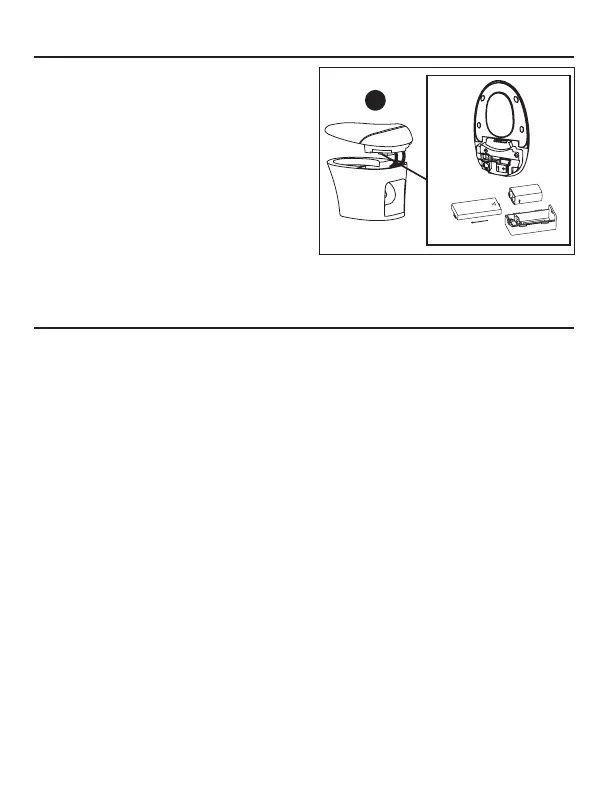
REPLACE THE BACK-UP BATTERY
1. Remove the power plug from the outlet.
2. Lift up the lid.
3. Open the battery back cover.
4. Replace batteries, with attention given to their
positive and negative positions.
5. Press the Flush button on the side of the toilet
to make sure the toilet flushes properly.
6. Replace the battery box and position the lid
back on.
7. Insert the power plug and power on.
NOTE: Back-up batteries must be 9V alkaline cells.
Please do NOT use batteries of other specifications.
Properly dispose of or recycle replaced old batteries.
Push
battery box in
this direction.
Back-up
batteries
Battery box
A



 To Next Page