Check clips are not
touching each other
OR
Check the clips are
correctly connected
to the battery
Battery may
be faulty
Battery may be
faulty and may
need replacing
OR
There is a load
on the battery
causing the battery
to fail Analysis
The charger
has entered
recondition mode
3 times and has
timed out
Bulk charging
has timed out
and stopped
after 22 hours
Short circuit
or reverse
connection
of the clips
16
LOCKING THE BATTERY CHARGER SETTINGS
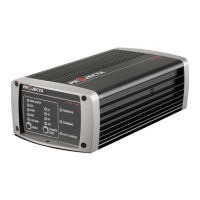
Locking the battery charger settings will disable the CHARGE RATE & MODE keys from
use. This function is ideal for hire vehicles etc as it prevents the chargers settings from
being altered if the keys are touched.
To lock; press and hold the ‘CHARGE RATE’ and ‘MODE’ keys for 3 seconds until all the
LEDs illuminate. This indicates the keys are now locked.
To unlock; press and hold and ‘CHARGE RATE’ and ‘MODE’ keys for 3 seconds until all
the LEDs illuminate. This indicates the keys are now unlocked.
FAULT CODES
There are three error codes that may be displayed. These will be displayed in the
following way:
Power Charging Full Fault Remedy
(Red LED) (Blue LED) (Green LED)
___ ___ ___
(Slow Flash) OFF OFF
– – – – – – –
(Fast Flash) OFF OFF
___ ___ ___
(Slow Flash) OFF ON



 To Next Page