EasyManua.ls Logo

Projecta INTELLI-CHARGE IC25 - User Manual

Projecta INTELLI-CHARGE IC25
24 pages
Print Icon
To Next Page IconTo Next Page
Loading...
INTELLI-CHARGE
7 STAGE SWITCHMODE
BATTERY CHARGER
P/No.s IC25, IC25W, IC25RV, IC35, IC50, IC8-24
Question and Answer IconNeed help?

Do you have a question about the Projecta INTELLI-CHARGE IC25 and is the answer not in the manual?

Summary

Important Safety Information

General Safety Warnings

Crucial warnings about handling explosive gases, ventilation, and proper usage.

7-Stage Automatic Charging Process

Initial Charging Stages

Covers Desulphation, Soft Start, Bulk, and Absorption phases.

Specialized Charging Stages

Includes Equalisation (Calcium), Analysis, and Recondition.

Final Charging Stage

The Float stage maintains the battery at 100% charge.

5-Stage Lithium Charging Profile

Lithium Soft Start Stages

Soft Start 1 (5% bulk) and Soft Start 2 (25% bulk).

Lithium Bulk and Absorption

Bulk charge for speed, Absorption for full charge.

Lithium Float Stage

Maintains the battery at 100% charge.

Battery Chemistry Selection Guide

Power Supply and Lithium Settings

13.8V power supply and 14.2V Lithium charging.

Lead-Acid Battery Types

Settings for GEL (14.1V), AGM (14.4V), WET (14.7V), Calcium (14.7V).

Charger Features

Adjustable Charge Rate and Remote Control

Adjust output for battery size; monitor/control remotely.

Installation and Protection Features

Direct install, temp comp, polarity & over-temp protection.

Mounting and Technology Features

Indoor mounting, switchmode tech, LCD/LED indicators.

Mounting the Remote Control

Flush Mount Installation

Instructions for recessing the remote control into a surface.

Surface Mount Installation

Instructions for attaching the remote control to a surface.

Removing the Remote Control

Flush Mount Removal

Steps to detach the remote from a flush mount.

Surface Mount Removal

Steps to detach the remote from a surface mount.

Charger Controls and Buttons

VOLT;AMP Button Function

Changes LCD display between battery voltage and input current.

CHARGE RATE Button Function

Sets the charge rate according to battery size.

BATTERY TYPE Button Function

Selects charging profile based on battery chemistry.

RECONDITION Button Function

Initiates the recondition charging mode.

LED Charge Status Indicators

LED Signal Interpretation

Table detailing LED signals for different charging stages.

Step-by-Step Charging Instructions

Step 1: Check Electrolyte Level

Verify and top-up electrolyte level before charging.

Step 2: Connect to Battery

Options for connecting the charger to the battery.

Step 2 A: Battery Out of Vehicle

Procedure for connecting to a battery outside a vehicle.

Charging Instructions Continued

Step 2 B: Battery In Vehicle

Connecting to a battery fitted within a vehicle.

Charging Instructions Continued

Step 2 C: Permanent Hard Wiring

Instructions for hardwiring the charger leads to the battery.

Charging Instructions Continued

Step 3: Optional Accessories Setup

Installing remote control and temperature sensor.

Step 4: Connect to Mains Power

Connecting the charger to the 240V mains power supply.

Charging Instructions Continued

Step 5: Set Charge Rate

Selecting the appropriate charge rate for battery size.

Step 6: Set Battery Chemistry Type

Choosing the correct charging profile for battery chemistry.

Charging Instructions Continued

Step 7: Charging Process

Monitoring charging stages via LCD and LEDs.

Step 8: Disconnection Procedure

Steps for safely disconnecting the charger from the battery.

Step 9: Calcium Electrolyte Check

Checking electrolyte level for calcium batteries.

Initiating Recondition Mode

Locking the Remote Control

Faults and Error Codes

Product Specifications

Product Overview

Charger Components Identification

Identification of key charger parts and interfaces.

Model Dimensions and Layout

Physical dimensions and layout of different charger models.

Frequently Asked Questions

Battery Status and Charging Issues

How to check charge, troubleshoot zero volts, and use power supply.

Understanding Charging Process

Identifying charging stages and bypassing initial modes.

Specific Battery Charging Scenarios

Charging with appliances, calcium battery specifics.

Important Notes

Warranty Statement

Important Consumer Guarantees

Consumer rights under Australian law and warranty terms.

Overview

Projecta Intelli-Charge Battery Charger

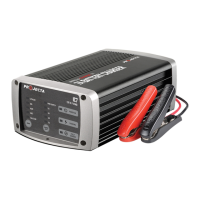
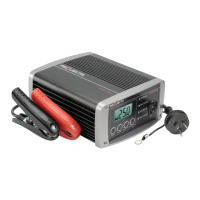
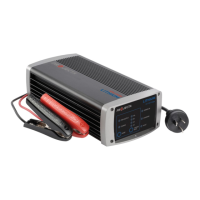
The Projecta Intelli-Charge Battery Charger is a sophisticated 7-stage switchmode charger designed to optimize battery life and performance across a wide range of battery chemistries. This device is suitable for automotive, calcium, marine, and all types of deep cycle batteries, including Gel, AGM, Wet, and Lithium (LiFePO4).

Function Description

The core function of the Intelli-Charge Battery Charger is to provide a comprehensive and automatic charging process through its multi-stage algorithms. For lead-acid batteries (Gel, AGM, Wet, Calcium), it employs a 7-stage charging cycle:

  1. Desulphation: This initial stage rejuvenates sulphated batteries that have been left flat for extended periods. It uses a high-frequency pulse to break down lead-sulphate hardening and clogging in battery cells, returning them to full charge capability.
  2. Soft Start: A preliminary charge process that gently introduces power to the battery, protecting it from sudden surges and extending its overall life.
  3. Bulk (Constant Current): This stage charges the battery at its maximum rate (constant current) until it reaches a set voltage, typically achieving approximately 80% charge. This significantly reduces overall charging time.
  4. Absorption (Constant Voltage): Following the bulk stage, the charger adjusts the charge rate to allow the battery to absorb more power, bringing it to a full 100% charge without overcharging.
  5. Equalisation (Calcium Mode Only): Specifically designed for calcium batteries, this stage restores full hydrometer readings by removing acid stratification of the electrolyte, ensuring the battery returns to full service.
  6. Analysis: After charging, the charger tests the battery to confirm it has successfully taken the charge. If the battery passes, it proceeds to the float stage. If it fails, the charger initiates a recondition charge.
  7. Recondition: This stage restores battery health for deeply discharged batteries by equalising the cells. It runs for a set period and retests the battery, performing up to three recondition cycles before switching to float or indicating an error.
  8. Float: The final stage maintains the battery at 100% charge without overcharging or damaging it. The charger can be left connected indefinitely in this mode.

For Lithium (LiFePO4) batteries, the Intelli-Charge utilizes a specific 5-stage charging algorithm:

  1. Soft Start 1: Gently initiates charging to increase battery life, charging the battery to 5% of the bulk charge.
  2. Soft Start 2: Continues the gentle charging process, bringing the battery to 25% of the bulk charge.
  3. Bulk Charge: Delivers maximum charge to a set voltage, reducing overall charging time.
  4. Absorption: Ensures a full charge to the battery without overcharging.
  5. Float: Maintains the battery at 100% charge indefinitely.

The charger also features a Power Supply mode, which provides a constant voltage of 13.8VDC. This mode is ideal for situations where appliances are drawing power from the battery, such as a fridge, and the charger needs to maintain the battery's charge.

Usage Features

The Intelli-Charge Battery Charger is designed with user convenience and safety in mind, offering several key usage features:

  • Adjustable Charge Rate: Users can adjust the charger's output to match the size of the battery being charged, ensuring optimal charging efficiency and safety.
  • Battery Chemistry Selection (Multi-Chem Function): This crucial feature allows users to select the appropriate charging profile for their specific battery type (Lithium, GEL, AGM, WET, or Calcium). This ensures correct and thorough charging, maximizing battery performance and life.
  • LCD Screen & LED Indicators: The charger is equipped with an LCD screen that displays battery voltage or input current, and colored LEDs that illuminate and flash to indicate the different stages of charging (e.g., Bulk Charge, Absorption, Fully Charged, Power On). This provides clear visual feedback on the charging process.
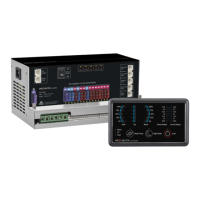
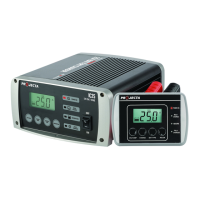
  • Remote Control Display (Optional): For models supporting this feature, a remote control display allows users to monitor and control the charger's performance from a distance. This is particularly useful when the main charger unit is flush or surface mounted out of sight, enabling synchronised operation locally or remotely.
  • Temperature Compensation (Optional): An external temperature sensor monitors the battery's temperature and automatically adjusts the charger's output. This compensation prevents overcharging, especially in warmer climates or environments, further protecting the battery.
  • Polarity Protection: This safety feature prevents damage to the charger and battery in case of incorrect connection of the battery clips.
  • Over Temperature Protection: The charger is designed to switch off automatically if it overheats, preventing damage to the unit.
  • Locking the Remote Control: A security feature that disables the CHARGE, BAT TYPE, and RECON keys on the remote, preventing accidental alteration of settings. This is useful for applications like hire vehicles where consistent settings are desired. The VOLT/AMP key remains functional to display volts or amps.
  • Connection Versatility: The charger offers multiple connection options: directly to a battery out of a vehicle, to a battery fitted in a vehicle (accommodating both negatively and positively earthed systems), and permanent hardwiring for fixed installations. Pre-wired cable lugs simplify hardwiring, and recommendations for circuit breakers or inline fuses are provided for safety.
  • Sensor Wires: For hardwired installations, sensor wires run parallel to the DC leads to ensure accurate voltage measurements directly from the battery, even if the main DC leads are cut.

Maintenance Features

While the Intelli-Charge Battery Charger is largely automatic in its operation, some features contribute to battery maintenance and overall system longevity:

  • Recondition Mode: This mode is a key maintenance feature, allowing users to restore deeply discharged batteries by equalising the cells. Performing a recondition charge periodically can optimize battery health and performance, extending its lifespan.
  • Float Stage: By maintaining the battery at 100% charge without overcharging, the float stage actively prevents battery degradation from undercharging, which is crucial for batteries left connected for extended periods.
  • Electrolyte Level Check (Calcium Mode Only): For calcium batteries, the manual recommends checking and topping up the electrolyte level after charging, ensuring optimal performance and longevity for this specific battery type.
  • Fault & Error Display: The charger provides clear fault codes and LED signals (e.g., "Err," "F01," "OTP," "OLC," "OCP") to indicate potential issues such as short circuits, reverse polarity, bulk charging timeouts, recondition mode timeouts, overheating, or sensor wire disconnections. This diagnostic capability aids in troubleshooting and maintaining the system.
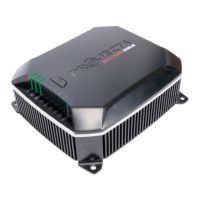
  • Ventilation Requirements: The mounting instructions emphasize the importance of installing the charger in a well-ventilated space with adequate clearance for the cooling fan. This ensures efficient heat dissipation, contributing to the charger's long-term reliability and preventing overheating.

Projecta INTELLI-CHARGE IC25 Specifications

General IconGeneral
Output Voltage12V DC
Output Current25A
Weight2.5 kg
Input Voltage240V AC
Battery Type CompatibilityLead Acid, AGM, Gel, Calcium
Charge Stages8 Stage
Protection FeaturesReverse Polarity, Over Temperature, Over Voltage, Short Circuit

Related product manuals