ALERT
TYPE
INSTRUCTION DISPLAY
Manual
Inquiry
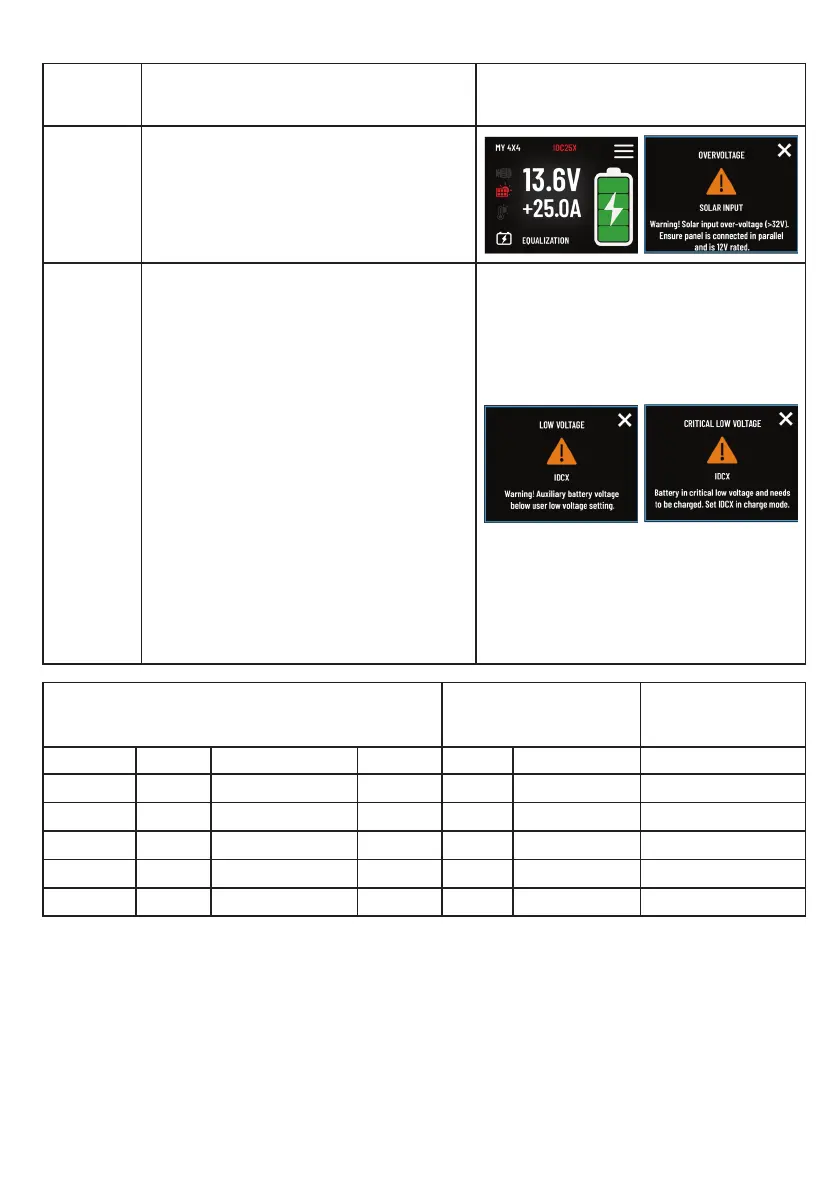
• Click the red error icon to view
system issue details.
• Popup messages indicate the specic
problem.
• To close the error detail popup, click
the ‘X’.
Automatic
Alert
• Low Voltage: Alert for reduced
auxiliary battery voltage (<11V).
• Critical Low Voltage: More severe
alert with an alarm for extremely low
auxiliary battery voltage(<9V).
The alarm lasts 30 seconds and can be
stopped by the user.
If not resolved, it repeats every 10
minutes, up to three times for both Low
and Critical Low Voltage alerts.
Firmware Update: The system is updating
its rmware. Please do not turn off any
device in the network and wait until the
process is complete. This process may take
up to 15 minutes for a major update that
includes a graphic library update.
AUX BATTERY VOLTAGE (V) LOW VOLTAGE(V)
CRITICAL LOW
VOLTAGE (V)
Chemistry High Medium Low Default Setting Range Range
GEL ≥12.65 12.65≥V≥12.00 <12.00 11 10-12.6 1.5<V<10
AGM ≥12.60 12.65≥V≥12.00 <12.00 11 10-12.6 1.5<V<10
WET ≥12.40 12.40≥V≥12.00 <12.00 11 10-12.6 1.5<V<10
CAL ≥12.40 12.40≥V≥12.00 <12.00 11 10-12.6 1.5<V<10
LITH ≥13.14 13.14≥V≥12.85 <12.85 12 11-13.0 1.5<V<11
ERROR AND ALERT MESSAGES
10


 To Next Page